LibreBuild
🟠 Updated over a year ago🖼️ Gallery (4 images)

🔍 Analysis
- 🏆 #196 of 1317 bukkit mods in this game by downloads
📋 About This Mod
# ️ LibreBuild !(https://cdn.modrinth.com/data/cached_images/8cf304d737a45735d436d78957a16fc0afe07699.png) **LibreBuild** is a Minecraft plugin that allows **players and administrators** to place schematic files (`.schem`) easily, making building more accessible for everyone. Whether you're an admin managing world structures or a player wanting a pre-built house, LibreBuild has you covered! ## Features ✔️ **Easy schematic placement** - Load and place schematics with a simple item. ✔️ **Admin & Player roles** - Admins manage schematics, players place them. ✔️ **WorldGuard protection** - Prevents griefing by checking for protected areas. ✔️ **Multi-language support** - English, Spanish, French, Russian, Dutch. ✔️ **Customizable blueprints** - Define what schematics players can use. ## 📥 Installation 1. **Download the plugin** from the (https://github.com/andrewyernau/LibreBuild/releases) section or here. 2. Place `LibreBuild.jar` into your server’s `plugins/` folder. 3. Don't forget to install **WorldEdit** and **WorldGuard**. (Minimum version: 7.3.9 and 7.0.9 tested) 4. Restart your server. 5. (Optional) Configure settings in `config.yml`. ## 🎮 How It Works ### 🔹 For Admins - **Create and manage schematics** via the **WorldEdit API**. - **Distribute blueprints** to players to allow controlled placement. ### 🔹 For Players - Right-click with a blueprint to preview the schematic (if in an allowed area). - Right-click again to place it. ## 🛡️ Permissions | Permission | Default | Description | |-----------------------------|----------|------------| | `librebuild.item.use` | true | Allows players to place schematics. | | `librebuild.command.admin` | op | Grants access to admin commands. | ## 🌍 Supported Languages - English (en) - Spanish (es) - French (fr) - Russian (ru) - Dutch (de) Want another language? Just edit the `language.yml` file or add a custom `.yml` translation! ## 🏗️ Future Updates **Planned Features:** - ✅ GUI for easier schematic selection ## 🔗 Links & Support 📌 **GitHub Repository:** (https://github.com/andrewyernau/LibreBuild) 💬 **Discord Support:** (https://discord.gg/939UecsD95) 💖 **Contribute:** Pull requests are welcome! --- > "Bringing back the classic house purchasing mechanics, so players don't have to trust their building skills to have a cute house." > — **andrewyernau**
# ️ LibreBuild
!(https://cdn.modrinth.com/data/cached_images/8cf304d737a45735d436d78957a16fc0afe07699.png)
LibreBuild is a Minecraft plugin that allows players and administrators to place schematic files (`.schem`) easily, making building more accessible for everyone. Whether you're an admin managing world structures or a player wanting a pre-built house, LibreBuild has you covered!
## Features ✔️ Easy schematic placement - Load and place schematics with a simple item. ✔️ Admin & Player roles - Admins manage schematics, players place them. ✔️ WorldGuard protection - Prevents griefing by checking for protected areas. ✔️ Multi-language support - English, Spanish, French, Russian, Dutch. ✔️ Customizable blueprints - Define what schematics players can use.
## 📥 Installation
1. Download the plugin from the (https://github.com/andrewyernau/LibreBuild/releases) section or here. 2. Place `LibreBuild.jar` into your server’s `plugins/` folder. 3. Don't forget to install WorldEdit and WorldGuard. (Minimum version: 7. 3. 9 and 7. 0. 9 tested) 4. Restart your server. 5. (Optional) Configure settings in `config.yml`.
## 🎮 How It Works
### 🔹 For Admins - Create and manage schematics via the WorldEdit API. - Distribute blueprints to players to allow controlled placement.
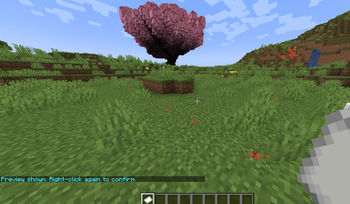
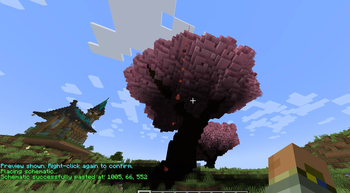
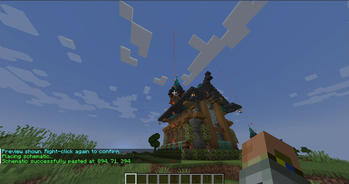
### 🔹 For Players - Right-click with a blueprint to preview the schematic (if in an allowed area). - Right-click again to place it.
## 🛡️ Permissions
| Permission | Default | Description | |-----------------------------|----------|------------| | `librebuild.item.use` | true | Allows players to place schematics. | | `librebuild.command.admin` | op | Grants access to admin commands. |
## 🌍 Supported Languages - English (en) - Spanish (es) - French (fr) - Russian (ru) - Dutch (de)
Want another language? Just edit the `language.yml` file or add a custom `.yml` translation!
## 🏗️ Future Updates Planned Features: - ✅ GUI for easier schematic selection
## 🔗 Links & Support 📌 GitHub Repository: (https://github.com/andrewyernau/LibreBuild) 💬 Discord Support: (https://discord.gg/939UecsD95) 💖 Contribute: Pull requests are welcome!
> "Bringing back the classic house purchasing mechanics, so players don't have to trust their building skills to have a cute house." > — andrewyernau
📊 Mod Details
- Game
- Minecraft Plugins
- Author
- andrewyernau
- Version
- 1.0.0
- Downloads
- 318
- Endorsements
- 7
- Category
- bukkit
- Created
- 1/22/2025
- Updated
- 1/21/2025
- Game Versions
- 1.20, 1.20.1, 1.20.2, 1.20.3, 1.20.4
- Tags
- utility
🔧 How to Install Minecraft Plugins Mods
Download from Modrinth. Use Prism Launcher or drop into your mods folder.
📖 Full step-by-step install guide for Minecraft Plugins →
Visit the official mod page for specific installation instructions for this mod.
🎮 Need cheat codes or console commands? Check ur gaming wiki for Minecraft Plugins commands, item IDs, and more.
❓ Frequently Asked Questions
Which Minecraft Plugins versions does LibreBuild support?
The author lists 1.20, 1.20.1, 1.20.2, 1.20.3, 1.20.4, 1.20.5. Other versions may work but are untested by the author.
What is the latest version of LibreBuild?
Version 1.0.0, published 2025-01-21 with 318 downloads recorded at the source.
Keep browsing — more Minecraft Plugins mods await