Leaf
⚪ Last updated 2024🖼️ Gallery (4 images)

🔍 Analysis
- 👍 0.6% endorsement rate
- 🏆 #47 of 131 management mods in this game by downloads
📋 About This Mod
<img src="https://raw.githubusercontent.com/smuddgge/Leaf/main/graphics/leaf_slogon.png"> <div align=center> <a href="https://github.com/smuddgge/Leaf/releases"> <img src="https://raw.githubusercontent.com/smuddgge/Leaf/main/graphics/download.png" width="512" alt="Download"></a> <a href="https://smuddgge.gitbook.io/leaf-4.3.0/"> <img alt="Wiki" src="https://raw.githubusercontent.com/smuddgge/Leaf/main/graphics/wiki.png" width="512"></a> <a href="https://discord.gg/pax7uFhaaD"> <img alt="Discord" src="https://raw.githubusercontent.com/smuddgge/Leaf/main/graphics/Discord.png" width="512"></a> </div> <div > <a href="https://builtbybit.com/resources/leaf-velocity-plugin.26200/field?field=dependencies"> <img alt="Dependencies" src="https://raw.githubusercontent.com/smuddgge/Leaf/main/graphics/download dependencys.png" width="190"></a> </div> <img src="https://raw.githubusercontent.com/smuddgge/Leaf/main/graphics/features.jpg" alt="Features"> # Overview You get to decide what you want on your proxy! - Simply add configuration to add your own custom commands. - And remove configuration to remove un-used commands. - Organise the configuration with multiple directories and files! - Create your own proxy commands. - Create multiple staff chats and player chats. - Create GUI's. - Load balancing. - Utility commands. - Global messaging. - Global session history. - and more! # Commands - This plugin adds the ability to create your own proxy commands that players can use on your network. - When creating a command in the configuration file, you can choose from many different types that have different functions. - You can delete any command in the configuration file and it will be removed from the server. - You can have multiple commands with the same type as long as the identifier is different. - The reload command lets you reload all the commands so you don't have to restart the server. **Command Example** ```yaml # The commands identifier. info: # The type of command. type: "info" # If the command is enabled. enabled: true # The command name. # In this instance it will let you do /leaf. name: "leaf" # The message sent to the player when they run the command. message: - "&8&m&l-------&r &a&lLeaf &8&m&l-------" - "&7" - "&7Velocity Proxy Plugin" - "&7Version &f<version>" - "&7Author &fSmudge" - "&7" - "&8&m&l--------------------" ``` | Command Type | Usage | Description | | - | - | - | | message | | Used to message a player. | | reply | / | Used to reply to the last message. | | ignore | / | Used to ignore a player.| | unignore | / | Used to unignore a player.| |ignorelist|/|Used to list the ignored players.| |togglemessages|/|Used to toggle your messages.| |togglespy|/|Used to toggle veiwing other players messages.| |messagehistory|/ |Similar to core protect, it lets you see player's message history.| |alert|/ |Used to send a message to everyone on the server. |alertraw|/ |Used to send a json message to everyone on the server. Simular to /tellraw |chat|/ |Used to send a message to a chat. |find|/ |Used to get infomation about an online player. |history|/ |Used to get global session history about a player from the database. |info|/|Displays a message to the player. |inventory|/|Displays a inventory to the player. |join|/|Sends a player to a server. |list|/|Displays a list of players that are online. This could be a staff list. |reload|/|Reloads the entire plugin. Configuration, commands, events, placeholders and variables. |report|/|Send a message to a group of players. Commonly used to report bugs to staff. Simular to /helpop| |send|/ |Send a group of players to a server. |servers|/|Displays a list of online servers and the amount of players online. |teleport|/ |Teleport to the server a player is on. |variable|/ |Set the value of a variable. You can set options for players to pick from.| And more! All command types are listed in the wiki. If you have any suggestions, feel free to create a feature request in the GitHub issues page or message me directly in the discord. # Events You can create custom events. Currently there is only a option for when a player joins the proxy. This allows you to do load balancing, and send players to the server with the least amount of players on. ```yaml load_balancing: # The type of event. type: "playerjoin" # Used to enable and disable the event. # Defaults to true. enabled: false # Add commands to be run. commands: - "leaf" # Add servers to be sent to. # If more than 1 server is stated the player will # go to the server with the least amount of players servers: - "hub1" - "hub2" ``` # Placeholders You can create your own conditional pla






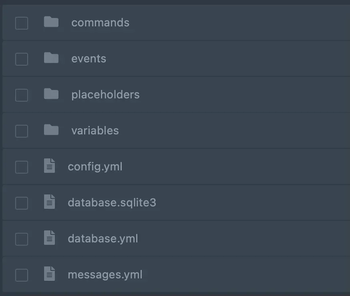
# Overview You get to decide what you want on your proxy! - Simply add configuration to add your own custom commands. - And remove configuration to remove un-used commands. - Organise the configuration with multiple directories and files! - Create your own proxy commands. - Create multiple staff chats and player chats. - Create GUI's. - Load balancing. - Utility commands. - Global messaging. - Global session history. - and more!
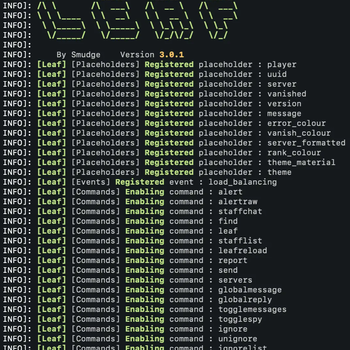
# Commands - This plugin adds the ability to create your own proxy commands that players can use on your network. - When creating a command in the configuration file, you can choose from many different types that have different functions. - You can delete any command in the configuration file and it will be removed from the server. - You can have multiple commands with the same type as long as the identifier is different. - The reload command lets you reload all the commands so you don't have to restart the server.
Command Example
```yaml
# The commands identifier.
info:
# The type of command.
type: "info"
# If the command is enabled.
enabled: true
# The command name.
# In this instance it will let you do /leaf.
name: "leaf"
# The message sent to the player when they run the command.
message:
- "&8&m&l-------&r &a&lLeaf &8&m&l-------"
- "&7"
- "&7Velocity Proxy Plugin"
- "&7Version &f
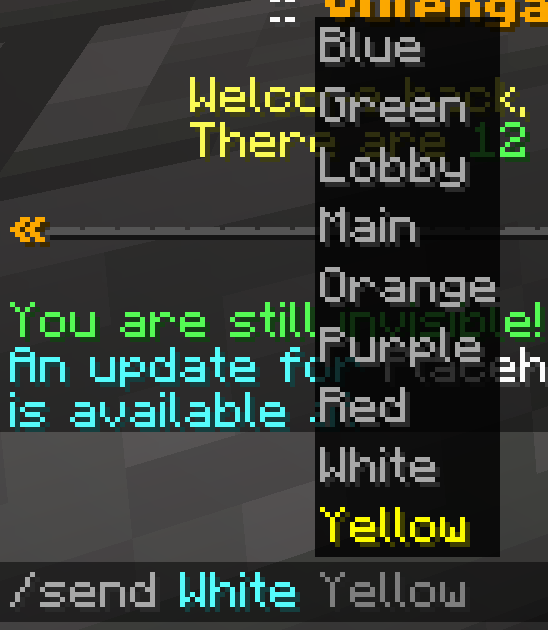
And more! All command types are listed in the wiki. If you have any suggestions, feel free to create a feature request in the GitHub issues page or message me directly in the discord.
# Events You can create custom events. Currently there is only a option for when a player joins the proxy. This allows you to do load balancing, and send players to the server with the least amount of players on. ```yaml
load_balancing: # The type of event. type: "playerjoin" # Used to enable and disable the event. # Defaults to true. enabled: false # Add commands to be run. commands: - "leaf" # Add servers to be sent to. # If more than 1 server is stated the player will # go to the server with the least amount of players servers: - "hub1" - "hub2" ```
# Placeholders You can create your own conditional pla
📊 Mod Details
- Game
- Minecraft Plugins
- Author
- smuddgge
- Version
- 5.2.2
- Downloads
- 3,180
- Endorsements
- 18
- Category
- management
- Created
- 3/25/2023
- Updated
- 6/11/2024
- Game Versions
- 1.7.2, 1.7.3, 1.7.4, 1.7.5, 1.7.6
- Tags
- management, social, utility
🔧 How to Install Minecraft Plugins Mods
Download from Modrinth. Use Prism Launcher or drop into your mods folder.
📖 Full step-by-step install guide for Minecraft Plugins →
Visit the official mod page for specific installation instructions for this mod.
🎮 Need cheat codes or console commands? Check ur gaming wiki for Minecraft Plugins commands, item IDs, and more.
❓ Frequently Asked Questions
Which Minecraft Plugins versions does Leaf support?
The author lists 1.7.2, 1.7.3, 1.7.4, 1.7.5, 1.7.6, 1.7.7. Other versions may work but are untested by the author.
What is the latest version of Leaf?
Version 5.2.2, published 2024-06-11 with 3,180 downloads recorded at the source.
Keep browsing — more Minecraft Plugins mods await