LAN Welcome Message
🟠 Updated over a year ago🖼️ Gallery (1 images)
🔍 Analysis
- 🏆 #947 of 1224 bukkit mods in this game by downloads
📋 About This Mod
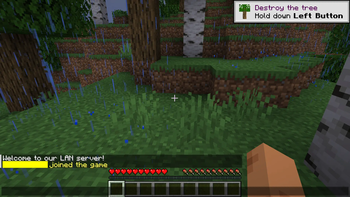
# LAN Welcome Message A simple PaperMC plugin that sends a custom MiniMessage-formatted welcome message to players when they join the server, but **only if they are connecting from a LAN (Local Area Network).** This plugin was created to share a web browser map that is only available on LAN, ensuring that only players who can access it will receive the link. --- ## Features - Sends a personalized welcome message to LAN players. - Supports advanced text formatting and interactivity using (https://docs.adventure.kyori.net/minimessage/format.html). - Configurable message in the `config.yml`. --- ## Requirements - Minecraft server running **PaperMC**. - Java 17 or later. - Adventure library (already included in PaperMC). --- ## Installation 1. Download the latest release of the plugin from the (https://modrinth.com/plugin/lan-welcome-message/versions) page. 2. Place the `LanJoinMessage-1.x.x.jar` file into your server's `plugins/` directory. 3. Start the server to generate the `config.yml` file. 4. Edit the `config.yml` file to customize your welcome message. Use MiniMessage formatting for colors, hover text, and more. --- ## Configuration The plugin generates a `config.yml` file on first run. You can define the LAN-only welcome message here: ```yaml # MiniMessage-formatted welcome message for LAN players. lan-message: "<green>Welcome to the <bold>LAN Server</bold>! <hover:show_text:'Enjoy your stay!'><click:open_url:'https://example.com'></click></hover>" ```
# LAN Welcome Message
A simple PaperMC plugin that sends a custom MiniMessage-formatted welcome message to players when they join the server, but only if they are connecting from a LAN (Local Area Network).
This plugin was created to share a web browser map that is only available on LAN, ensuring that only players who can access it will receive the link.
## Features - Sends a personalized welcome message to LAN players. - Supports advanced text formatting and interactivity using (https://docs.adventure.kyori.net/minimessage/format.html). - Configurable message in the `config.yml`.
## Requirements - Minecraft server running PaperMC. - Java 17 or later. - Adventure library (already included in PaperMC).
## Installation 1. Download the latest release of the plugin from the (https://modrinth.com/plugin/lan-welcome-message/versions) page. 2. Place the `LanJoinMessage-1.x.x.jar` file into your server's `plugins/` directory. 3. Start the server to generate the `config.yml` file. 4. Edit the `config.yml` file to customize your welcome message. Use MiniMessage formatting for colors, hover text, and more.
## Configuration
The plugin generates a `config.yml` file on first run. You can define the LAN-only welcome message here:
```yaml
# MiniMessage-formatted welcome message for LAN players.
lan-message: "
📊 Mod Details
- Game
- Minecraft Plugins
- Author
- Artificial
- Version
- 1.1.0
- Downloads
- 93
- Endorsements
- 1
- Category
- bukkit
- Created
- 1/7/2025
- Updated
- 1/3/2025
- Game Versions
- 1.18.2, 1.19, 1.19.1, 1.19.2, 1.19.3
- Tags
- social, utility
🔧 How to Install Minecraft Plugins Mods
Download from Modrinth. Use Prism Launcher or drop into your mods folder.
📖 Full step-by-step install guide for Minecraft Plugins →
Visit the official mod page for specific installation instructions for this mod.
🎮 Need cheat codes or console commands? Check ur gaming wiki for Minecraft Plugins commands, item IDs, and more.
❓ Frequently Asked Questions
Which Minecraft Plugins versions does LAN Welcome Message support?
The author lists 1.18.2, 1.19, 1.19.1, 1.19.2, 1.19.3, 1.19.4. Other versions may work but are untested by the author.
What is the latest version of LAN Welcome Message?
Version 1.1.0, published 2025-01-03 with 93 downloads recorded at the source.
Keep browsing — more Minecraft Plugins mods await