JoinMesg
🟡 Updated this year🖼️ Gallery (1 images)
🔍 Analysis
- 🏆 #81 of 137 folia mods in this game by downloads
📋 About This Mod
# JoinMesg A Minecraft server plugin that customizes join, quit, and first-join messages. Fully compatible with Folia, Bukkit/Paper, and their forks! ## Features - Customize welcome messages for first-time players - Customize player join messages - Customize player quit messages - Full support for Folia, Bukkit/Paper and their forks - Configurable messages with color codes - Built-in metrics collection (bStats) ## Usage Tutorial ### Installation 1. Download the latest version of JoinMesg plugin 2. Place the `.jar` file into your server's `plugins` folder 3. Restart or reload your server 4. A `config.yml` file will be generated automatically ### Configuration Edit the `config.yml` file in the `plugins/JoinMesg` directory to customize messages: ```yaml #Welcome to join for the first time welcomeFirstJoin: enabled: true message: "&dNew players &e%player% &dare welcome to join the server!" #If you don't turn on the following functions, you won't modify the information instead of turning it off #Players join the server join: enabled: true message: "&a%player%" #The player leaves the server quit: enabled: true message: "&c%player%" #Compatibility mode (if the function does not work properly, you can try toggling this option) compatible: true ``` ### Message Placeholders - `%player%` - Displays the player's name ### Color Codes Use Minecraft color codes in your messages: - `&a` - Green - `&c` - Red - `&d` - Light Purple - `&e` - Yellow - `&f` - White - And more... ### Commands | Command | Permission | Description | |---------|------------|-------------| | `/joinmesg` | `joinmesg.maincmd` | Display plugin help | | `/joinmesg reload` | `joinmesg.reload` | Reload plugin configuration | | `/jm` | `joinmesg.maincmd` | Alias for `/joinmesg` | ### Permissions | Permission | Description | Default | |------------|-------------|---------| | `joinmesg.*` | Full access to all plugin features | OP | | `joinmesg.admin` | Admin permissions | OP | | `joinmesg.maincmd` | Access to main command | OP | | `joinmesg.reload` | Permission to reload plugin | OP | ## Requirements - Java 17 or higher - Minecraft 1.20+ (Paper/Bukkit/Folia) ## Support - Website: https://mc.wunanc.top - Issues: Create an issue on the repository --- ## bStats Metrics This plugin uses bStats to collect anonymous usage statistics. You can view the plugin metrics on the bStats website. !(https://bstats.org/signatures/bukkit/JoinMesg.svg)
A Minecraft server plugin that customizes join, quit, and first-join messages. Fully compatible with Folia, Bukkit/Paper, and their forks!
## Features
- Customize welcome messages for first-time players
- Customize player join messages
- Customize player quit messages
- Full support for Folia, Bukkit/Paper and their forks
- Configurable messages with color codes
- Built-in metrics collection (bStats)
## Usage Tutorial
### Installation
1. Download the latest version of JoinMesg plugin 2. Place the `.jar` file into your server's `plugins` folder 3. Restart or reload your server 4. A `config.yml` file will be generated automatically
### Configuration
Edit the `config.yml` file in the `plugins/JoinMesg` directory to customize messages:
```yaml #Welcome to join for the first time welcomeFirstJoin: enabled: true message: "&dNew players &e%player% &dare welcome to join the server!"
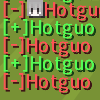
#If you don't turn on the following functions, you won't modify the information instead of turning it off #Players join the server join: enabled: true message: "&a[+]%player%"
#The player leaves the server quit: enabled: true message: "&c[-]%player%"
#Compatibility mode (if the function does not work properly, you can try toggling this option) compatible: true ``` ### Message Placeholders
- `%player%` - Displays the player's name
### Color Codes
Use Minecraft color codes in your messages: - `&a` - Green - `&c` - Red - `&d` - Light Purple - `&e` - Yellow - `&f` - White - And more...
### Commands
| Command | Permission | Description | |---------|------------|-------------| | `/joinmesg` | `joinmesg.maincmd` | Display plugin help | | `/joinmesg reload` | `joinmesg.reload` | Reload plugin configuration | | `/jm` | `joinmesg.maincmd` | Alias for `/joinmesg` |
### Permissions
| Permission | Description | Default | |------------|-------------|---------| | `joinmesg.*` | Full access to all plugin features | OP | | `joinmesg.admin` | Admin permissions | OP | | `joinmesg.maincmd` | Access to main command | OP | | `joinmesg.reload` | Permission to reload plugin | OP |
## Requirements
- Java 17 or higher
- Minecraft 1. 20+ (Paper/Bukkit/Folia)
- Website: https://mc.wunanc.top
- Issues: Create an issue on the repository
## bStats Metrics
This plugin uses bStats to collect anonymous usage statistics. You can view the plugin metrics on the bStats website.
!(https://bstats.org/signatures/bukkit/JoinMesg.svg)
📊 Mod Details
- Game
- Minecraft Plugins
- Author
- wunanc
- Version
- 1.3.3
- Downloads
- 49
- Endorsements
- 0
- Category
- folia
- Created
- 3/24/2026
- Updated
- 3/20/2026
- Game Versions
- 1.20, 1.20.1, 1.20.2, 1.20.3, 1.20.4
- Tags
- utility
🔧 How to Install Minecraft Plugins Mods
Download from Modrinth. Use Prism Launcher or drop into your mods folder.
📖 Full step-by-step install guide for Minecraft Plugins →
Visit the official mod page for specific installation instructions for this mod.
🎮 Need cheat codes or console commands? Check ur gaming wiki for Minecraft Plugins commands, item IDs, and more.
❓ Frequently Asked Questions
Which Minecraft Plugins versions does JoinMesg support?
The author lists 1.20, 1.20.1, 1.20.2, 1.20.3, 1.20.4, 1.20.5. Other versions may work but are untested by the author.
What is the latest version of JoinMesg?
Version 1.3.3, published 2026-03-20 with 49 downloads recorded at the source.
Keep browsing — more Minecraft Plugins mods await