ItemBlocker
🟡 Updated this year🖼️ Gallery (2 images)
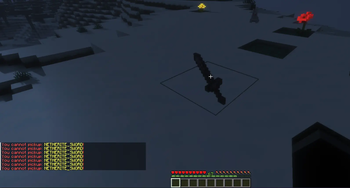
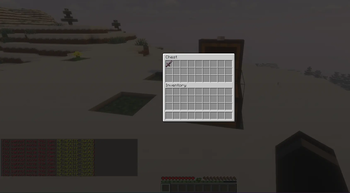
🔍 Analysis
- 👍 0.2% endorsement rate
- 🏆 #151 of 169 folia mods in this game by downloads
📋 About This Mod
# 🛡️ ItemBlocker <p align="center"> <img alt="Paper" src="https://cdn.jsdelivr.net/npm/@intergrav/devins-badges@3/assets/compact/supported/paper_vector.svg"> <img alt="Purpur" src="https://cdn.jsdelivr.net/npm/@intergrav/devins-badges@3/assets/compact/supported/purpur_vector.svg"> <a href="https://www.spigotmc.org/resources/itemblocker.131418/"><img alt="Spigot" src="https://cdn.jsdelivr.net/npm/@intergrav/devins-badges@3/assets/compact/supported/spigot_vector.svg"></a> <a href="https://github.com/kuqk/ItemBlocker"><img alt="GitHub" src="https://cdn.jsdelivr.net/npm/@intergrav/devins-badges@3/assets/compact/available/github_vector.svg"></a> <a href="https://modrinth.com/plugin/itemblocker"><img alt="Modrinth" src="https://cdn.jsdelivr.net/npm/@intergrav/devins-badges@3/assets/compact/available/modrinth_vector.svg"></a> <a href="https://hangar.papermc.io/kuqk/ItemBlocker"><img alt="Hangar" src="https://cdn.jsdelivr.net/npm/@intergrav/devins-badges@3/assets/compact/available/hangar_vector.svg"></a> </p> <p align="center"> <strong>Clean, detailed, and flexible item restrictions for modern Minecraft servers.</strong> <br> Block items, smithing results, enchantments, potion effects, inventory movement, hopper movement, and more on Minecraft 1.21.x, 26.1. </p> ## ✨ What Is ItemBlocker? ItemBlocker is a plugin for server owners who want strong control over items without turning configuration into chaos. It is built around a simple idea: keep one clear `default` section for global restrictions, then add `presets` for survival, events, minigames, worlds, or special modes when you need more specific rules. That means you can do things like: - block TNT everywhere on the server - block Elytra only in one preset - block Smithing results like netherite tools - block specific enchantments from a chosen level - block potion effects instead of blocking every single potion item manually - stop restricted items from being moved through inventories or hoppers ## 🧠 How ItemBlocker Works ItemBlocker is split into a few clean layers: - 🌍 `default` is your always-available global section - 🗂️ `presets` let you create separate groups of rules - 📦 `items` let you block specific materials and actions - ✨ `enchantments` let you block enchants from a chosen minimum level - 🧪 `potions` let you block potion effects from a chosen minimum level - 💬 `reason` lets you define the message players should understand In practice, that means you are not limited to "item yes or no". You can decide: - what is blocked - where it is blocked - how it is blocked - why the player sees that restriction ## 🌍 Default Section The `default` section lives in `blocked-items.yml` and acts as the global base for the whole server. Use it when a restriction should always exist unless you intentionally manage something differently with presets. Inside `default`, you can configure: - 💬 one global `reason` - ✨ blocked `enchantments` - 🧪 blocked `potions` - 📦 blocked `items` This is the best place for things like: - admin-only items - dangerous survival shortcuts - overpowered enchants - potion effects you never want players to keep ## 🗂️ Presets Presets live in `presets.yml` and are the main tool for grouped restrictions. Each preset can have its own: - 📝 `description` - 💬 `reason` - 🌍 preset `worlds` - ✨ enchantment rules - 🧪 potion rules - 📦 item rules ### 📌 Important preset behavior - A preset can be active only in selected worlds. - An item inside that preset can also have its own `worlds` filter. - If you want the same item to behave differently in different places, use different presets instead of trying to overload one rule. ## 🌐 Worlds And Targeting ItemBlocker lets you decide where rules apply in two places: - 🌍 on the preset itself - 📦 on the individual item rule ### `worlds: all` This means the rule works in every world. ### `worlds: world,world_nether` This means the rule is only active in those listed worlds. ### `in:default` and `in:<preset>` This decides which target you are editing or showing with commands. Examples: ```text /ib block TNT in:default /ib block ELYTRA in:survival /ib show TNT in:default /ib show potion strength in:survival ``` ## 📦 Item Rules Item rules are the core of the plugin. Every item rule answers two questions: 1. Which actions should be blocked? 2. In which worlds should that rule work? Each item can have one rule per target, and that rule can contain: - ⚙️ `actions` - 🌍 `worlds` You can target an item directly by material name or use `hand` to use the item from the player's main hand. Examples: ```text /ib block TNT /ib block hand actions:use,drop in:survival /ib edit ELYTRA worlds:world /ib unblock BEDROCK in:default ``` ## ⚔️ Item Actions ItemBlocker supports the following actions: - 🛠️ `crafting` - blocks getting the result of a crafting recipe - 📥 `pickup` - blocks picking the item up from the ground - 📤 `drop` - blocks throwing the
# 🛡️ ItemBlocker






Clean, detailed, and flexible item restrictions for modern Minecraft servers.
Block items, smithing results, enchantments, potion effects, inventory movement, hopper movement, and more on Minecraft 1. 21.x, 26. 1.
## ✨ What Is ItemBlocker?
ItemBlocker is a plugin for server owners who want strong control over items without turning configuration into chaos.
It is built around a simple idea: keep one clear `default` section for global restrictions, then add `presets` for survival, events, minigames, worlds, or special modes when you need more specific rules.
That means you can do things like:
- block TNT everywhere on the server
- block Elytra only in one preset
- block Smithing results like netherite tools
- block specific enchantments from a chosen level
- block potion effects instead of blocking every single potion item manually
- stop restricted items from being moved through inventories or hoppers
## 🧠 How ItemBlocker Works
ItemBlocker is split into a few clean layers:
- 🌍 `default` is your always-available global section
- 🗂️ `presets` let you create separate groups of rules
- 📦 `items` let you block specific materials and actions
- ✨ `enchantments` let you block enchants from a chosen minimum level
- 🧪 `potions` let you block potion effects from a chosen minimum level
- 💬 `reason` lets you define the message players should understand
In practice, that means you are not limited to "item yes or no". You can decide:
- what is blocked
- where it is blocked
- how it is blocked
- why the player sees that restriction
## 🌍 Default Section
The `default` section lives in `blocked-items.yml` and acts as the global base for the whole server.
Use it when a restriction should always exist unless you intentionally manage something differently with presets.
Inside `default`, you can configure:
- 💬 one global `reason`
- ✨ blocked `enchantments`
- 🧪 blocked `potions`
- 📦 blocked `items`
This is the best place for things like:
- admin-only items
- dangerous survival shortcuts
- overpowered enchants
- potion effects you never want players to keep
## 🗂️ Presets
Presets live in `presets.yml` and are the main tool for grouped restrictions.
Each preset can have its own:
- 📝 `description`
- 💬 `reason`
- 🌍 preset `worlds`
- ✨ enchantment rules
- 🧪 potion rules
- 📦 item rules
### 📌 Important preset behavior
- A preset can be active only in selected worlds.
- An item inside that preset can also have its own `worlds` filter.
- If you want the same item to behave differently in different places, use different presets instead of trying to overload one rule.
## 🌐 Worlds And Targeting
ItemBlocker lets you decide where rules apply in two places:
- 🌍 on the preset itself
- 📦 on the individual item rule
### `worlds: all`
This means the rule works in every world.
### `worlds: world,world_nether`
This means the rule is only active in those listed worlds.
### `in:default` and `in:
This decides which target you are editing or showing with commands.
```text /ib block TNT in:default /ib block ELYTRA in:survival /ib show TNT in:default /ib show potion strength in:survival ```
## 📦 Item Rules
Item rules are the core of the plugin.
Every item rule answers two questions:
1. Which actions should be blocked? 2. In which worlds should that rule work?
Each item can have one rule per target, and that rule can contain:
- ⚙️ `actions`
- 🌍 `worlds`
You can target an item directly by material name or use `hand` to use the item from the player's main hand.
```text /ib block TNT /ib block hand actions:use,drop in:survival /ib edit ELYTRA worlds:world /ib unblock BEDROCK in:default ```
## ⚔️ Item Actions
ItemBlocker supports the following actions:
- 🛠️ `crafting` - blocks getting the result of a crafting recipe
- 📥 `pickup` - blocks picking the item up from the ground
- 📤 `drop` - blocks throwing the
📊 Mod Details
- Game
- Minecraft Plugins
- Author
- kuqk
- Version
- 1.1.3
- Downloads
- 1,257
- Endorsements
- 3
- Category
- folia
- Created
- 12/18/2025
- Updated
- 6/16/2026
- Game Versions
- 1.21, 1.21.1, 1.21.2, 1.21.3, 1.21.4
- Tags
- game-mechanics, utility
🔧 How to Install Minecraft Plugins Mods
Download from Modrinth. Use Prism Launcher or drop into your mods folder.
📖 Full step-by-step install guide for Minecraft Plugins →
Visit the official mod page for specific installation instructions for this mod.
🎮 Need cheat codes or console commands? Check ur gaming wiki for Minecraft Plugins commands, item IDs, and more.
❓ Frequently Asked Questions
Which Minecraft Plugins versions does ItemBlocker support?
The author lists 1.21, 1.21.1, 1.21.2, 1.21.3, 1.21.4, 1.21.5. Other versions may work but are untested by the author.
What is the latest version of ItemBlocker?
Version 1.1.3, published 2026-06-16 with 1,257 downloads recorded at the source.
Keep browsing — more Minecraft Plugins mods await