invrewind
🟡 Updated this year🖼️ Gallery (6 images)
🔍 Analysis
- 🏆 #100 of 122 folia mods in this game by downloads
📋 About This Mod
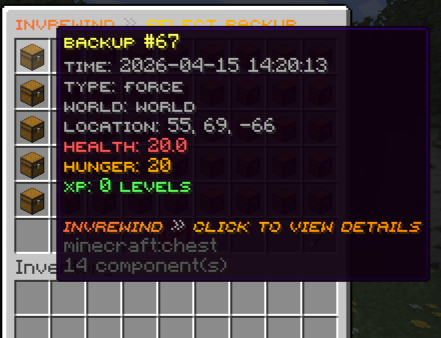
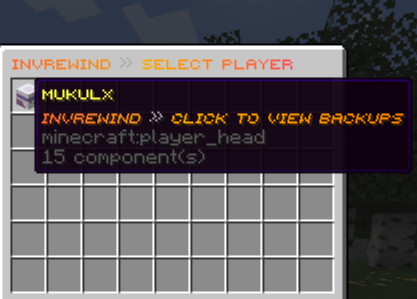
# InvRewind Highly configurable inventory backup and restore plugin for Paper, Purpur, and Folia. For server owners and admins who want to backup player inventories and restore them when players lose items. --- ## Why Use This Plugin? **Protect Your Players' Progress** - Never lose items due to bugs, glitches, or accidents - Restore inventories after server crashes or rollbacks - Recover from duplication exploits or inventory wipes **Flexible & Powerful** - Multiple database options (YAML, SQLite, MySQL) - Export and import backups between formats - Automatic fallback if database fails - Works on Paper, Purpur, and Folia servers **Easy to Use** - Intuitive GUI for browsing and restoring backups - Selective restore - choose exactly what to restore - Async operations - no server lag - Console and in-game command support **Actively Maintained** - Frequent updates with new features - Bug fixes as they're discovered - Community-driven improvements - Open source on GitHub --- ## Features ### Core Functionality - **Automatic Backups** - Capture player inventories on death, world change, join, quit, and scheduled intervals - **Force Backups** - Create manual backups on demand via command - **GUI-Based Restoration** - Intuitive interface for browsing and restoring backups - **Selective Restore** - Restore specific items: inventory, armor, offhand, ender chest, XP, or location - **Database Migration** - Export and import backups between YAML, SQLite, and MySQL formats ### Technical Features - **Folia Compatible** - Full support for Folia's region-based threading - **Multi-Database Support** - Choose between YAML, SQLite, or MySQL - **Database Fallback** - Automatic fallback to YAML if database connection fails - **Async Operations** - All database operations run asynchronously to prevent lag - **Backup Limits** - Automatic cleanup of old backups per type - **Pagination** - Handle large player counts and backup lists efficiently - **Duplicate Detection** - Skip duplicate backups on import ### Backup Types - **Death** - Automatic backup when player dies - **World Change** - Backup when switching worlds (including custom dimensions) - **Join** - Backup when player joins the server - **Quit** - Backup when player leaves the server - **Scheduled** - Automatic backups at regular intervals - **Force** - Manual backups created by admins --- ## Commands | Command | Description | Permission | |---------|-------------|------------| | `/invrewind` or `/ir` | Open player selection GUI | `invrewind.admin` | | `/invrewind reload` | Reload configuration | `invrewind.admin` | | `/invrewindforce <player\|all>` | Force backup for player(s) | `invrewind.admin` | | `/invrewind export ` | Export backups to specified format | `invrewind.export` | | `/invrewind import <type> <filename>` | Import backups from file | `invrewind.import` | --- ## Configuration ### Database Options ```yaml database: type: yaml # yaml, sqlite, or mysql ``` - **YAML** - File-based, easy to backup, good for small servers - **SQLite** - File-based database, better performance for medium servers - **MySQL** - External database, best for large/multi-server setups ### Auto-Backup Settings ```yaml auto-backup: on-death: true on-world-change: true on-join: true on-quit: true scheduled: enabled: false interval: 30 # minutes require-movement: true min-items: 1 ``` ### Backup Limits ```yaml auto-backup: limits: enabled: true max-per-type: death: 50 world-change: 30 join: 20 quit: 20 scheduled: 40 force: 100 ``` ### Features ```yaml features: save-inventory: true save-armor: true save-offhand: true save-enderchest: true save-health: true save-hunger: true save-xp: true save-location: true ``` ### Migration Settings ```yaml migration: # Delete source file/folder after successful import delete-source-after-import: false ``` ### GUI Sounds ```yaml gui: sounds-enabled: true # Enable/disable all GUI sounds ``` --- ## Database Migration ### Export Backups Export your current database to any format: ``` /invrewind export # Export to current database type /invrewind export yaml # Export to YAML folder structure /invrewind export sqlite # Export to SQLite .db file /invrewind export mysql # Export to MySQL .sql dump ``` **Export locations:** - YAML: `plugins/InvRewind/exports/yaml/export_TIMESTAMP/` - SQLite: `plugins/InvRewind/exports/sqlite/export_TIMESTAMP.db` - MySQL: `plugins/InvRewind/exports/mysql/export_TIMESTAMP.sql` ### Import Backups Import backups from any format: ``` /invrewind import yaml <foldername> # Import from YAML folder /invrewind import sqlite <filename> # Import from SQLite .db file /invrewind import mysql <filename> # Import from MySQL .sql file ``` **Import locations:** - YAML: Place folders in `plugins/InvRewind/imports/yaml/` - SQLite: Place .db files in `plugins/InvRew
# InvRewind
Highly configurable inventory backup and restore plugin for Paper, Purpur, and Folia.
For server owners and admins who want to backup player inventories and restore them when players lose items.
## Why Use This Plugin?
Protect Your Players' Progress - Never lose items due to bugs, glitches, or accidents - Restore inventories after server crashes or rollbacks - Recover from duplication exploits or inventory wipes
Flexible & Powerful - Multiple database options (YAML, SQLite, MySQL) - Export and import backups between formats - Automatic fallback if database fails - Works on Paper, Purpur, and Folia servers
Easy to Use - Intuitive GUI for browsing and restoring backups - Selective restore - choose exactly what to restore - Async operations - no server lag - Console and in-game command support
Actively Maintained - Frequent updates with new features - Bug fixes as they're discovered - Community-driven improvements - Open source on GitHub
## Features
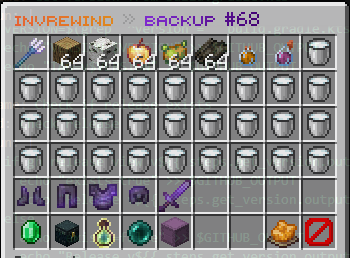
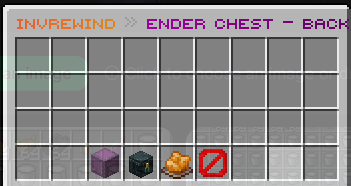
### Core Functionality - Automatic Backups - Capture player inventories on death, world change, join, quit, and scheduled intervals - Force Backups - Create manual backups on demand via command - GUI-Based Restoration - Intuitive interface for browsing and restoring backups - Selective Restore - Restore specific items: inventory, armor, offhand, ender chest, XP, or location - Database Migration - Export and import backups between YAML, SQLite, and MySQL formats
### Technical Features - Folia Compatible - Full support for Folia's region-based threading - Multi-Database Support - Choose between YAML, SQLite, or MySQL - Database Fallback - Automatic fallback to YAML if database connection fails - Async Operations - All database operations run asynchronously to prevent lag - Backup Limits - Automatic cleanup of old backups per type - Pagination - Handle large player counts and backup lists efficiently - Duplicate Detection - Skip duplicate backups on import
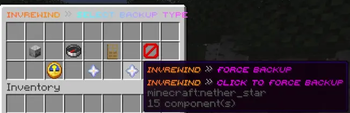
### Backup Types - Death - Automatic backup when player dies - World Change - Backup when switching worlds (including custom dimensions) - Join - Backup when player joins the server - Quit - Backup when player leaves the server - Scheduled - Automatic backups at regular intervals - Force - Manual backups created by admins
## Commands
| Command | Description | Permission |
|---------|-------------|------------|
| `/invrewind` or `/ir` | Open player selection GUI | `invrewind.admin` |
| `/invrewind reload` | Reload configuration | `invrewind.admin` |
| `/invrewindforce
## Configuration
### Database Options
```yaml database: type: yaml # yaml, sqlite, or mysql ```
- YAML - File-based, easy to backup, good for small servers
- SQLite - File-based database, better performance for medium servers
- MySQL - External database, best for large/multi-server setups
### Auto-Backup Settings
```yaml auto-backup: on-death: true on-world-change: true on-join: true on-quit: true scheduled: enabled: false interval: 30 # minutes require-movement: true min-items: 1 ```
### Backup Limits
```yaml auto-backup: limits: enabled: true max-per-type: death: 50 world-change: 30 join: 20 quit: 20 scheduled: 40 force: 100 ```
### Features
```yaml features: save-inventory: true save-armor: true save-offhand: true save-enderchest: true save-health: true save-hunger: true save-xp: true save-location: true ```
### Migration Settings
```yaml migration: # Delete source file/folder after successful import delete-source-after-import: false ```
### GUI Sounds
```yaml gui: sounds-enabled: true # Enable/disable all GUI sounds ```
## Database Migration
### Export Backups
Export your current database to any format:
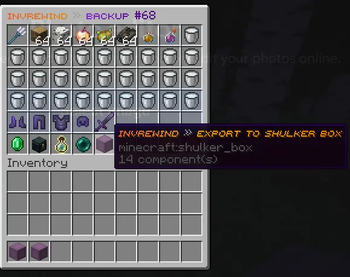
``` /invrewind export # Export to current database type /invrewind export yaml # Export to YAML folder structure /invrewind export sqlite # Export to SQLite .db file /invrewind export mysql # Export to MySQL .sql dump ```
Export locations: - YAML: `plugins/InvRewind/exports/yaml/export_TIMESTAMP/` - SQLite: `plugins/InvRewind/exports/sqlite/export_TIMESTAMP.db` - MySQL: `plugins/InvRewind/exports/mysql/export_TIMESTAMP.sql`
### Import Backups
Import backups from any format:
```
/invrewind import yaml
Import locations: - YAML: Place folders in `plugins/InvRewind/imports/yaml/` - SQLite: Place .db files in `plugins/InvRew
📊 Mod Details
- Game
- Minecraft Plugins
- Author
- mukulx
- Version
- 1.4.1
- Downloads
- 179
- Endorsements
- 2
- Category
- folia
- Created
- 5/5/2026
- Updated
- 7/26/2026
- Game Versions
- 1.21, 1.21.1, 1.21.2, 1.21.3, 1.21.4
- Tags
- management, storage, utility
🔧 How to Install Minecraft Plugins Mods
Download from Modrinth. Use Prism Launcher or drop into your mods folder.
📖 Full step-by-step install guide for Minecraft Plugins →
Visit the official mod page for specific installation instructions for this mod.
🎮 Need cheat codes or console commands? Check ur gaming wiki for Minecraft Plugins commands, item IDs, and more.
❓ Frequently Asked Questions
Which Minecraft Plugins versions does invrewind support?
The author lists 1.21, 1.21.1, 1.21.2, 1.21.3, 1.21.4, 1.21.5. Other versions may work but are untested by the author.
What is the latest version of invrewind?
Version 1.4.1, published 2026-07-26 with 179 downloads recorded at the source.
Keep browsing — more Minecraft Plugins mods await