Inventory Backup
🟠 Updated over a year ago🖼️ Gallery (3 images)
🔍 Analysis
- 👍 0.6% endorsement rate
- 🏆 #1499 of 1560 bukkit mods in this game by downloads
📋 About This Mod
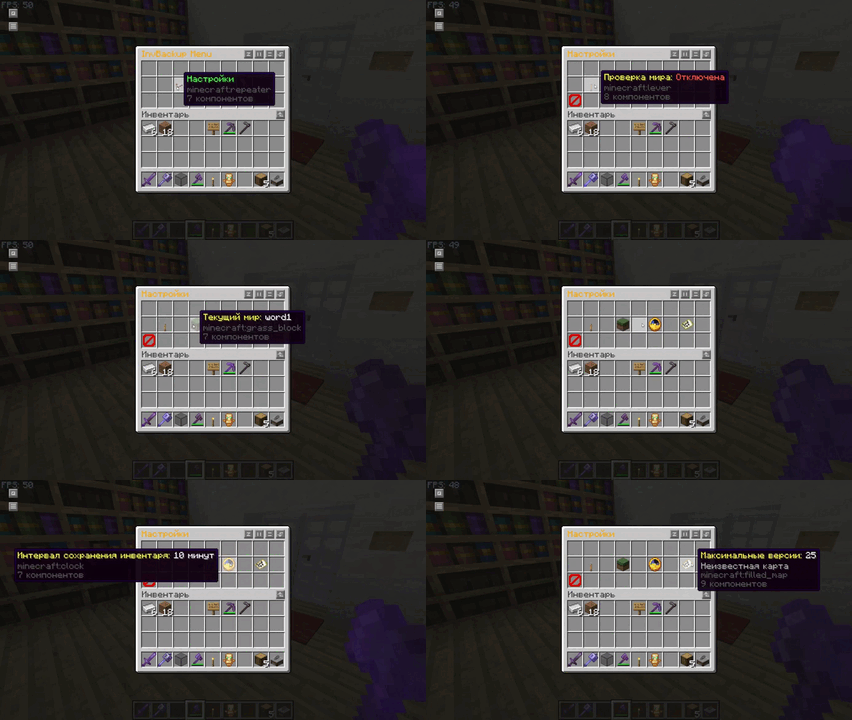
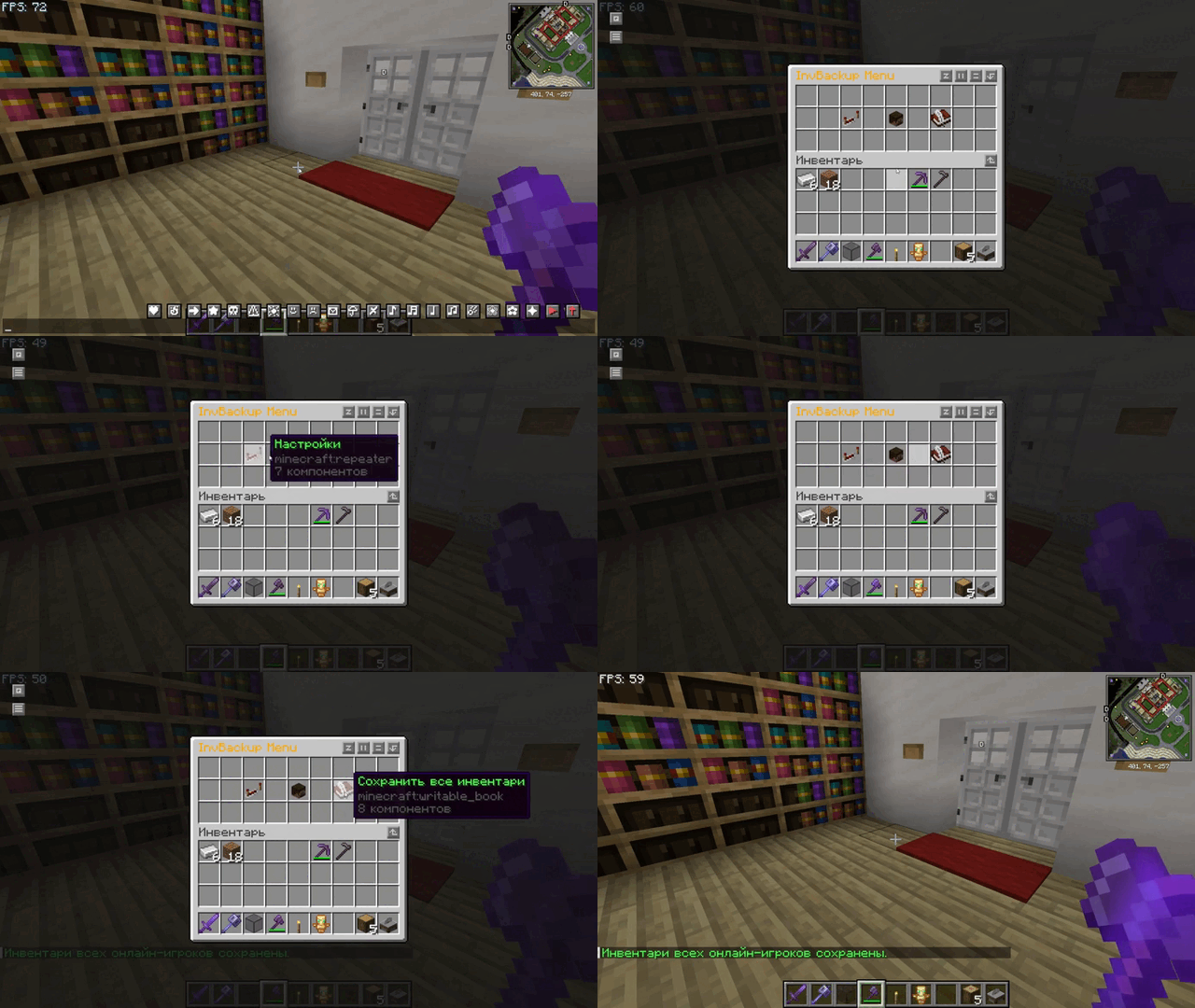
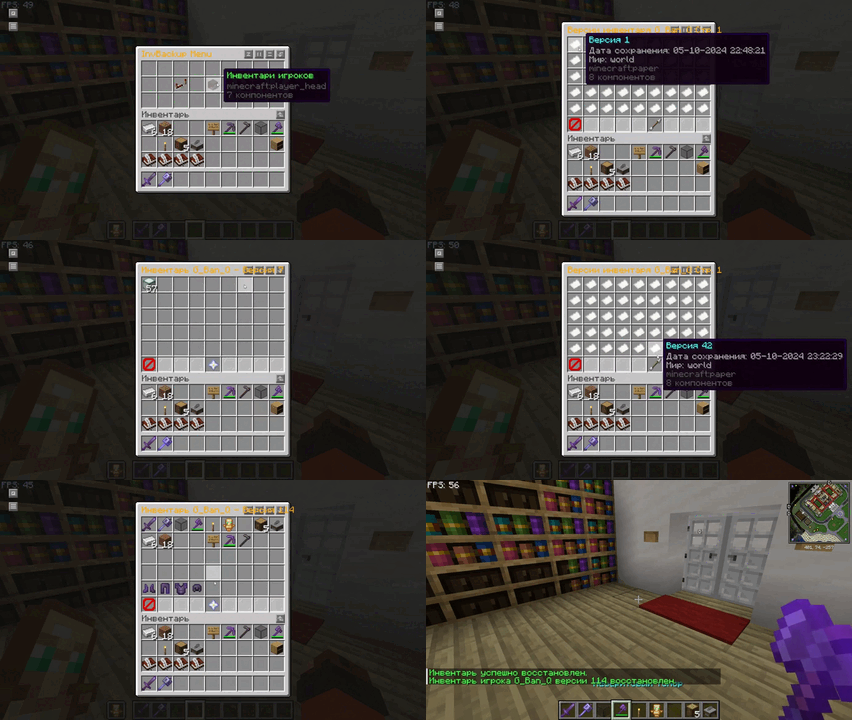
--- ## 📖 **Project Overview** **InvBackup** is a Minecraft plugin that provides robust inventory backup and recovery functionality for server administrators. The plugin features an intuitive graphical interface (GUI) for easy interaction, allowing administrators to manage and restore player inventories, configure automatic backups, and apply world-specific settings. This ensures seamless protection of player progress, even in the event of server crashes or other issues. <div align="center"> <img src="https://cdn.modrinth.com/data/ua1oolre/images/6ba972c134d19430d8f6ce597e5ea9286019ba57.gif" alt="gif" width="400"/> <img src="https://cdn.modrinth.com/data/ua1oolre/images/0fbec4b8d5147909304a4b086b4c13541cd47edb.gif" alt="gif" width="400"/> <img src="https://cdn.modrinth.com/data/ua1oolre/images/89690db94e12b51d93a9f4da684939f0d87b71ed.gif" alt="gif" width="400"/> </div> ## 📋 **Features** - **Graphical User Interface (GUI)**: Manage and navigate through the plugin's settings, player inventories, and backup versions via an easy-to-use GUI. - **Player Inventory Backup**: Allows manual or automatic backups of player inventories. - **Inventory Restoration**: Restore a player's inventory from the latest or a specific backup version through the GUI or commands. - **World-Specific Controls**: Define which worlds should allow inventory backups or restorations. - **Interval-based Backups**: Automatically back up player inventories at configurable time intervals. - **Customizable Interface**: Admins can change backup settings such as intervals, maximum backup versions, and toggle world-specific features directly from the plugin’s GUI. - **Pagination**: Navigate player inventory backups and version history through paginated menus, ensuring smooth browsing of multiple backup versions. Вот обновлённая таблица команд с добавлением команды для открытия интерфейса меню: --- ## 🛠️ **Commands** The **InvBackup** plugin offers several commands for managing and controlling player inventory backups and opening menus: | Command | Description | Usage | Aliases | |----------------------------------|--------------------------------------------------------------------------|----------------------------------------|----------------| | **/invbackup save** | Manually save the inventory of a specified player. | `/invbackup save <player>` | `/ib save` | | **/invbackup restore** | Restore the specified player's inventory from a backup copy. (if no version is specified, the latest save is loaded) | `/invbackup restore <player> <version>`| `/ib restore` | | **/invbackup toggleworldcheck** | Toggle the world check feature to restrict inventory backups/restores by world. | `/invbackup toggleworldcheck` | `/ib toggleworldcheck` | | **/invbackup setworld** | Set the world for inventory backup operations. | `/invbackup setworld <world>` | `/ib setworld` | | **/invbackup setinterval**| Set an automatic backup interval in seconds. | `/invbackup setinterval <time>` | `/ib setinterval` | | **/invbackup reload** | Reload the plugin’s configuration settings. | `/invbackup reload` | `/ib reload` | | **/invbackup saveall** | Manually save the inventories of all online players. | `/invbackup saveall` | `/ib saveall` | | **/invbackup menu** | Opens the main **InvBackup** menu interface where admins can navigate various options such as settings, player inventories, and more. | `/invbackup menu` | `/ib menu` | --- ### Highlights: - **Backup Intervals**: Automatically create backups at regular intervals to ensure data integrity. - **World-Specific Behavior**: Enable or disable backups for specific worlds. - **Manual Control**: Admins can initiate backups and restores as needed for individual players --- ## 🔑 **Permissions** The plugin uses a straightforward permission system that controls access to various features, both in the GUI and via commands. | **Permission** | **Description** | **Default** | |--------------------------|---------------------------------------------------------------------------------|--------------| | `invbackup.admin` | Full access to all backup and restore features, including GUI settings. | OP | ### Permission Breakdown: - **`invbackup.admin`**: This permission grants full control over the plugin, allowing players with this role to manage inventories, backups, restores, and settings through both commands and the GUI. --- ## ⚙️ **Configuration File** The **InvBackup** plugin generates a configurat
## 📖 Project Overview
InvBackup is a Minecraft plugin that provides robust inventory backup and recovery functionality for server administrators. The plugin features an intuitive graphical interface (GUI) for easy interaction, allowing administrators to manage and restore player inventories, configure automatic backups, and apply world-specific settings. This ensures seamless protection of player progress, even in the event of server crashes or other issues.
## 📋 Features
- Graphical User Interface (GUI): Manage and navigate through the plugin's settings, player inventories, and backup versions via an easy-to-use GUI.
- Player Inventory Backup: Allows manual or automatic backups of player inventories.
- Inventory Restoration: Restore a player's inventory from the latest or a specific backup version through the GUI or commands.
- World-Specific Controls: Define which worlds should allow inventory backups or restorations.
- Interval-based Backups: Automatically back up player inventories at configurable time intervals.
- Customizable Interface: Admins can change backup settings such as intervals, maximum backup versions, and toggle world-specific features directly from the plugin’s GUI.
- Pagination: Navigate player inventory backups and version history through paginated menus, ensuring smooth browsing of multiple backup versions.
Вот обновлённая таблица команд с добавлением команды для открытия интерфейса меню:
## 🛠️ Commands
The InvBackup plugin offers several commands for managing and controlling player inventory backups and opening menus:
| Command | Description | Usage | Aliases |
|----------------------------------|--------------------------------------------------------------------------|----------------------------------------|----------------|
| /invbackup save | Manually save the inventory of a specified player. | `/invbackup save
### Highlights:
- Backup Intervals: Automatically create backups at regular intervals to ensure data integrity.
- World-Specific Behavior: Enable or disable backups for specific worlds.
- Manual Control: Admins can initiate backups and restores as needed for individual players
## 🔑 Permissions
The plugin uses a straightforward permission system that controls access to various features, both in the GUI and via commands.
| Permission | Description | Default | |--------------------------|---------------------------------------------------------------------------------|--------------| | `invbackup.admin` | Full access to all backup and restore features, including GUI settings. | OP |
### Permission Breakdown:
- `invbackup.admin`: This permission grants full control over the plugin, allowing players with this role to manage inventories, backups, restores, and settings through both commands and the GUI.
## ⚙️ Configuration File
The InvBackup plugin generates a configurat
📊 Mod Details
- Game
- Minecraft Plugins
- Author
- G_Ban_Q
- Version
- 1.0-RELEASE
- Downloads
- 1,137
- Endorsements
- 7
- Category
- bukkit
- Created
- 10/6/2024
- Updated
- 10/17/2024
- Game Versions
- 1.20, 1.20.1, 1.20.2, 1.20.3, 1.20.4
- Tags
- game-mechanics, storage, utility
🔧 How to Install Minecraft Plugins Mods
Download from Modrinth. Use Prism Launcher or drop into your mods folder.
📖 Full step-by-step install guide for Minecraft Plugins →
Visit the official mod page for specific installation instructions for this mod.
🎮 Need cheat codes or console commands? Check ur gaming wiki for Minecraft Plugins commands, item IDs, and more.
❓ Frequently Asked Questions
Which Minecraft Plugins versions does Inventory Backup support?
The author lists 1.20, 1.20.1, 1.20.2, 1.20.3, 1.20.4, 1.20.5. Other versions may work but are untested by the author.
What is the latest version of Inventory Backup?
Version 1.0-RELEASE, published 2024-10-17 with 1,137 downloads recorded at the source.
Keep browsing — more Minecraft Plugins mods await