ImageFireworksPro
⚪ Last updated 2024🖼️ Gallery (1 images)
🔍 Analysis
- 👍 0.5% endorsement rate
- 🏆 #66 of 70 decoration mods in this game by downloads
📋 About This Mod
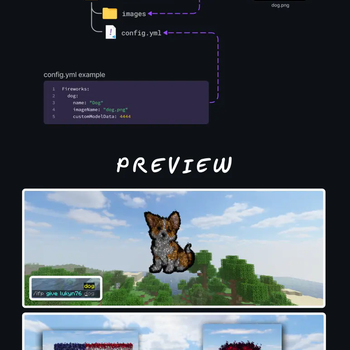
# ImageFireworksPro ImageFireworksPro is a Spigot plugin that enables the creation of custom fireworks that display images as particle effects in Minecraft. !(https://i.imgur.com/V3KpvgX.png) ## Installation 1. Place `ImageFireworksPro.jar` into the server's `plugins` directory. 2. Restart the server or load using Plugman. ## Adding Images 1. Put `.png` or `.jpg` image files into the `plugins/ImageFireworksPro/images` directory on your server. Make sure images are no larger then 100x100 pixels to avoid performance issues due to the large number of particles. 2. Define each image in the `config.yml` in the `ImageFireworksPro` plugin directory with the appropriate `customModelData`. Example entry in (src/main/resources/config.yml): ```yaml Fireworks: identifier: name: "Display Name" imageName: "filename.png" customModelData: 1234 flightDuration: 1 # 0-3 displayTime: 3 # in seconds ``` 3. Reload the config with command `/ifp reload` 4. Done! ## Usage In-game, use command `/ifp give <player> <firework> ` to obtain the image firework or launch a firework rocket with the same `customModelData` to display the image. Fireworks work with dispensers & crossbows too! ## Support Report issues or request features by opening an issue on the GitHub repository. ## License This project is licensed under the GNU General Public License v3.0 - see the (LICENSE) file for details.
# ImageFireworksPro
ImageFireworksPro is a Spigot plugin that enables the creation of custom fireworks that display images as particle effects in Minecraft.
!(https://i.imgur.com/V3KpvgX.png)
## Installation
1. Place `ImageFireworksPro.jar` into the server's `plugins` directory. 2. Restart the server or load using Plugman.
## Adding Images
1. Put `.png` or `.jpg` image files into the `plugins/ImageFireworksPro/images` directory on your server. Make sure images are no larger then 100x100 pixels to avoid performance issues due to the large number of particles. 2. Define each image in the `config.yml` in the `ImageFireworksPro` plugin directory with the appropriate `customModelData`.
Example entry in (src/main/resources/config.yml):
```yaml Fireworks: identifier: name: "Display Name" imageName: "filename.png" customModelData: 1234 flightDuration: 1 # 0-3 displayTime: 3 # in seconds ```
3. Reload the config with command `/ifp reload` 4. Done!
## Usage
In-game, use command `/ifp give
## Support Report issues or request features by opening an issue on the GitHub repository.
## License This project is licensed under the GNU General Public License v3. 0 - see the (LICENSE) file for details.
📊 Mod Details
- Game
- Minecraft Plugins
- Author
- lukyn76
- Version
- 1.1.6
- Downloads
- 1,303
- Endorsements
- 6
- Category
- decoration
- Created
- 5/1/2024
- Updated
- 5/12/2024
- Game Versions
- 1.19, 1.19.1, 1.19.2, 1.19.3, 1.19.4
- Tags
- decoration, magic, management
🔧 How to Install Minecraft Plugins Mods
Download from Modrinth. Use Prism Launcher or drop into your mods folder.
📖 Full step-by-step install guide for Minecraft Plugins →
Visit the official mod page for specific installation instructions for this mod.
🎮 Need cheat codes or console commands? Check ur gaming wiki for Minecraft Plugins commands, item IDs, and more.
❓ Frequently Asked Questions
Which Minecraft Plugins versions does ImageFireworksPro support?
The author lists 1.19, 1.19.1, 1.19.2, 1.19.3, 1.19.4, 1.20. Other versions may work but are untested by the author.
What is the latest version of ImageFireworksPro?
Version 1.1.6, published 2024-05-12 with 1,303 downloads recorded at the source.
Keep browsing — more Minecraft Plugins mods await