HexaCitybuildSystem
🟡 Updated this year🖼️ Gallery (2 images)
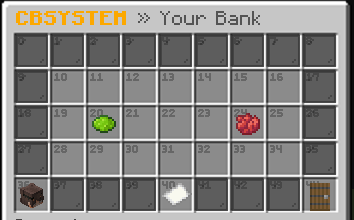
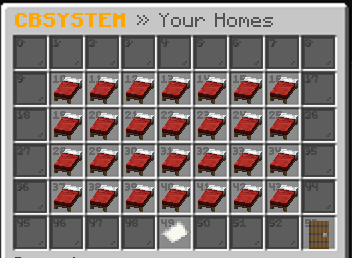
🔍 Analysis
- 🏆 #668 of 1317 bukkit mods in this game by downloads
📋 About This Mod
# HexaCitybuildSystem An advanced utility plugin for Minecraft servers providing essential commands for player management, teleportation, server administration, and more. ## Features - **Game Mode Control**: Change your own or others' game modes quickly. - **Teleportation System**: Request, accept, and force teleports between players. - **Player Utilities**: Heal, feed, toggle fly mode, vanish, clear inventories. - **Server Tools**: Maintenance mode, broadcasts, slow chat, spawn and warp points. - **Inventory Access**: View and manage inventories, ender chests, and trash. - **Custom Items**: Set heads, sign items, edit metadata. - **Economy & Stats**: Check playtime, manage homes, and track player activity. ## Installation 1. Download `CBSystem.jar` to your server's `plugins` folder. 2. Restart the server. 3. Configure settings in the `plugins/CBSystem/` folder. 4. Ensure you have the necessary permissions assigned to players. ## Commands `/gamemode (0,1,2,3)` – Change your game mode. | `cbsystem.gamemode` `/gamemode (0,1,2,3) ` – Change another player's game mode. | `cbsystem.gamemode.other` `/fly` – Toggle fly mode for yourself. | `cbsystem.fly` `/fly ` – Toggle fly mode for another player. | `cbsystem.fly.other` `/heal` – Heal yourself. | `cbsystem.heal` `/heal ` – Heal another player. | `cbsystem.heal.other` `/feed` – Feed yourself. | `cbsystem.feed` `/feed ` – Feed another player. | `cbsystem.feed.other` `/trash` – Open the trash interface. | `cbsystem.trash` `/head` – Give yourself your own head. | `cbsystem.head` `/head ` – Give another player's head. | `cbsystem.head.other` `/enderchest` or `/ec` – Open your ender chest. | `cbsystem.ec` `/ec ` – View another player's ender chest. | `cbsystem.ec.other` `/invsee ` – View another player's inventory. | `cbsystem.invsee` `/speed ` – Change your movement speed. | `cbsystem.speed` `/speed ` – Change another player's movement speed. | `cbsystem.speed.other` `/give ` – Give yourself an item. | `cbsystem.give` `/broadcast ` – Send a server-wide announcement. | `cbsystem.broadcast` `/slowchat` – Toggle slow chat mode. | `cbsystem.slowchat` `/spawn` – Teleport to spawn. | `cbsystem.spawn` `/setspawn` – Set the server spawn point. | `cbsystem.setspawn` `/warp ` – Teleport to a warp. | `cbsystem.warp` `/setwarp ` – Set a warp. | `cbsystem.setwarp` `/delwarp ` – Delete a warp. | `cbsystem.delwarp` `/tpo ` – Teleport to a player. | `cbsystem.tpo` `/tphere ` – Teleport a player to you. | `cbsystem.tphere` `/tpa ` – Request to teleport to a player. | `cbsystem.tpa` `/tpahere ` – Request a player to teleport to you. | `cbsystem.tpahere` `/tpaccept` – Accept a teleport request. | `cbsystem.tpaccept` `/tpadeny` – Deny a teleport request. | `cbsystem.tpadeny` `/tpatoggle` – Toggle teleport requests. | `cbsystem.tpatoggle` `/tp ` – Teleport to an Player. | `cbsystem.tp` `/playtime` – Check your playtime. | `cbsystem.playtime` `/playtime ` – Check another player's playtime. | `cbsystem.playtime.other` `/clear` – Clear your inventory. | `cbsystem.clear` `/clear ` – Clear another player's inventory. | `cbsystem.clear.other` `/vanish` – Toggle vanish mode. | `cbsystem.vanish` `/vanish ` – Toggle vanish for another player. | `cbsystem.vanish.other` `/maintenance` – Toggle maintenance mode. | `cbsystem.maintenance` `/sign` – Sign an item. | `cbsystem.sign` `/sudo ` – Execute a command as another player. | `cbsystem.sudo` `/discord` – Show the Discord link. | `cbsystem.discord` `/youtube` – Show the YouTube link. | `cbsystem.youtube` `/teamchat` – Enable team chat. | `cbsystem.teamchat` `/message ` – Send a private message. | `cbsystem.message` `/respond` – Reply to the last private message. | `cbsystem.respond` `/spawnentity ` – Spawn an entity. | `cbsystem.spawnentity` `/reload` – Reload CBSystem. | `cbsystem.reload` `/restart` – Restart the server. | `cbsystem.restart` `/homes` – Open the main homes GUI. | `cbsystem.home.use` `/home <name>` – Teleport to a home. | `cbsystem.home.teleport` `/sethome <name>` – Set a home. | `cbsystem.home.set.*` `/delhome <name>` – Delete a home. | `cbsystem.home.delete` `/bank` – Opens the Bank GUI. | `cbsystem.bank` ## Permissions - `cbsystem.*` – Access to all commands. - Individual command permissions are listed in the **Commands** section above. ## Support For help or issues: 1. Check the server console/logs for errors. 2. Verify you have the correct permissions. 3. Ensure the plugin is up to date. 4. Contact support via your server's community or (https://discord.gg/zvnrSXgB8H). ## License HexaCitybuildSystem is licensed under **CC-BY-NC-4.0**. You are free to share and adapt t
# HexaCitybuildSystem
An advanced utility plugin for Minecraft servers providing essential commands for player management, teleportation, server administration, and more.
## Features
- Game Mode Control: Change your own or others' game modes quickly.
- Teleportation System: Request, accept, and force teleports between players.
- Player Utilities: Heal, feed, toggle fly mode, vanish, clear inventories.
- Server Tools: Maintenance mode, broadcasts, slow chat, spawn and warp points.
- Inventory Access: View and manage inventories, ender chests, and trash.
- Custom Items: Set heads, sign items, edit metadata.
- Economy & Stats: Check playtime, manage homes, and track player activity.
## Installation
1. Download `CBSystem.jar` to your server's `plugins` folder. 2. Restart the server. 3. Configure settings in the `plugins/CBSystem/` folder. 4. Ensure you have the necessary permissions assigned to players.
## Commands
`/gamemode (0,1,2,3)` – Change your game mode. | `cbsystem.gamemode`
`/gamemode (0,1,2,3) ` – Change another player's game mode. | `cbsystem.gamemode.other`
`/fly` – Toggle fly mode for yourself. | `cbsystem.fly`
`/fly ` – Toggle fly mode for another player. | `cbsystem.fly.other`
`/heal` – Heal yourself. | `cbsystem.heal`
`/heal ` – Heal another player. | `cbsystem.heal.other`
`/feed` – Feed yourself. | `cbsystem.feed`
`/feed ` – Feed another player. | `cbsystem.feed.other`
`/trash` – Open the trash interface. | `cbsystem.trash`
`/head` – Give yourself your own head. | `cbsystem.head`
`/head ` – Give another player's head. | `cbsystem.head.other`
`/enderchest` or `/ec` – Open your ender chest. | `cbsystem.ec`
`/ec ` – View another player's ender chest. | `cbsystem.ec.other`
`/invsee ` – View another player's inventory. | `cbsystem.invsee`
`/speed ` – Change your movement speed. | `cbsystem.speed`
`/speed ` – Change another player's movement speed. | `cbsystem.speed.other`
`/give ` – Give yourself an item. | `cbsystem.give`
`/broadcast ` – Send a server-wide announcement. | `cbsystem.broadcast`
`/slowchat` – Toggle slow chat mode. | `cbsystem.slowchat`
`/spawn` – Teleport to spawn. | `cbsystem.spawn`
`/setspawn` – Set the server spawn point. | `cbsystem.setspawn`
`/warp ` – Teleport to a warp. | `cbsystem.warp`
`/setwarp ` – Set a warp. | `cbsystem.setwarp`
`/delwarp ` – Delete a warp. | `cbsystem.delwarp`
`/tpo ` – Teleport to a player. | `cbsystem.tpo`
`/tphere ` – Teleport a player to you. | `cbsystem.tphere`
`/tpa ` – Request to teleport to a player. | `cbsystem.tpa`
`/tpahere ` – Request a player to teleport to you. | `cbsystem.tpahere`
`/tpaccept` – Accept a teleport request. | `cbsystem.tpaccept`
`/tpadeny` – Deny a teleport request. | `cbsystem.tpadeny`
`/tpatoggle` – Toggle teleport requests. | `cbsystem.tpatoggle`
`/tp ` – Teleport to an Player. | `cbsystem.tp`
`/playtime` – Check your playtime. | `cbsystem.playtime`
`/playtime ` – Check another player's playtime. | `cbsystem.playtime.other`
`/clear` – Clear your inventory. | `cbsystem.clear`
`/clear ` – Clear another player's inventory. | `cbsystem.clear.other`
`/vanish` – Toggle vanish mode. | `cbsystem.vanish`
`/vanish ` – Toggle vanish for another player. | `cbsystem.vanish.other`
`/maintenance` – Toggle maintenance mode. | `cbsystem.maintenance`
`/sign` – Sign an item. | `cbsystem.sign`
`/sudo ` – Execute a command as another player. | `cbsystem.sudo`
`/discord` – Show the Discord link. | `cbsystem.discord`
`/youtube` – Show the YouTube link. | `cbsystem.youtube`
`/teamchat` – Enable team chat. | `cbsystem.teamchat`
`/message ` – Send a private message. | `cbsystem.message`
`/respond` – Reply to the last private message. | `cbsystem.respond`
`/spawnentity ` – Spawn an entity. | `cbsystem.spawnentity`
`/reload` – Reload CBSystem. | `cbsystem.reload`
`/restart` – Restart the server. | `cbsystem.restart`
`/homes` – Open the main homes GUI. | `cbsystem.home.use`
`/home
## Permissions
- `cbsystem.` – Access to all commands.
- Individual command permissions are listed in the Commands section above.
For help or issues: 1. Check the server console/logs for errors. 2. Verify you have the correct permissions. 3. Ensure the plugin is up to date. 4. Contact support via your server's community or (https://discord.gg/zvnrSXgB8H).
HexaCitybuildSystem is licensed under CC-BY-NC-4. 0. You are free to share and adapt t
📊 Mod Details
- Game
- Minecraft Plugins
- Author
- einfxchwolf
- Version
- 1.3-SNAPSHOT
- Downloads
- 236
- Endorsements
- 0
- Category
- bukkit
- Created
- 8/15/2025
- Updated
- 10/10/2025
- Game Versions
- 1.21, 1.21.1, 1.21.2, 1.21.3, 1.21.4
- Tags
- economy, management, utility
🔧 How to Install Minecraft Plugins Mods
Download from Modrinth. Use Prism Launcher or drop into your mods folder.
📖 Full step-by-step install guide for Minecraft Plugins →
Visit the official mod page for specific installation instructions for this mod.
🎮 Need cheat codes or console commands? Check ur gaming wiki for Minecraft Plugins commands, item IDs, and more.
❓ Frequently Asked Questions
Which Minecraft Plugins versions does HexaCitybuildSystem support?
The author lists 1.21, 1.21.1, 1.21.2, 1.21.3, 1.21.4, 1.21.5. Other versions may work but are untested by the author.
What is the latest version of HexaCitybuildSystem?
Version 1.3-SNAPSHOT, published 2025-10-10 with 236 downloads recorded at the source.
Keep browsing — more Minecraft Plugins mods await