Hello GPT
⚪ Last updated 2024🖼️ Gallery (2 images)

🔍 Analysis
- 👍 1.6% endorsement rate — high engagement, a strong quality signal
- 🏆 #48 of 143 paper mods in this game by downloads
📋 About This Mod
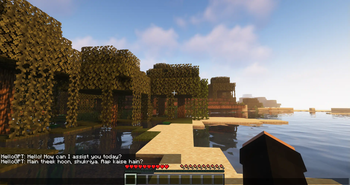
### HelloGPT Plugin #### Overview HelloGPT is an innovative Minecraft plugin that integrates the powerful OpenAI GPT-3.5 model directly into your Minecraft server. With this plugin, players can interact with an advanced AI by simply typing commands in the game. Whether you want to create immersive storytelling, provide dynamic responses, or just have some fun conversations, HelloGPT brings AI-driven interaction to your Minecraft world. #### Features - **Seamless Integration:** Easy-to-use command to interact with the AI directly within the game. - **Customizable Settings:** Configure your own API key, model, and max tokens directly through the plugin configuration file. - **Dynamic Responses:** Utilize the power of OpenAI's GPT-3.5 to get context-aware and intelligent responses. - **Error Handling:** Provides user-friendly error messages and logs detailed error information for admins. - **Fun and Educational:** Enhance your server with AI-driven dialogues, role-playing scenarios, or educational interactions. #### Commands - **/saygpt \<message\>:** Send a message to the AI and receive a response directly in the game chat. #### Installation 1. **Download the Plugin:** Download the HelloGPT plugin JAR file from the plugin website. 2. **Add to Server:** Place the JAR file in the `plugins` folder of your Minecraft server. 3. **Configure API Key:** Edit the `config.yml` file to add your OpenAI API key, model, and max tokens. 4. **Restart Server:** Restart your Minecraft server to load the plugin. 5. **Enjoy:** Use the `/saygpt` command to start interacting with the AI. #### Configuration The `config.yml` file allows you to set up the plugin according to your needs: ```yaml api-key: "your-openai-api-key" model: "gpt-3.5-turbo" max-tokens: 100 ``` #### Example Usage - **Interactive NPCs:** Create NPCs that respond intelligently to player queries. - **Storytelling:** Develop dynamic and branching storylines based on player input. - **Learning Tool:** Use the AI to answer questions or provide information on various topics. #### Support For support and updates, visit our (https://discord.gg/BrEHrV3Gzw) #### Requirements - **Minecraft Server:** Version 1.20 or higher. - **Java:** Version 8 or higher. - **OpenAI API Key:** Obtainable from the OpenAI platform. --- ### Screenshots !(https://i.postimg.cc/7LKqSYfK/Screenshot-2024-06-09-151642.png) !(https://i.postimg.cc/1tWb3Jvt/Screenshot-2024-06-09-151901.png) --- By using HelloGPT, you bring the cutting-edge technology of OpenAI into the immersive world of Minecraft, providing endless possibilities for creative and engaging gameplay. Download HelloGPT today and transform your server with the power of AI!
### HelloGPT Plugin
#### Overview HelloGPT is an innovative Minecraft plugin that integrates the powerful OpenAI GPT-3. 5 model directly into your Minecraft server. With this plugin, players can interact with an advanced AI by simply typing commands in the game. Whether you want to create immersive storytelling, provide dynamic responses, or just have some fun conversations, HelloGPT brings AI-driven interaction to your Minecraft world.
#### Features - Seamless Integration: Easy-to-use command to interact with the AI directly within the game. - Customizable Settings: Configure your own API key, model, and max tokens directly through the plugin configuration file. - Dynamic Responses: Utilize the power of OpenAI's GPT-3. 5 to get context-aware and intelligent responses. - Error Handling: Provides user-friendly error messages and logs detailed error information for admins. - Fun and Educational: Enhance your server with AI-driven dialogues, role-playing scenarios, or educational interactions.
#### Commands
- /saygpt \
#### Installation 1. Download the Plugin: Download the HelloGPT plugin JAR file from the plugin website. 2. Add to Server: Place the JAR file in the `plugins` folder of your Minecraft server. 3. Configure API Key: Edit the `config.yml` file to add your OpenAI API key, model, and max tokens. 4. Restart Server: Restart your Minecraft server to load the plugin. 5. Enjoy: Use the `/saygpt` command to start interacting with the AI.
#### Configuration The `config.yml` file allows you to set up the plugin according to your needs: ```yaml api-key: "your-openai-api-key" model: "gpt-3. 5-turbo" max-tokens: 100 ```
#### Example Usage - Interactive NPCs: Create NPCs that respond intelligently to player queries. - Storytelling: Develop dynamic and branching storylines based on player input. - Learning Tool: Use the AI to answer questions or provide information on various topics.
#### Support For support and updates, visit our (https://discord.gg/BrEHrV3Gzw) #### Requirements - Minecraft Server: Version 1. 20 or higher. - Java: Version 8 or higher. - OpenAI API Key: Obtainable from the OpenAI platform.
### Screenshots !(https://i.postimg.cc/7LKqSYfK/Screenshot-2024-06-09-151642.png) !(https://i.postimg.cc/1tWb3Jvt/Screenshot-2024-06-09-151901.png) ---
By using HelloGPT, you bring the cutting-edge technology of OpenAI into the immersive world of Minecraft, providing endless possibilities for creative and engaging gameplay. Download HelloGPT today and transform your server with the power of AI!
📊 Mod Details
- Game
- Minecraft Plugins
- Author
- kanhaiyaswagger
- Version
- 1.0
- Downloads
- 620
- Endorsements
- 10
- Category
- paper
- Created
- 6/9/2024
- Updated
- 6/9/2024
- Game Versions
- 1.20, 1.20.1, 1.20.2, 1.20.3, 1.20.4
- Tags
- social
🔧 How to Install Minecraft Plugins Mods
Download from Modrinth. Use Prism Launcher or drop into your mods folder.
📖 Full step-by-step install guide for Minecraft Plugins →
Visit the official mod page for specific installation instructions for this mod.
🎮 Need cheat codes or console commands? Check ur gaming wiki for Minecraft Plugins commands, item IDs, and more.
❓ Frequently Asked Questions
Which Minecraft Plugins versions does Hello GPT support?
The author lists 1.20, 1.20.1, 1.20.2, 1.20.3, 1.20.4, 1.20.5. Other versions may work but are untested by the author.
What is the latest version of Hello GPT?
Version 1.0, published 2024-06-09 with 620 downloads recorded at the source.
Keep browsing — more Minecraft Plugins mods await