HCG Lava Raise
🟡 Updated this year🖼️ Gallery (1 images)
🔍 Analysis
- 🏆 #44 of 81 folia mods in this game by downloads
📋 About This Mod
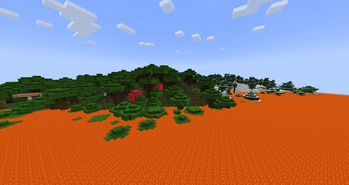
> Addon for **(https://modrinth.com/plugin/hcg)**, requires the base plugin to be installed. ## Lava raise While enabled, every Minecraft day at the configured world-clock **start time**, lava rises layer by layer from bedrock up to the configured **max Y** over the configured **travel time**; it holds there until the **end time**, then drains back down over the same travel time. Implementation notes: - **The lava is a client-side illusion.** It's sent as block-change packets, so the clients render real animated lava (fog, swim physics included) while the server world never changes, nothing can burn, flow, or need cleanup. - Burning is server-side: players at or below the lava level catch fire and take lava-rate damage (water protects them unless `replace-water` is on). Creative/spectator players are unaffected; mobs burn too if `damage-mobs` is on. - With `burn-placed-blocks` on (default), burnable blocks that were **placed by a player** (tracked from placement, persisted across restarts) burn away as the lava passes them. - Packets are paced (`blocks-per-tick`, default 40000 positions/tick) and sent for all chunks each player can see (`render-radius`, default = full view distance). The region is the world border, capped at `max-region` blocks. ## Volcano `/volcano setcenter` marks the crater at the block you're looking at, then `/volcano erupt ` throws debris and particles (with optional screen shake for nearby players). `/volcano schedule <time|off>` makes it erupt daily at a world-clock time, and `/volcano stop` calms it immediately. ## Commands `/lavaraise` alias: `/lr`. | Command | Effect | | --- | --- | | `/lavaraise` | Open the lava raise settings menu. | | `/lavaraise on\|off` | Arm or disarm the daily rising lava event. | | `/lavaraise status` | Show phase, current lava level, and settings. | | `/lavaraise start <time>` | World-clock time the lava starts rising. | | `/lavaraise end <time>` | World-clock time the lava starts draining. | | `/lavaraise duration <s>` | Seconds to travel bedrock <-> max level. | | `/lavaraise maxy <y>` | The Y level the lava rises to. | | `/lavaraise water <on\|off>` | Whether oceans fill with lava too. | | `/lavaraise blocks <on\|off>` | Whether player-placed burnables burn away. | | `/lavaraise mobs <on\|off>` | Whether mobs burn in the lava too. | | `/lavaraise cancel` | Drain the lava immediately. | | `/lavaraise purge <y>` | Remove REAL lava blocks in the region up to Y. | | `/volcano setcenter` | Mark the crater at the block you're looking at. | | `/volcano erupt ` | Eruption: debris, particles, screen shake. | | `/volcano schedule <time\|off>` | Erupt daily at a world-clock time. | | `/volcano stop` | Calm the volcano immediately. |
> Addon for (https://modrinth.com/plugin/hcg)**, requires the base plugin to be installed.
## Lava raise
While enabled, every Minecraft day at the configured world-clock start time, lava rises layer by layer from bedrock up to the configured max Y over the configured travel time; it holds there until the end time, then drains back down over the same travel time.
Implementation notes:
- The lava is a client-side illusion. It's sent as block-change packets, so the clients render
- real animated lava (fog, swim physics included) while the server world never changes, nothing can
- burn, flow, or need cleanup.
- Burning is server-side: players at or below the lava level catch fire and take lava-rate damage
- (water protects them unless `replace-water` is on). Creative/spectator players are unaffected; mobs
- burn too if `damage-mobs` is on.
- With `burn-placed-blocks` on (default), burnable blocks that were placed by a player** (tracked
- from placement, persisted across restarts) burn away as the lava passes them.
- Packets are paced (`blocks-per-tick`, default 40000 positions/tick) and sent for all chunks each
- player can see (`render-radius`, default = full view distance). The region is the world border,
- capped at `max-region` blocks.
`/volcano setcenter` marks the crater at the block you're looking at, then `/volcano erupt ` throws debris and particles (with optional screen shake for nearby players). `/volcano schedule
## Commands
`/lavaraise` alias: `/lr`.
| Command | Effect | | --- | --- | | `/lavaraise` | Open the lava raise settings menu. | | `/lavaraise on\|off` | Arm or disarm the daily rising lava event. | | `/lavaraise status` | Show phase, current lava level, and settings. | | `/lavaraise start
📊 Mod Details
- Game
- Minecraft Plugins
- Author
- amissouri
- Version
- 1.3.0
- Downloads
- 16
- Endorsements
- 0
- Category
- folia
- Created
- 8/7/2026
- Updated
- 7/16/2026
- Game Versions
- 1.21, 1.21.1, 1.21.2, 1.21.3, 1.21.4
- Tags
- game-mechanics, minigame, utility
🔧 How to Install Minecraft Plugins Mods
Download from Modrinth. Use Prism Launcher or drop into your mods folder.
📖 Full step-by-step install guide for Minecraft Plugins →
Visit the official mod page for specific installation instructions for this mod.
🎮 Need cheat codes or console commands? Check ur gaming wiki for Minecraft Plugins commands, item IDs, and more.
❓ Frequently Asked Questions
Which Minecraft Plugins versions does HCG Lava Raise support?
The author lists 1.21, 1.21.1, 1.21.2, 1.21.3, 1.21.4, 1.21.5. Other versions may work but are untested by the author.
What is the latest version of HCG Lava Raise?
Version 1.3.0, published 2026-07-16 with 16 downloads recorded at the source.
Keep browsing — more Minecraft Plugins mods await