hCaptureEvent
🟡 Updated this year🖼️ Gallery (5 images)
🔍 Analysis
- 🏆 #152 of 333 adventure mods in this game by downloads
📋 About This Mod
# hCaptureEvent !(https://cdn.modrinth.com/data/cached_images/b1c11ce6821a47a53265a42bfc1971d15e518140.png) **hCaptureEvent** is a flexible capture-event plugin for Minecraft servers. Create timed capture zones inside WorldGuard regions, let players or clans fight for control, track progress in real time, and reward the best participants automatically. !(https://cdn.modrinth.com/data/cached_images/920a61089c877ca817c9e2b8f54d66388e6a1bd0.png) The plugin is designed for servers that need active PvP events, King of the Hill-style gameplay, clan competitions, scheduled hot zones, custom rewards and fully configurable event logic. --- ## Overview hCaptureEvent allows you to create capture zones using WorldGuard regions. When an event starts, players inside the configured region begin gaining capture progress. The plugin tracks participants, leaders, time left, final places and rewards. You can run simple player-based capture events or enable clan mode through hClans to create team-based competitions. Everything is configured through YAML files, so each capture zone can have its own settings, schedule, rewards, visuals and rules. --- ## Main Features ### WorldGuard-Based Capture Zones hCaptureEvent uses WorldGuard regions as capture areas. Create a WorldGuard region, connect it to a capture zone config, and the plugin will track players inside that region while the event is active. Each capture zone is configured through its own file: ```text plugins/hCaptureEvent/captures/default.yml plugins/hCaptureEvent/captures/clan.yml ``` The zone ID is taken from the file name. For example: ```text default.yml -> default clan.yml -> clan ``` This makes it easy to create and manage multiple independent capture events. --- ### Multiple Capture Zones You can create as many capture zones as your server needs. Each zone can have its own: - WorldGuard region - World - Capture duration - Minimum online player requirement - Automatic schedule - Boss bar - Particle display - Rewards - Start actions - Stop actions - Enter actions - Exit actions - Progress rewards - Final place rewards - Clan mode settings This allows you to create different events for PvP arenas, clan wars, survival worlds, seasonal events, daily competitions or rotating hot zones. --- ### Player Capture Mode In normal mode, players participate individually. When a player enters an active capture zone, the plugin starts counting their progress. The longer the player stays inside the region, the more progress they gain. The plugin can track: - Current leader - Player progress - Capture time - Event time left - Final places - Top participants - Final winner This mode is suitable for King of the Hill events, PvP zones, competitive arenas and reward-based activity zones. --- ### Clan Capture Mode hCaptureEvent supports clan-based capture events through hClans. When clan mode is enabled, players participate together with their clan. The plugin calculates clan progress and determines the leading clan during the event. Clan mode can be used to: - Allow only players with a clan to participate - Track clan progress - Detect the leading clan - Detect the winning clan - Reward the winning clan - Give clan experience - Use the best player from the winning clan in reward actions This mode is useful for servers with clans, factions, guilds or team-based PvP systems. --- ### Scheduled Events Each capture zone can start automatically at configured times. Example: ```yaml time: enable: true start: - "00:00" - "00:30" zone: "Europe/Moscow" format: "HH:mm" ``` You can configure: - Multiple start times - Timezone - Time format - Minimum online requirement - Separate schedule for each zone This is useful for servers that want regular automated events without manual staff involvement. --- ### Manual Event Control Administrators can start and stop events manually. You can start all zones at once or only a specific zone. Examples: ```text /hcaptureevent start /hcaptureevent start all /hcaptureevent start default /hcaptureevent stop /hcaptureevent stop all /hcaptureevent stop default ``` This gives staff full control over active capture events. --- ### Minimum Online Requirement Each zone can require a minimum number of online players before it starts. If the server does not have enough players online, the event will not begin, and you can configure custom actions for this case. This helps prevent capture events from starting when there is not enough competition. --- ### Boss Bar Support Each active capture zone can display a boss bar with live event information. The boss bar can show: ```text {leader} {progress} {timeLeft} {clan} {clanProgress} ``` You can configure: - Boss bar title - Boss bar color - Boss bar style - Boss bar flags - Worlds where the boss bar is visible The boss bar helps players understand the current event state without using commands. --- ### Par
# hCaptureEvent
!(https://cdn.modrinth.com/data/cached_images/b1c11ce6821a47a53265a42bfc1971d15e518140.png)
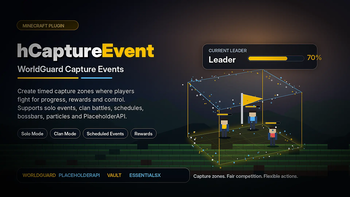
hCaptureEvent is a flexible capture-event plugin for Minecraft servers.
Create timed capture zones inside WorldGuard regions, let players or clans fight for control, track progress in real time, and reward the best participants automatically.
!(https://cdn.modrinth.com/data/cached_images/920a61089c877ca817c9e2b8f54d66388e6a1bd0.png)
The plugin is designed for servers that need active PvP events, King of the Hill-style gameplay, clan competitions, scheduled hot zones, custom rewards and fully configurable event logic.
## Overview
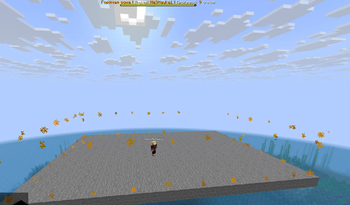
hCaptureEvent allows you to create capture zones using WorldGuard regions.
When an event starts, players inside the configured region begin gaining capture progress. The plugin tracks participants, leaders, time left, final places and rewards.
You can run simple player-based capture events or enable clan mode through hClans to create team-based competitions.
Everything is configured through YAML files, so each capture zone can have its own settings, schedule, rewards, visuals and rules.
## Main Features
### WorldGuard-Based Capture Zones
hCaptureEvent uses WorldGuard regions as capture areas.
Create a WorldGuard region, connect it to a capture zone config, and the plugin will track players inside that region while the event is active.
Each capture zone is configured through its own file:
```text plugins/hCaptureEvent/captures/default.yml plugins/hCaptureEvent/captures/clan.yml ```
The zone ID is taken from the file name.
For example:
```text default.yml -> default clan.yml -> clan ```
This makes it easy to create and manage multiple independent capture events.
### Multiple Capture Zones
You can create as many capture zones as your server needs.
Each zone can have its own:
- WorldGuard region
- World
- Capture duration
- Minimum online player requirement
- Automatic schedule
- Boss bar
- Particle display
- Rewards
- Start actions
- Stop actions
- Enter actions
- Exit actions
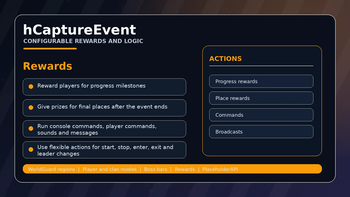
- Progress rewards
- Final place rewards
- Clan mode settings
This allows you to create different events for PvP arenas, clan wars, survival worlds, seasonal events, daily competitions or rotating hot zones.
### Player Capture Mode
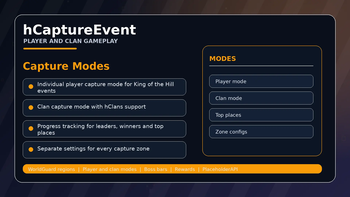
In normal mode, players participate individually.
When a player enters an active capture zone, the plugin starts counting their progress. The longer the player stays inside the region, the more progress they gain.
The plugin can track:
- Current leader
- Player progress
- Capture time
- Event time left
- Final places
- Top participants
- Final winner
This mode is suitable for King of the Hill events, PvP zones, competitive arenas and reward-based activity zones.
### Clan Capture Mode
hCaptureEvent supports clan-based capture events through hClans.
When clan mode is enabled, players participate together with their clan. The plugin calculates clan progress and determines the leading clan during the event.
Clan mode can be used to:
- Allow only players with a clan to participate
- Track clan progress
- Detect the leading clan
- Detect the winning clan
- Reward the winning clan
- Give clan experience
- Use the best player from the winning clan in reward actions
This mode is useful for servers with clans, factions, guilds or team-based PvP systems.
### Scheduled Events
Each capture zone can start automatically at configured times.
```yaml time: enable: true start: - "00:00" - "00:30" zone: "Europe/Moscow" format: "HH:mm" ```
You can configure:
- Multiple start times
- Timezone
- Time format
- Minimum online requirement
- Separate schedule for each zone
This is useful for servers that want regular automated events without manual staff involvement.
### Manual Event Control
Administrators can start and stop events manually.
You can start all zones at once or only a specific zone.
```text /hcaptureevent start /hcaptureevent start all /hcaptureevent start default
/hcaptureevent stop /hcaptureevent stop all /hcaptureevent stop default ```
This gives staff full control over active capture events.
### Minimum Online Requirement
Each zone can require a minimum number of online players before it starts.
If the server does not have enough players online, the event will not begin, and you can configure custom actions for this case.
This helps prevent capture events from starting when there is not enough competition.
### Boss Bar Support
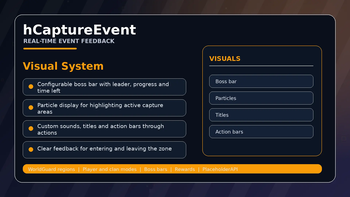
Each active capture zone can display a boss bar with live event information.
The boss bar can show:
```text {leader} {progress} {timeLeft} {clan} {clanProgress} ```
You can configure:
- Boss bar title
- Boss bar color
- Boss bar style
- Boss bar flags
- Worlds where the boss bar is visible
The boss bar helps players understand the current event state without using commands.
📊 Mod Details
- Game
- Minecraft Plugins
- Author
- He3HaukaX
- Version
- 2.7.1
- Downloads
- 235
- Endorsements
- 1
- Category
- adventure
- Created
- 5/12/2026
- Updated
- 7/24/2026
- Game Versions
- 1.21, 1.21.1, 1.21.2, 1.21.3, 1.21.4
- Tags
- adventure, economy, game-mechanics
🔧 How to Install Minecraft Plugins Mods
Download from Modrinth. Use Prism Launcher or drop into your mods folder.
📖 Full step-by-step install guide for Minecraft Plugins →
Visit the official mod page for specific installation instructions for this mod.
🎮 Need cheat codes or console commands? Check ur gaming wiki for Minecraft Plugins commands, item IDs, and more.
❓ Frequently Asked Questions
Which Minecraft Plugins versions does hCaptureEvent support?
The author lists 1.21, 1.21.1, 1.21.2, 1.21.3, 1.21.4, 1.21.5. Other versions may work but are untested by the author.
What is the latest version of hCaptureEvent?
Version 2.7.1, published 2026-07-24 with 235 downloads recorded at the source.
Keep browsing — more Minecraft Plugins mods await