HardMob
🟡 Updated this year🖼️ Gallery (4 images)

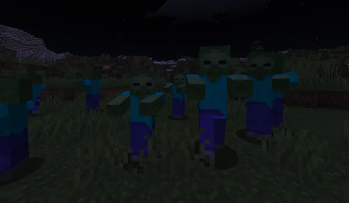

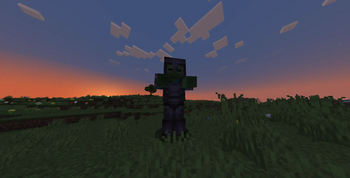
🔍 Analysis
- 🏆 #140 of 316 game-mechanics mods in this game by downloads
📋 About This Mod
# HardMob (https://img.shields.io/badge/License-GPLv3-blue.svg)](https://www.gnu.org/licenses/gpl-3.0) !(https://img.shields.io/badge/version-2.0.0-brightgreen) !(https://img.shields.io/badge/Minecraft-1.21.*-yellow) !(https://img.shields.io/badge/platform-Paper%2FSpigot-lightgrey) > RPG‑style mob levelling and elite bosses for your Minecraft server. **HardMob** makes every mob more dangerous and rewarding as your world ages. Mobs gain a **level** based on in‑game days, their attributes scale accordingly, and a configurable chance turns them into **elite bosses** with special loot and visuals. !(https://cdn.modrinth.com/data/ZjsgYqqV/images/89100e5297b142bf932d0d157dec3a687e5e90a1_350.webp) --- ## ✨ Features - 🧮 **Dynamic levels** – mobs scale from 1 to 99 depending on world age. - 📈 **Stat modifiers** – health, damage, speed, knockback resistance all grow with level. - 👑 **Elite mobs** – bosses with configurable size, full armour, and custom drops. - 🎲 **Configurable distributions** – uniform, more low levels, or more high levels. - 🧪 **Potion effects** – high‑level mobs can receive random buffs. - 🖼 **Visual polish** – custom nameplates showing health & level, dynamic mob sizes. - 🌍 **World blacklist** and **mob whitelist** for precise control. - ⚙️ **Commands** – spawn custom mobs or bosses manually with `/hardmob`. --- ## 📦 Requirements - **Server**: Paper 1.21.* - **Java**: 17 or newer --- ## 🚀 Installation 1. Download the latest `HardMob.jar` from the (https://github.com/Mr-Catcraft/hardmob/releases) page. 2. Place it into the `plugins/` folder of your server. 3. Restart the server (a full restart is recommended over `/reload`). 4. Edit `plugins/HardMob/config.yml` to your liking. 5. Apply changes with `/hardmob reload` (no restart needed). --- ## ⚙️ Configuration All settings live in `plugins/HardMob/config.yml`. Below is the complete reference. You can also read the comments inside the file itself. <details> <summary><b>General</b></summary> ```yaml general: enabled: true # Master switch for the entire plugin ``` </details> <details> <summary><b>Level System</b></summary> ```yaml level_system: enabled: true formula: A: 99.0 # max level after infinite days B: 98.0 # difference at day 0 C: 40.0 # days until ~63% of max distribution: uniform # uniform | weighted_low | weighted_high scaling: health_percent_per_level: 2.0 damage_percent_per_level: 1.5 speed_percent_per_level: 0.3 knockback_resist_per_level: 0.01 equipment: thresholds: 20: chainmail 40: iron 60: diamond 80: netherite enchant_multiplier: 0.2 potion_effects: chance_per_level: 0.5 duration_multiplier: 1.0 amplifier_base: 0 max_duration_seconds: 600 ``` </details> <details> <summary><b>Elite Mobs</b></summary> ```yaml elite_mobs: enabled: true spawn_chance_percent: 0.5 # 0.5% chance to become elite health_multiplier: 2.0 damage_multiplier: 2.0 speed_multiplier: 0.7 size: 2.0 always_equipped: true drops: diamonds: { min: 0, max: 4 } gold: { min: 0, max: 20 } music_discs: - MUSIC_DISC_13 ... exp_per_level: 10 ``` </details> <details> <summary><b>Visual</b></summary> ```yaml visual: dynamic_size: enabled: true min: 0.8 max: 1.2 custom_name: enabled: true visible: false format: "&8 &f%name% &8" format_boss: "&8 &f%name% &8" colors: low_level: "GREEN" medium_level: "YELLOW" high_level: "RED" boss: "DARK_RED" ``` </details> <details> <summary><b>Restrictions & Debug</b></summary> ```yaml world_blacklist: - world_the_end # worlds where HardMob won't run mob_whitelist: # empty = all mobs allowed debug_mode: false ``` </details> --- ## 🛡 Commands & Permissions | Command | Permission | Description | |--------------------------------------|----------------------|------------------------------------------------| | `/hardmob reload` | `hardmob.reload` | Reloads the configuration | | `/hardmob spawn <mob> <level> ` | `hardmob.spawn` | Spawns a HardMob mob with specified level | | `/hardmob spawnboss <mob> <level>` | `hardmob.spawnboss` | Spawns an elite boss with specified level | - `<mob>` – entity type name, e.g. `ZOMBIE`, `SKELETON`, `CREEPER`. - `<level>` – integer between 1 and 99. - `` – optional flag; if present, the mob is elite (same as `spawnboss`). - All permissions default to **op** (server operators). --- ## ❓ FAQ **Q: Mobs aren’t changing at all. What should I check?** A: Ensure `general.enabled` is `true`, the world isn’t in `world_blacklist`, and the mob type is e
[!(https://img.shields.io/badge/License-GPLv3-blue.svg)](https://www.gnu.org/licenses/gpl-3. 0) !(https://img.shields.io/badge/version-2. 0. 0-brightgreen) !(https://img.shields.io/badge/Minecraft-1. 21.-yellow) !(https://img.shields.io/badge/platform-Paper%2FSpigot-lightgrey)
> RPG‑style mob levelling and elite bosses for your Minecraft server.
HardMob makes every mob more dangerous and rewarding as your world ages. Mobs gain a level based on in‑game days, their attributes scale accordingly, and a configurable chance turns them into elite bosses with special loot and visuals.
!(https://cdn.modrinth.com/data/ZjsgYqqV/images/89100e5297b142bf932d0d157dec3a687e5e90a1_350.webp)
## ✨ Features
- 🧮 Dynamic levels – mobs scale from 1 to 99 depending on world age.
- 📈 Stat modifiers – health, damage, speed, knockback resistance all grow with level.
- 👑 Elite mobs – bosses with configurable size, full armour, and custom drops.
- 🎲 Configurable distributions – uniform, more low levels, or more high levels.
- 🧪 Potion effects – high‑level mobs can receive random buffs.
- 🖼 Visual polish – custom nameplates showing health & level, dynamic mob sizes.
- 🌍 World blacklist and mob whitelist for precise control.
- ⚙️ Commands – spawn custom mobs or bosses manually with `/hardmob`.
## 📦 Requirements
- Server: Paper 1. 21.
- Java: 17 or newer
## 🚀 Installation
1. Download the latest `HardMob.jar` from the (https://github.com/Mr-Catcraft/hardmob/releases) page. 2. Place it into the `plugins/` folder of your server. 3. Restart the server (a full restart is recommended over `/reload`). 4. Edit `plugins/HardMob/config.yml` to your liking. 5. Apply changes with `/hardmob reload` (no restart needed).
## ⚙️ Configuration
All settings live in `plugins/HardMob/config.yml`. Below is the complete reference. You can also read the comments inside the file itself.
General
```yaml general: enabled: true # Master switch for the entire plugin ```
Level System
```yaml level_system: enabled: true formula: A: 99. 0 # max level after infinite days B: 98. 0 # difference at day 0 C: 40. 0 # days until ~63% of max distribution: uniform # uniform | weighted_low | weighted_high scaling: health_percent_per_level: 2. 0 damage_percent_per_level: 1. 5 speed_percent_per_level: 0. 3 knockback_resist_per_level: 0. 01 equipment: thresholds: 20: chainmail 40: iron 60: diamond 80: netherite enchant_multiplier: 0. 2 potion_effects: chance_per_level: 0. 5 duration_multiplier: 1. 0 amplifier_base: 0 max_duration_seconds: 600 ```
Elite Mobs
```yaml elite_mobs: enabled: true spawn_chance_percent: 0. 5 # 0. 5% chance to become elite health_multiplier: 2. 0 damage_multiplier: 2. 0 speed_multiplier: 0. 7 size: 2. 0 always_equipped: true drops: diamonds: { min: 0, max: 4 } gold: { min: 0, max: 20 } music_discs: - MUSIC_DISC_13 ... exp_per_level: 10 ```
Visual
```yaml visual: dynamic_size: enabled: true min: 0. 8 max: 1. 2 custom_name: enabled: true visible: false format: "&8[&c%health%&8/&c%max_health%&8] &f%name% &8[&6%level% lvl&8]" format_boss: "&8[&c%health%&8/&c%max_health%&8] &f%name% &8[&4BOSS&8]" colors: low_level: "GREEN" medium_level: "YELLOW" high_level: "RED" boss: "DARK_RED" ```
Restrictions & Debug
```yaml world_blacklist: - world_the_end # worlds where HardMob won't run mob_whitelist: [] # empty = all mobs allowed debug_mode: false ```
## 🛡 Commands & Permissions
| Command | Permission | Description |
|--------------------------------------|----------------------|------------------------------------------------|
| `/hardmob reload` | `hardmob.reload` | Reloads the configuration |
| `/hardmob spawn
- `
` – entity type name, e.g. `ZOMBIE`, `SKELETON`, `CREEPER`. - `
` – integer between 1 and 99. - `` – optional flag; if present, the mob is elite (same as `spawnboss`).
- All permissions default to op (server operators).
Q: Mobs aren’t changing at all. What should I check? A: Ensure `general.enabled` is `true`, the world isn’t in `world_blacklist`, and the mob type is e
📊 Mod Details
- Game
- Minecraft Plugins
- Author
- Mr_Catcraft
- Version
- 2.0.0
- Downloads
- 117
- Endorsements
- 0
- Category
- game-mechanics
- Created
- 5/8/2026
- Updated
- 4/24/2026
- Game Versions
- 1.21, 1.21.1, 1.21.2, 1.21.3, 1.21.4
- Tags
- game-mechanics, mobs, utility
🔧 How to Install Minecraft Plugins Mods
Download from Modrinth. Use Prism Launcher or drop into your mods folder.
📖 Full step-by-step install guide for Minecraft Plugins →
Visit the official mod page for specific installation instructions for this mod.
🎮 Need cheat codes or console commands? Check ur gaming wiki for Minecraft Plugins commands, item IDs, and more.
❓ Frequently Asked Questions
Which Minecraft Plugins versions does HardMob support?
The author lists 1.21, 1.21.1, 1.21.2, 1.21.3, 1.21.4, 1.21.5. Other versions may work but are untested by the author.
What is the latest version of HardMob?
Version 2.0.0, published 2026-04-24 with 117 downloads recorded at the source.
Keep browsing — more Minecraft Plugins mods await