HardcoreDeathBan
🟡 Updated this year🖼️ Gallery (2 images)

🔍 Analysis
- 🏆 #6 of 38 cursed mods in this game by downloads
📋 About This Mod
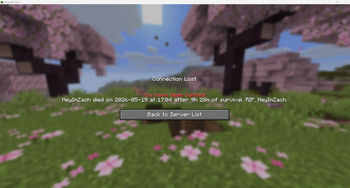
# About HardcoreDeathBan A tiny Paper plugin that bans players on death, with configurable lives, messages and PAPI support. Built for Hardcore servers. HardcoreDeathBan was originally created for my friend's community Hardcore server when I couldn't find a 26.1.x Hardcore ban plugin with customizable ban messages. This plugin was in use from Day 1 of the server to facilitate it's unique gimmick of 3 lives = ban. I immediately knew I wanted to make this public to help any others who needed hardcore lives with custom ban messages. ## Lives system The plugin optionally supports a multi-life mode. With `lives.enabled: true` in `config.yml`, each player starts with `lives.default` lives (default 3). Each death decrements their count by 1. They're only permanently banned when they hit 0. Lives are stored in `plugins/HardcoreDeathBan/lives.yml`, keyed by UUID. They persist across server restarts. Lives only regenerate manually: admins grant them via the `/hcdb lives` commands. When a player dies but has lives left, the plugin sends configurable notifications (personal message, title/subtitle, server broadcast). Each is independently toggleable and configurable in the `lives.notifications` config section, with (https://docs.advntr.dev/minimessage/) formatting support for colors and styles. ## Install 1. Drop the jar into your server's `plugins/` directory. 2. Start the server once to generate `plugins/HardcoreDeathBan/config.yml`. 3. Edit `ban-message` to your liking. 4. Run `/hcdb reload` in-game or from the console. ## Commands - `/hcdb reload`: reloads `config.yml` without restarting the server. Requires the `hardcoredeathban.reload` permission (op by default). Alias: `/hardcoredeathban reload`. - `/hcdb lives <player>`: show how many lives a player has left. - `/hcdb lives <player> set <amount>`: set exact lives count. - `/hcdb lives <player> add <amount>`: grant additional lives. - `/hcdb lives <player> remove <amount>`: take lives away. - `/hcdb lives <player> reset`: reset to the configured default. - `/hcdb lives reset-all`: wipe everyone's lives data (e.g. for a new season). The `lives` subcommands require the `hardcoredeathban.lives.manage` permission (op by default) and the lives system to be enabled (`lives.enabled: true` in config). ## Configuration Edit `plugins/HardcoreDeathBan/config.yml`. It's heavily documented, so every option should be intuitive: ```yaml ban-message: "{death-message} on {date} at {time} after %statistic_time_played% of survival. RIP, {player}." ``` - `ban-message`: the text shown on the ban screen. Supports placeholders (see below). - `timezone`, `timestamp-format`, `date-format`, `time-format`: control how `{timestamp}`, `{date}`, and `{time}` render. - `lives.*`: see "Lives system" section above. More info in the config.yml ### Built-in placeholders These work in `ban-message` and in any lives notification (`lives.notifications.message.text`, `title`, `subtitle`, `broadcast.text`): | Placeholder | Description | |---|---| | `{player}` | The player's username. | | `{world}` | World the player died in (e.g. `world`, `world_nether`). | | `{cause}` | Short damage type (e.g. `fall`, `lava`, `mob_attack`). | | `{death-message}` | Full vanilla death message (e.g. "Notch was blown up by Creeper"). | | `{timestamp}` | Full timestamp formatted via `timestamp-format`. | | `{date}` | Date formatted via `date-format`. | | `{time}` | Time formatted via `time-format`. | | `{lives_remaining}` | Lives the player has left (lives system only). | | `{lives_max}` | Configured starting lives (lives system only). | | `{lives_lost}` | `lives_max - lives_remaining` (lives system only). | ### PlaceholderAPI support If (https://hangar.papermc.io/HelpChat/PlaceholderAPI) is installed, all `%papi_placeholders%` are resolved in `ban-message` and lives notifications. Useful expansions include `Statistic` (for `%statistic_time_played%`) and `Player`: install with `/papi ecloud download <Name>`. This plugin also registers its own PAPI expansion exposing the lives count for use in scoreboards, tab lists, and other plugins that consume PAPI placeholders: | Placeholder | Description | |---|---| | `%hcdb_lives_remaining%` | The player's current lives. Returns the configured default if the player isn't tracked yet. | | `%hcdb_lives_max%` | Configured starting lives (`lives.default`). | | `%hcdb_lives_lost%` | `max - remaining`. | These return empty strings when `lives.enabled: false`. The expansion is only registered if PlaceholderAPI is loaded. ## Exempting players By default, ops are exempt (`default: op` in plugin.yml). To exempt non-op players, use any permission plugin (LuckPerms, etc.). For example, with LuckPerms: ``` /lp user <username> permission set hardcoredeathban.exempt true ``` ## Unbanning Use the same unban command you're used to. The vanilla command for unbanning is: `/pardon <username>` (from console or any op). ## Notes
# About HardcoreDeathBan
A tiny Paper plugin that bans players on death, with configurable lives, messages and PAPI support. Built for Hardcore servers. HardcoreDeathBan was originally created for my friend's community Hardcore server when I couldn't find a 26. 1.x Hardcore ban plugin with customizable ban messages. This plugin was in use from Day 1 of the server to facilitate it's unique gimmick of 3 lives = ban. I immediately knew I wanted to make this public to help any others who needed hardcore lives with custom ban messages.
## Lives system The plugin optionally supports a multi-life mode. With `lives.enabled: true` in `config.yml`, each player starts with `lives.default` lives (default 3). Each death decrements their count by 1. They're only permanently banned when they hit 0. Lives are stored in `plugins/HardcoreDeathBan/lives.yml`, keyed by UUID. They persist across server restarts. Lives only regenerate manually: admins grant them via the `/hcdb lives` commands. When a player dies but has lives left, the plugin sends configurable notifications (personal message, title/subtitle, server broadcast). Each is independently toggleable and configurable in the `lives.notifications` config section, with (https://docs.advntr.dev/minimessage/) formatting support for colors and styles.
1. Drop the jar into your server's `plugins/` directory. 2. Start the server once to generate `plugins/HardcoreDeathBan/config.yml`. 3. Edit `ban-message` to your liking. 4. Run `/hcdb reload` in-game or from the console.
## Commands
- `/hcdb reload`: reloads `config.yml` without restarting the server. Requires the `hardcoredeathban.reload` permission (op by default). Alias: `/hardcoredeathban reload`.
- `/hcdb lives
`: show how many lives a player has left. - `/hcdb lives
set `: set exact lives count. - `/hcdb lives
add `: grant additional lives. - `/hcdb lives
remove `: take lives away. - `/hcdb lives
reset`: reset to the configured default. - `/hcdb lives reset-all`: wipe everyone's lives data (e.g. for a new season).
The `lives` subcommands require the `hardcoredeathban.lives.manage` permission (op by default) and the lives system to be enabled (`lives.enabled: true` in config).
## Configuration
Edit `plugins/HardcoreDeathBan/config.yml`. It's heavily documented, so every option should be intuitive:
```yaml ban-message: "{death-message} on {date} at {time} after %statistic_time_played% of survival. RIP, {player}." ```
- `ban-message`: the text shown on the ban screen. Supports placeholders (see below).
- `timezone`, `timestamp-format`, `date-format`, `time-format`: control how `{timestamp}`, `{date}`, and `{time}` render.
- `lives.*`: see "Lives system" section above.
More info in the config.yml
### Built-in placeholders These work in `ban-message` and in any lives notification (`lives.notifications.message.text`, `title`, `subtitle`, `broadcast.text`): | Placeholder | Description | |---|---| | `{player}` | The player's username. | | `{world}` | World the player died in (e.g. `world`, `world_nether`). | | `{cause}` | Short damage type (e.g. `fall`, `lava`, `mob_attack`). | | `{death-message}` | Full vanilla death message (e.g. "Notch was blown up by Creeper"). | | `{timestamp}` | Full timestamp formatted via `timestamp-format`. | | `{date}` | Date formatted via `date-format`. | | `{time}` | Time formatted via `time-format`. | | `{lives_remaining}` | Lives the player has left (lives system only). | | `{lives_max}` | Configured starting lives (lives system only). | | `{lives_lost}` | `lives_max - lives_remaining` (lives system only). |
### PlaceholderAPI support
If (https://hangar.papermc.io/HelpChat/PlaceholderAPI) is installed, all `%papi_placeholders%` are resolved in `ban-message` and lives notifications. Useful expansions include `Statistic` (for `%statistic_time_played%`) and `Player`: install with `/papi ecloud download
## Exempting players
By default, ops are exempt (`default: op` in plugin.yml). To exempt non-op players, use any permission plugin (LuckPerms, etc.). For example, with LuckPerms:
```
/lp user
## Unbanning
Use the same unban command you're used to.
The vanilla command for unbanning is: `/pardon
📊 Mod Details
- Game
- Minecraft Plugins
- Author
- zachgotit
- Version
- 1.0.2
- Downloads
- 285
- Endorsements
- 1
- Category
- cursed
- Created
- 5/23/2026
- Updated
- 5/21/2026
- Game Versions
- 26.1, 26.1.1, 26.1.2
- Tags
- cursed, game-mechanics, management
🔧 How to Install Minecraft Plugins Mods
Download from Modrinth. Use Prism Launcher or drop into your mods folder.
📖 Full step-by-step install guide for Minecraft Plugins →
Visit the official mod page for specific installation instructions for this mod.
🎮 Need cheat codes or console commands? Check ur gaming wiki for Minecraft Plugins commands, item IDs, and more.
❓ Frequently Asked Questions
Which Minecraft Plugins versions does HardcoreDeathBan support?
The author lists 26.1, 26.1.1, 26.1.2. Other versions may work but are untested by the author.
What is the latest version of HardcoreDeathBan?
Version 1.0.2, published 2026-05-21 with 285 downloads recorded at the source.
Keep browsing — more Minecraft Plugins mods await