GnHopper
🟡 Updated this year🖼️ Gallery (1 images)
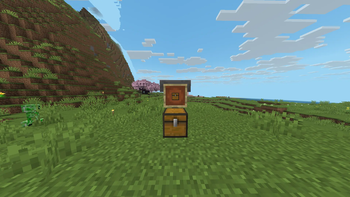
🔍 Analysis
- 🏆 #919 of 1080 bukkit mods in this game by downloads
📋 About This Mod
# 🛠️ Professional Item Processor A high-performance solution for managing and processing items with minimal server impact. ### 📖 Quick Overview This plugin allows you to automate item actions through a flexible filtering system. Whether you want to process items visually via **Item Frames** or manage them through a **GUI**, our built-in **Lazy Mode** ensures your server stays lag-free by intelligently distributing tasks. --- ### 🚀 Key Features #### 🔍 Versatile Filtering Modes * **ITEMFRAME Mode:** Targets items displayed in Item Frames. Includes a **Whitelist System** so you can specify exactly which items should be processed. * **GUI Mode:** Provides an intuitive graphical interface for easy management and real-time configuration. #### ⚡ Precision Speed Control Fine-tune the processing power to match your server's needs: * **Rate & Type:** Customize how and what triggers the processing. * **Dynamic Speed:** Adjust execution velocity to find the perfect balance between speed and stability. #### 🐢 Intelligent "Lazy Mode" Optimization Keep your TPS (Ticks Per Second) high even with massive workloads: * **Per-Chunk Processing:** Spreads the workload based on active chunks to prevent overloading specific areas. * **Server-Wide Throttling:** Limits operations per tick across the entire server, eliminating sudden lag spikes. --- ### 🔧 Installation 1. Download the `.jar` file. 2. Drop it into your `plugins` folder. 3. Restart your server and enjoy!
# 🛠️ Professional Item Processor
A high-performance solution for managing and processing items with minimal server impact.
### 📖 Quick Overview This plugin allows you to automate item actions through a flexible filtering system. Whether you want to process items visually via Item Frames or manage them through a GUI, our built-in Lazy Mode ensures your server stays lag-free by intelligently distributing tasks.
### 🚀 Key Features
#### 🔍 Versatile Filtering Modes ITEMFRAME Mode: Targets items displayed in Item Frames. Includes a Whitelist System so you can specify exactly which items should be processed. GUI Mode: Provides an intuitive graphical interface for easy management and real-time configuration.
#### ⚡ Precision Speed Control Fine-tune the processing power to match your server's needs: Rate & Type: Customize how and what triggers the processing. Dynamic Speed: Adjust execution velocity to find the perfect balance between speed and stability.
#### 🐢 Intelligent "Lazy Mode" Optimization Keep your TPS (Ticks Per Second) high even with massive workloads: Per-Chunk Processing: Spreads the workload based on active chunks to prevent overloading specific areas. Server-Wide Throttling: Limits operations per tick across the entire server, eliminating sudden lag spikes.
### 🔧 Installation 1. Download the `.jar` file. 2. Drop it into your `plugins` folder. 3. Restart your server and enjoy!
📊 Mod Details
- Game
- Minecraft Plugins
- Author
- gn027c
- Version
- 1.0.2
- Downloads
- 38
- Endorsements
- 1
- Category
- bukkit
- Created
- 5/14/2026
- Updated
- 5/13/2026
- Game Versions
- 1.21, 1.21.1, 1.21.2, 1.21.3, 1.21.4
- Tags
- game-mechanics
🔧 How to Install Minecraft Plugins Mods
Download from Modrinth. Use Prism Launcher or drop into your mods folder.
📖 Full step-by-step install guide for Minecraft Plugins →
Visit the official mod page for specific installation instructions for this mod.
🎮 Need cheat codes or console commands? Check ur gaming wiki for Minecraft Plugins commands, item IDs, and more.
❓ Frequently Asked Questions
Which Minecraft Plugins versions does GnHopper support?
The author lists 1.21, 1.21.1, 1.21.2, 1.21.3, 1.21.4, 1.21.5. Other versions may work but are untested by the author.
What is the latest version of GnHopper?
Version 1.0.2, published 2026-05-13 with 38 downloads recorded at the source.
Keep browsing — more Minecraft Plugins mods await