GambleGate
🟡 Updated this year🖼️ Gallery (4 images)
🔍 Analysis
- 🏆 #47 of 92 economy mods in this game by downloads
📋 About This Mod
> **日本語は下に。プラグインは日本語のみ。 / Japanese is below. The plugin itself is currently available in Japanese only.** ## Video Tutorial coming soon.. # GambleGate GambleGate is a casino and venue-management plugin for **Paper 1.21.11**. It combines WorldEdit regions, Vault economy transactions, GSit-powered seats, admission passes, visual effects, and four playable casino games in one plugin. ## Features - Build complex casino venues by combining multiple WorldEdit cuboid selections - Charge entrance fees through Vault - Entrance and exit gates with confirmation menus, sounds, titles, and teleport destinations - Detect and roll back unauthorized entry by walking or teleporting - One-block exit grace area around venue regions - Venue-specific 30-day passes, auto-renewing subscriptions, and 7-day trials - VIP-only regions and permission-controlled automatic iron doors - Casino scoreboard showing balance, session profit/loss, play count, and pass status - Per-player casino BGM with Normal, Quiet, and Off modes - Custom MIDI playback for admitted players - Venue-wide and per-player daily/lifetime transaction statistics - Configurable sounds, messages, odds, payouts, particles, displays, and prices - Celebration fireworks based on the player's net profit - Clickable glowing rule signs for every game ## Casino games ### Slots Uses the shelf block introduced in Minecraft 1.21.11 as a three-reel slot machine. A nearby GSit chair and lever are linked automatically. Players sit down and pull the lever to start a spin. Possible symbols include copper, iron, emerald, diamond, and gold. Three gold symbols start **Gold Rush**, a chain of free spins with increasing prize value and a special bust condition. ### High & Low A physical table game controlled with three nearby buttons: LOW, Start/Cash Out, and HIGH. Players select a bet from a GUI, predict the next card, build a winning streak, and cash out before losing. ### Crash Players select a bet and watch a multiplier rise from 1.00x. After the configured minimum multiplier, the same button can be pressed to cash out. Waiting too long causes the round to crash and the bet to be lost. ### Physical Roulette A 16-pocket roulette game built from real blocks. An ItemDisplay ball travels around the registered gold-block pockets and stops at the selected result. Players can bet on: - Red or black - Odd or even - LOW 1–8 or HIGH 9–16 - One of four 4-number sections - One exact number Roulette includes a spectator room, a FIFO player queue, an inactivity timeout, live queue information, and a TextDisplay showing the current player's selected bet and amount. ## Requirements All dependencies are required. GambleGate is server-side only. Players do not need to install a client mod. | Dependency | Tested version | Purpose | | --- | --- | --- | | Paper | 1.21.11 | Server platform | | Java | 21 | Runtime | | WorldEdit | 7.4.2 | Venue and VIP region selection | | Vault | 1.7.x | Economy API | | Vault-compatible economy plugin | Varies | Player balances and transactions | | GSit | 3.5.1 | Seat detection for casino games | Vault does not provide an economy by itself. A separate Vault-compatible economy plugin is required. ## Installation 1. Install WorldEdit, Vault, a Vault-compatible economy plugin, and GSit. 2. Place the GambleGate jar in the server's `plugins` directory. 3. Start or restart the server. 4. Create a venue with `/gamblevenue create <venue> <entrance fee>`. 5. Select an area with WorldEdit and run `/gamblevenue addregion <venue>`. 6. Run `/gamblevenue help` for the complete in-game setup command list. Use `/gamblevenue reload` after editing the configuration. A full server restart is recommended when updating the plugin jar. ## Configuration and data - `plugins/GambleGate/config.yml`: venues, gates, prices, game odds, payouts, effects, and sounds - `plugins/GambleGate/message.yml`: chat messages, GUI text, titles, scoreboards, and signs - `plugins/GambleGate/passes.yml`: pass ownership, expiry dates, subscriptions, and trial history - `plugins/GambleGate/casino-accounts.json`: venue-wide and per-player transaction statistics - `plugins/GambleGate/casino-midi/`: optional `.mid` and `.midi` files When a plugin update adds new message keys, GambleGate preserves existing customized values and only appends missing defaults. ## Important notes - **The plugin's built-in interface and default messages are Japanese only.** Messages can be edited manually in `message.yml`. - This release specifically targets Paper 1.21.11 and uses its shelf block API. - The default base RTP is 1.0 for all games. Optional dynamic odds can adjust it within the configured range according to casino statistics. - Casino statistics do not limit payouts or shut down a venue. - This plugin is intended for virtual in-game currency. Server owners are responsible for following applicable laws and platform rules if anything with real-world value is involved. --- # 日本語 GambleGateは、**Paper 1
> 日本語は下に。プラグインは日本語のみ。 / Japanese is below. The plugin itself is currently available in Japanese only.
## Video Tutorial coming soon..
# GambleGate
GambleGate is a casino and venue-management plugin for Paper 1. 21. 11. It combines WorldEdit regions, Vault economy transactions, GSit-powered seats, admission passes, visual effects, and four playable casino games in one plugin.
## Features
- Build complex casino venues by combining multiple WorldEdit cuboid selections
- Charge entrance fees through Vault
- Entrance and exit gates with confirmation menus, sounds, titles, and teleport destinations
- Detect and roll back unauthorized entry by walking or teleporting
- One-block exit grace area around venue regions
- Venue-specific 30-day passes, auto-renewing subscriptions, and 7-day trials
- VIP-only regions and permission-controlled automatic iron doors
- Casino scoreboard showing balance, session profit/loss, play count, and pass status
- Per-player casino BGM with Normal, Quiet, and Off modes
- Custom MIDI playback for admitted players
- Venue-wide and per-player daily/lifetime transaction statistics
- Configurable sounds, messages, odds, payouts, particles, displays, and prices
- Celebration fireworks based on the player's net profit
- Clickable glowing rule signs for every game
## Casino games
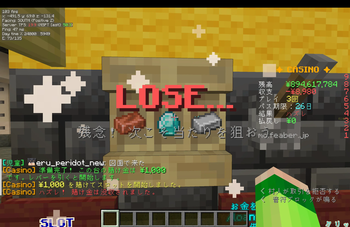
Uses the shelf block introduced in Minecraft 1. 21. 11 as a three-reel slot machine. A nearby GSit chair and lever are linked automatically. Players sit down and pull the lever to start a spin.
Possible symbols include copper, iron, emerald, diamond, and gold. Three gold symbols start Gold Rush, a chain of free spins with increasing prize value and a special bust condition.
### High & Low
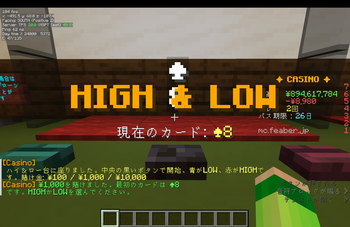
A physical table game controlled with three nearby buttons: LOW, Start/Cash Out, and HIGH. Players select a bet from a GUI, predict the next card, build a winning streak, and cash out before losing.
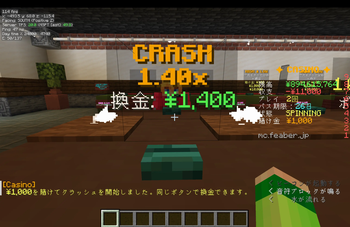
Players select a bet and watch a multiplier rise from 1. 00x. After the configured minimum multiplier, the same button can be pressed to cash out. Waiting too long causes the round to crash and the bet to be lost.
### Physical Roulette
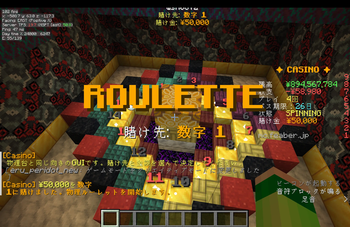
A 16-pocket roulette game built from real blocks. An ItemDisplay ball travels around the registered gold-block pockets and stops at the selected result.
Players can bet on:
- Red or black
- Odd or even
- LOW 1–8 or HIGH 9–16
- One of four 4-number sections
- One exact number
Roulette includes a spectator room, a FIFO player queue, an inactivity timeout, live queue information, and a TextDisplay showing the current player's selected bet and amount.
## Requirements
All dependencies are required.
GambleGate is server-side only. Players do not need to install a client mod.
| Dependency | Tested version | Purpose | | --- | --- | --- | | Paper | 1. 21. 11 | Server platform | | Java | 21 | Runtime | | WorldEdit | 7. 4. 2 | Venue and VIP region selection | | Vault | 1. 7.x | Economy API | | Vault-compatible economy plugin | Varies | Player balances and transactions | | GSit | 3. 5. 1 | Seat detection for casino games |
Vault does not provide an economy by itself. A separate Vault-compatible economy plugin is required.
## Installation
1. Install WorldEdit, Vault, a Vault-compatible economy plugin, and GSit.
2. Place the GambleGate jar in the server's `plugins` directory.
3. Start or restart the server.
4. Create a venue with `/gamblevenue create
Use `/gamblevenue reload` after editing the configuration. A full server restart is recommended when updating the plugin jar.
## Configuration and data
- `plugins/GambleGate/config.yml`: venues, gates, prices, game odds, payouts, effects, and sounds
- `plugins/GambleGate/message.yml`: chat messages, GUI text, titles, scoreboards, and signs
- `plugins/GambleGate/passes.yml`: pass ownership, expiry dates, subscriptions, and trial history
- `plugins/GambleGate/casino-accounts.json`: venue-wide and per-player transaction statistics
- `plugins/GambleGate/casino-midi/`: optional `.mid` and `.midi` files
When a plugin update adds new message keys, GambleGate preserves existing customized values and only appends missing defaults.
## Important notes
- The plugin's built-in interface and default messages are Japanese only. Messages can be edited manually in `message.yml`.
- This release specifically targets Paper 1. 21. 11 and uses its shelf block API.
- The default base RTP is 1. 0 for all games. Optional dynamic odds can adjust it within the configured range according to casino statistics.
- Casino statistics do not limit payouts or shut down a venue.
- This plugin is intended for virtual in-game currency. Server owners are responsible for following applicable laws and platform rules if anything with real-world value is involved.
GambleGateは、**Paper 1
📊 Mod Details
- Game
- Minecraft Plugins
- Author
- wsn0672
- Version
- 1.3.0
- Downloads
- 19
- Endorsements
- 0
- Category
- economy
- Created
- 8/7/2026
- Updated
- 8/9/2026
- Game Versions
- 1.21.11
- Tags
- economy, minigame
🔧 How to Install Minecraft Plugins Mods
Download from Modrinth. Use Prism Launcher or drop into your mods folder.
📖 Full step-by-step install guide for Minecraft Plugins →
Visit the official mod page for specific installation instructions for this mod.
🎮 Need cheat codes or console commands? Check ur gaming wiki for Minecraft Plugins commands, item IDs, and more.
❓ Frequently Asked Questions
Which Minecraft Plugins versions does GambleGate support?
The author lists 1.21.11. Other versions may work but are untested by the author.
What is the latest version of GambleGate?
Version 1.3.0, published 2026-08-09 with 19 downloads recorded at the source.
Keep browsing — more Minecraft Plugins mods await