FurnacePlus
🟠 Updated over a year ago🖼️ Gallery (1 images)
🔍 Analysis
- 👍 1.1% endorsement rate — high engagement, a strong quality signal
- 🏆 #1530 of 1560 bukkit mods in this game by downloads
📋 About This Mod
# FurnacePlus **Enhance your Minecraft gameplay with upgraded furnaces!** ## Overview FurnacePlus is a Minecraft plugin that allows players to upgrade their furnaces to higher levels, increasing smelting speed and efficiency. With each upgrade, your furnace becomes faster but consumes more fuel, adding a strategic element to resource management. This plugin is perfect for servers looking to enhance the vanilla experience without drastically altering gameplay mechanics. ## Features - **Upgradeable Furnaces**: Upgrade your furnaces through 5 levels, each providing increased smelting speed. - **Balanced Gameplay**: Increased fuel consumption balances the faster smelting speeds. - **Customizable Configurations**: All settings, messages, and upgrade requirements are configurable. - **Visual Indicators**: Furnaces display their upgrade level when hovered over. - **Visual Effects**: Enjoy sound effects and particle animations upon upgrading. - **Permissions and Commands**: Includes a reload command for admins to reload configurations on the fly. ## Upgrade Levels | Level | Name | Required Material | Quantity | |-------|------------------|---------------------|----------| | 0 | No Upgrade | N/A | N/A | | 1 | Iron Furnace | Iron Ingot | 16 | | 2 | Gold Furnace | Gold Ingot | 32 | | 3 | Emerald Furnace | Emerald | 16 | | 4 | Diamond Furnace | Diamond | 16 | | 5 | Netherite Furnace| Netherite Ingot | 8 | - **Level 0 (No Upgrade)**: Standard furnace behavior. - **Levels 1-5**: Each level increases smelting speed and fuel consumption. ## Installation 1. **Download the plugin jar file** from Modrinth. 2. **Place the jar file** into your server's `plugins` directory. 3. **Restart the server** to generate the default configuration files. 4. **Configure the plugin** by editing the `config.yml` file in the `plugins/FurnacePlus` directory as needed. 5. **Reload the plugin** using `/furnaceplus reload` if you make configuration changes while the server is running. ## Configuration The `config.yml` file allows you to customize: - **Smelting speed multipliers** per level. - **Fuel consumption multipliers** per level. - **Upgrade requirements** (materials and quantities). - **Messages** displayed to players. - **Visual effects and sounds** upon upgrading. ### Example `config.yml` ```yaml # Base smelting speed multiplier base-speed-multiplier: 1.0 # Additional speed per level speed-multiplier-per-level: 0.5 # Base fuel consumption multiplier base-fuel-consumption-multiplier: 1.0 # Additional fuel consumption per level fuel-consumption-multiplier-per-level: 0.5 # Upgrade settings upgrades: 0: name: "&8No Upgrade" 1: name: "&7Iron Furnace" material: "IRON_INGOT" amount: 16 2: name: "&6Gold Furnace" material: "GOLD_INGOT" amount: 32 3: name: "&aEmerald Furnace" material: "EMERALD" amount: 16 4: name: "&bDiamond Furnace" material: "DIAMOND" amount: 16 5: name: "&cNetherite Furnace" material: "NETHERITE_INGOT" amount: 8 # Messages messages: max_level_reached: "&aYour furnace is already at the maximum level." not_enough_materials: "&cYou don't have enough materials to upgrade." upgrade_successful: "&aYou have upgraded your furnace to: %level_name%." furnace_level_display: "&8Furnace Level: %level_name%" reload_successful: "&aFurnacePlus configuration reloaded successfully." no_permission: "&cYou don't have permission to perform this command." # Visual effects visual: upgrade_sound: "ENTITY_PLAYER_LEVELUP" upgrade_effect: "VILLAGER_HAPPY" ``` ## Commands and Permissions - **Command**: `/furnaceplus reload` - **Description**: Reloads the plugin configuration. - **Permission**: `furnaceplus.reload` ## How to Use 1. **Place a Furnace**: Place a standard furnace in the world. 2. **Upgrade the Furnace**: - Hold the required material in your hand. - Right-click on the furnace. - If you have enough materials, they will be consumed, and the furnace will upgrade. 3. **Check Furnace Level**: Hover over the furnace to see its current level. 4. **Use the Furnace**: Place fuel and items to smelt as usual. The furnace will operate at increased speed based on its level. ## Compatibility - **Minecraft Versions**: 1.19 - 1.21 - **Server Software**: Paper, Purpur (requires API that supports `setCookSpeedMultiplier`) ## Requirements - **Java Version**: Java 17 or higher - **Permissions Plugin** (optional): For managing permissions if you wish to restrict command usage. ## Known Issues - **Fuel Consumption**: Increased fuel consumption is implemented by reducing burn time per fuel item. - **Custom Fuels**: May not correctly adjust fuel consumption for custom fuel items added by other plugins. ## Support and Contributions If you encounter any issues or have suggestions for
# FurnacePlus
Enhance your Minecraft gameplay with upgraded furnaces!
## Overview
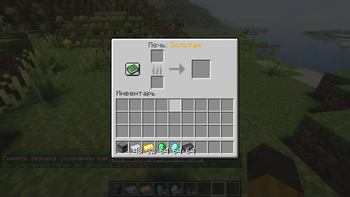
FurnacePlus is a Minecraft plugin that allows players to upgrade their furnaces to higher levels, increasing smelting speed and efficiency. With each upgrade, your furnace becomes faster but consumes more fuel, adding a strategic element to resource management. This plugin is perfect for servers looking to enhance the vanilla experience without drastically altering gameplay mechanics.
## Features
- Upgradeable Furnaces: Upgrade your furnaces through 5 levels, each providing increased smelting speed.
- Balanced Gameplay: Increased fuel consumption balances the faster smelting speeds.
- Customizable Configurations: All settings, messages, and upgrade requirements are configurable.
- Visual Indicators: Furnaces display their upgrade level when hovered over.
- Visual Effects: Enjoy sound effects and particle animations upon upgrading.
- Permissions and Commands: Includes a reload command for admins to reload configurations on the fly.
## Upgrade Levels
| Level | Name | Required Material | Quantity | |-------|------------------|---------------------|----------| | 0 | No Upgrade | N/A | N/A | | 1 | Iron Furnace | Iron Ingot | 16 | | 2 | Gold Furnace | Gold Ingot | 32 | | 3 | Emerald Furnace | Emerald | 16 | | 4 | Diamond Furnace | Diamond | 16 | | 5 | Netherite Furnace| Netherite Ingot | 8 |
- Level 0 (No Upgrade): Standard furnace behavior.
- Levels 1-5: Each level increases smelting speed and fuel consumption.
## Installation
1. Download the plugin jar file from Modrinth. 2. Place the jar file into your server's `plugins` directory. 3. Restart the server to generate the default configuration files. 4. Configure the plugin by editing the `config.yml` file in the `plugins/FurnacePlus` directory as needed. 5. Reload the plugin using `/furnaceplus reload` if you make configuration changes while the server is running.
## Configuration
The `config.yml` file allows you to customize:
- Smelting speed multipliers per level.
- Fuel consumption multipliers per level.
- Upgrade requirements (materials and quantities).
- Messages displayed to players.
- Visual effects and sounds upon upgrading.
### Example `config.yml`
```yaml # Base smelting speed multiplier base-speed-multiplier: 1. 0
# Additional speed per level speed-multiplier-per-level: 0. 5
# Base fuel consumption multiplier base-fuel-consumption-multiplier: 1. 0
# Additional fuel consumption per level fuel-consumption-multiplier-per-level: 0. 5
# Upgrade settings upgrades: 0: name: "&8No Upgrade" 1: name: "&7Iron Furnace" material: "IRON_INGOT" amount: 16 2: name: "&6Gold Furnace" material: "GOLD_INGOT" amount: 32 3: name: "&aEmerald Furnace" material: "EMERALD" amount: 16 4: name: "&bDiamond Furnace" material: "DIAMOND" amount: 16 5: name: "&cNetherite Furnace" material: "NETHERITE_INGOT" amount: 8
# Messages messages: max_level_reached: "&aYour furnace is already at the maximum level." not_enough_materials: "&cYou don't have enough materials to upgrade." upgrade_successful: "&aYou have upgraded your furnace to: %level_name%." furnace_level_display: "&8Furnace Level: %level_name%" reload_successful: "&aFurnacePlus configuration reloaded successfully." no_permission: "&cYou don't have permission to perform this command."
# Visual effects visual: upgrade_sound: "ENTITY_PLAYER_LEVELUP" upgrade_effect: "VILLAGER_HAPPY" ```
## Commands and Permissions
- Command: `/furnaceplus reload`
- - Description: Reloads the plugin configuration.
- - Permission: `furnaceplus.reload`
## How to Use
1. Place a Furnace: Place a standard furnace in the world. 2. Upgrade the Furnace: - Hold the required material in your hand. - Right-click on the furnace. - If you have enough materials, they will be consumed, and the furnace will upgrade. 3. Check Furnace Level: Hover over the furnace to see its current level. 4. Use the Furnace: Place fuel and items to smelt as usual. The furnace will operate at increased speed based on its level.
## Compatibility
- Minecraft Versions: 1. 19 - 1. 21
- Server Software: Paper, Purpur (requires API that supports `setCookSpeedMultiplier`)
## Requirements
- Java Version: Java 17 or higher
- Permissions Plugin (optional): For managing permissions if you wish to restrict command usage.
## Known Issues
- Fuel Consumption: Increased fuel consumption is implemented by reducing burn time per fuel item.
- Custom Fuels: May not correctly adjust fuel consumption for custom fuel items added by other plugins.
## Support and Contributions
If you encounter any issues or have suggestions for
📊 Mod Details
- Game
- Minecraft Plugins
- Author
- verkme
- Version
- 1.0
- Downloads
- 1,103
- Endorsements
- 12
- Category
- bukkit
- Created
- 10/29/2024
- Updated
- 10/28/2024
- Game Versions
- 1.21, 1.21.1, 1.21.2, 1.21.3
- Tags
- game-mechanics, management, storage
🔧 How to Install Minecraft Plugins Mods
Download from Modrinth. Use Prism Launcher or drop into your mods folder.
📖 Full step-by-step install guide for Minecraft Plugins →
Visit the official mod page for specific installation instructions for this mod.
🎮 Need cheat codes or console commands? Check ur gaming wiki for Minecraft Plugins commands, item IDs, and more.
❓ Frequently Asked Questions
Which Minecraft Plugins versions does FurnacePlus support?
The author lists 1.21, 1.21.1, 1.21.2, 1.21.3. Other versions may work but are untested by the author.
What is the latest version of FurnacePlus?
Version 1.0, published 2024-10-28 with 1,103 downloads recorded at the source.
Keep browsing — more Minecraft Plugins mods await