FGFareas
🟡 Updated this year🖼️ Gallery (2 images)

🔍 Analysis
- 🏆 #86 of 137 folia mods in this game by downloads
📋 About This Mod
# 🌍 Need a Server for This Plugin? ## 🚀 Create your own Minecraft server in minutes! Play with friends, install mods/plugins easily, and get started fast ⚡ (https://cdn.modrinth.com/data/cached_images/33c9b7da2642124a4c6091bc43f7e19426b1a2c5_0.webp)](https://url-shortener.curseforge.com/upK92) ### 💖 Support the project by using the link above! --- --- (https://cdn.modrinth.com/data/cached_images/944e491bb266730cc410f8ace60a605419641549_0.webp)](https://discord.gg/mP23dpVQ6V) # ✨ FGFarea – Area Plugin FGFarea is a plugin for **Paper / Folia / Purpur 1.21.x** that creates temporary build zones without permanently damaging your world. 🔄 --- ## 🌟 Features ### 🧱 Destruction - Place any blocks you want - ❌ Only player-placed blocks can be broken - 🌍 Original terrain is protected ### ⏳ Reset - Timer per area - On end: - 🧹 Blocks removed - 💧 Water cleared - 🚫 Waterlogging fixed - 🛤️ Paths restored ### 🔔 Countdown - 💜 Styled messages (§d) - 🔔 15s warning - ⏱️ 5–1 countdown --- ## 🛠️ Admin - 📍 Selection: `/fgfareas pos1` & `/fgfareas pos2` - 🏗️ Build mode (bypass) - 🐞 Debug mode - 📋 Area list --- ## ⚙️ Config - 💬 Custom messages - 🔊 Custom sounds - ⏱️ Adjustable timers - 💾 Saved in `areas.yml` --- ## ⌨️ Commands /fgfareas pos1 /fgfareas pos2 /fgfareas create <name> <seconds> /fgfareas list /fgfareas reset <name> /fgfareas build /fgfareas debug /fgfareas reload --- ## 🎯 Use Cases - 🏹 Bridge maps - 🛏️ Bedwars practice - 🧪 Testing arenas - 🎨 Creative events --- ## 🧠 Summary Build freely. Reset instantly. Keep your world clean. **FGFarea handles everything automatically.** <details> <summary>Config</summary> <pre> ``` # ====================================================== # FGFarea Configuration # ====================================================== # Support: Paper 1.21.11 # Formatting: Use § for color codes. # # Available Placeholders: # <name> - Name of the area # <time> - Time in seconds (used in reset countdowns/list) # <world> - Name of the world # <action> - The debug action (e.g., PLACED, BREAK) # <material>- Block type name # <coords> - X, Y, Z coordinates (debug only) # --- --- settings: # Enable or disable all sounds played by the plugin play_sounds: true # Seconds at which a countdown message should be sent in the chat announcement_times: # Interval in seconds to remind admins that they are still in Build Mode build_mode_reminder_interval: 5 # --- --- # Valid sounds can be found here: https://jd.papermc.io/paper/1.21.1/org/bukkit/Sound.html sounds: warning_15s: "BLOCK_NOTE_BLOCK_PLING" countdown: "BLOCK_NOTE_BLOCK_BIT" reset_success: "ENTITY_PLAYER_LEVELUP" # --- --- messages: # Prefix prepended to most plugin messages prefix: "§d " # System & Error Messages no_permission: "§cNo permission." only_placed_blocks: "§cYou can only break placed blocks!" config_reloaded: "§aConfiguration successfully reloaded!" # Admin & Build Mode build_mode_enabled: "§7Build mode: §aENABLED" build_mode_disabled: "§7Build mode: §cDISABLED" build_mode_reminder: "§eReminder: You are still in BUILD MODE!" debug_mode_enabled: "§7Debug mode: §aENABLED" debug_mode_disabled: "§7Debug mode: §cDISABLED" # Area Management pos1_set: "§aPosition 1 successfully set!" pos2_set: "§aPosition 2 successfully set!" pos_missing: "§cPlease set both pos1 and pos2 first!" area_created: "§aArea '<name>' created with a <time>s timer!" area_not_found: "§cThe specified area was not found." invalid_timer: "§cError: Invalid timer value. Please use a number." # Reset System # Placeholders: <name> (Area Name), <time> (Seconds remaining) reset_announcement_15s: "§eArea <name> will reset in 15 seconds!" reset_announcement_countdown: "§cReset in <time>..." reset_success: "§aArea '<name>' has been reset to its original state!" # List Command (/fgfareas list) # Placeholders: <name>, <world>, <time> area_list_header: "§d--- Active FGFareas ---" area_list_format: "§7- §f<name> §7(World: <world>, Reset: <time>s)" </pre> </details> # ❓ Can I use these plugins in a server pack? 📦 ***Of course! Please feel free to include these plugins in your server packs!*** 💜✨ You may: * ✅ Use these plugins on public and private servers * ✅ Include them in server packs * ✅ Share server packs containing these plugins Just please: * ❌ Do not reupload the plugins themselves * ❌ Do not claim them as your own Have fun and enjoy! 🌟
# 🌍 Need a Server for This Plugin?
## 🚀 Create your own Minecraft server in minutes!
Play with friends, install mods/plugins easily, and get started fast ⚡
[!(https://cdn.modrinth.com/data/cached_images/33c9b7da2642124a4c6091bc43f7e19426b1a2c5_0.webp)](https://url-shortener.curseforge.com/upK92)
### 💖 Support the project by using the link above!
[!(https://cdn.modrinth.com/data/cached_images/944e491bb266730cc410f8ace60a605419641549_0.webp)](https://discord.gg/mP23dpVQ6V)
# ✨ FGFarea – Area Plugin
FGFarea is a plugin for Paper / Folia / Purpur 1. 21.x that creates temporary build zones without permanently damaging your world. 🔄
## 🌟 Features
### 🧱 Destruction - Place any blocks you want - ❌ Only player-placed blocks can be broken - 🌍 Original terrain is protected
### ⏳ Reset - Timer per area - On end: - 🧹 Blocks removed - 💧 Water cleared - 🚫 Waterlogging fixed - 🛤️ Paths restored
### 🔔 Countdown - 💜 Styled messages (§d) - 🔔 15s warning - ⏱️ 5–1 countdown
## 🛠️ Admin
- 📍 Selection: `/fgfareas pos1` & `/fgfareas pos2`
- 🏗️ Build mode (bypass)
- 🐞 Debug mode
- 📋 Area list
## ⚙️ Config
- 💬 Custom messages
- 🔊 Custom sounds
- ⏱️ Adjustable timers
- 💾 Saved in `areas.yml`
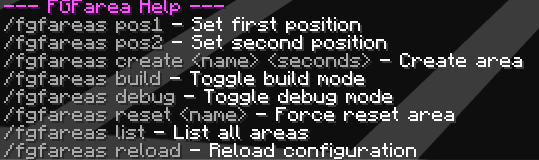
## ⌨️ Commands
/fgfareas pos1
/fgfareas pos2
/fgfareas create
## 🎯 Use Cases
- 🏹 Bridge maps
- 🛏️ Bedwars practice
- 🧪 Testing arenas
- 🎨 Creative events
## 🧠 Summary
Build freely. Reset instantly. Keep your world clean. FGFarea handles everything automatically.
Config
``` # ====================================================== # FGFarea Configuration # ====================================================== # Support: Paper 1. 21. 11 # Formatting: Use § for color codes. # # Available Placeholders: #- Name of the area #
# ❓ Can I use these plugins in a server pack? 📦
Of course! Please feel free to include these plugins in your server packs! 💜✨
✅ Use these plugins on public and private servers ✅ Include them in server packs ✅ Share server packs containing these plugins
Just please:
❌ Do not reupload the plugins themselves * ❌ Do not claim them as your own
Have fun and enjoy! 🌟
📊 Mod Details
- Game
- Minecraft Plugins
- Author
- FelixFGF
- Version
- 1.1
- Downloads
- 48
- Endorsements
- 1
- Category
- folia
- Created
- 4/29/2026
- Updated
- 6/1/2026
- Game Versions
- 1.21, 1.21.1, 1.21.2, 1.21.3, 1.21.4
- Tags
- game-mechanics
🔧 How to Install Minecraft Plugins Mods
Download from Modrinth. Use Prism Launcher or drop into your mods folder.
📖 Full step-by-step install guide for Minecraft Plugins →
Visit the official mod page for specific installation instructions for this mod.
🎮 Need cheat codes or console commands? Check ur gaming wiki for Minecraft Plugins commands, item IDs, and more.
❓ Frequently Asked Questions
Which Minecraft Plugins versions does FGFareas support?
The author lists 1.21, 1.21.1, 1.21.2, 1.21.3, 1.21.4, 1.21.5. Other versions may work but are untested by the author.
What is the latest version of FGFareas?
Version 1.1, published 2026-06-01 with 48 downloads recorded at the source.
Keep browsing — more Minecraft Plugins mods await