FairyChat
🟡 Updated this year🖼️ Gallery (4 images)


🔍 Analysis
- 👍 0.4% endorsement rate
- 🏆 #59 of 169 folia mods in this game by downloads
📋 About This Mod
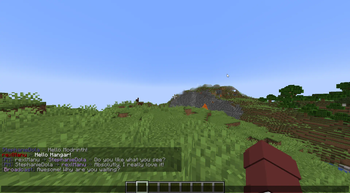
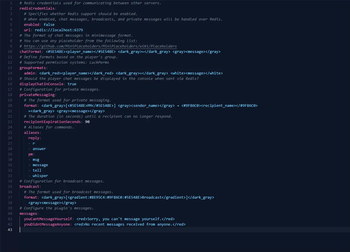
# FairyChat The next generation chat plugin for managing your server's chat. _FairyChat is the future of chat management for your server, providing a range of features from customizable chat formats to multi-server message broadcasting. The perfect solution to bring a seamless chatting experience to your server users._ ## Features - **Customizable Chat Format**: Personalize the chat format as per your needs. - **Per-Group Chat Format**: Differentiate chats based on the user group for better management. - **Private Messaging**: Send private messages to other players with ease. Supports tab completion across multiple servers. - **MiniMessage & MiniPlaceholders Support**: All formats are compatible with MiniMessage & MiniPlaceholders, making the customization process easier than ever. - **Legacy Support**: Legacy Color codes are supported, so you don't have to worry about your old chat formats. PlaceholderAPI is also supported. - **Optional Multi-Server Message Sending**: Have multiple servers? No problem. FairyChat supports sending messages across servers with Redis. - **Fully Paper Compatible**: FairyChat is fully compatible with Paper, and is optimized to provide the best performance. - **Cooldown for Chat**: Prevent spamming by adding a cooldown to chat messages with a configurable threshold. - **Reloadable Configuration**: All configuration changes can be reloaded without restarting the server. - **Mentions**: Mention other players in chat with ease using the `@` symbol. Get notified with a sound when you are mentioned. - **Ignore Players**: Ignore players you don't want to see messages from. - **Chat clear**: Clear the chat with a single command in multiple servers at once. - **Similarity Check**: Prevent players from sending similar messages in a short period of time. ## Documentation You can find the documentation for FairyChat (https://github.com/rexlManu/FairyChat/wiki). ## Commands & Permissions | Command | Permission | Description | |----------------------------|--------------------------------------|-----------------------------------------------------| | `/broadcast <message>` | `fairychat.command.broadcast` | Broadcast a message to all servers | | | `fairychat.feature.minimessage` | Allows MiniMessage & Color Codes in chat | | `/pm <username> <message>` | | Send a private message to a player | | `/r <message>` | | Reply to a private message | | `/ignore <username>` | | Toggle ignoring a player | | | `fairychat.bypass.ignore` | Bypass ignoring a player | | | `fairychat.notify-update` | Notify about updates on join | | `/clearchat ` | `fairychat.command.chatclear` | Clear the chat for all players or a optional player | | `/fairychat` | | Show information about FairyChat | | `/fairychat reload` | `fairychat.command.fairychat.reload` | Reload the configuration | | | `fairychat.bypass.similarity` | Bypass the similarity check for last message | | | `fairychat.bypass.cooldown` | Bypass the chat cooldown | | | `fairychat.feature.displayitem` | Allow players to show the item in and with <item> | | | `fairychat.messages.join.ignore` | The join message will not be sent | | | `fairychat.messages.quit.ignore` | The quit message will not be sent | ## Installation You need to have (https://papermc.io/) (or fork of paper) installed on your server. FairyChat is not compatible with other server software. 1. Download the latest FairyChat version from (https://github.com/rexlManu/FairyChat/releases). 2. Place the downloaded jar file in your server's `plugins` folder. 3. Restart your server. 4. Configure FairyChat to your liking. 5. Restart your server again. ### Recommended Plugin It's recommended to install (https://modrinth.com/plugin/freedomchat) alongside FairyChat. FreedomChat fixes the issue with random kicks because of invalid chat signatures. ## Placeholders For more information on how to use placeholders, please checkout the (.github/docs/PLACEHOLDERS.md) file. ## Support If you need any help with FairyChat, feel free to join our (https://discord.gg/bM8NtsJVeb). For bug reports and featu
# FairyChat
The next generation chat plugin for managing your server's chat.
_FairyChat is the future of chat management for your server, providing a range of features from customizable chat formats to multi-server message broadcasting. The perfect solution to bring a seamless chatting experience to your server users._
## Features
- Customizable Chat Format: Personalize the chat format as per your needs.
- Per-Group Chat Format: Differentiate chats based on the user group for better management.
- Private Messaging: Send private messages to other players with ease. Supports tab completion across multiple
- servers.
- MiniMessage & MiniPlaceholders Support: All formats are compatible with MiniMessage & MiniPlaceholders, making the
- customization process easier than ever.
- Legacy Support: Legacy Color codes are supported, so you don't have to worry about your old chat formats.
- PlaceholderAPI is also supported.
- Optional Multi-Server Message Sending: Have multiple servers? No problem. FairyChat supports sending messages
- across servers with Redis.
- Fully Paper Compatible: FairyChat is fully compatible with Paper, and is optimized to provide the best
- performance.
- Cooldown for Chat: Prevent spamming by adding a cooldown to chat messages with a configurable threshold.
- Reloadable Configuration: All configuration changes can be reloaded without restarting the server.
- Mentions: Mention other players in chat with ease using the `@` symbol. Get notified with a sound when you are
- mentioned.
- Ignore Players: Ignore players you don't want to see messages from.
- Chat clear: Clear the chat with a single command in multiple servers at once.
- Similarity Check: Prevent players from sending similar messages in a short period of time.
## Documentation
You can find the documentation for FairyChat (https://github.com/rexlManu/FairyChat/wiki).
## Commands & Permissions
| Command | Permission | Description |
|----------------------------|--------------------------------------|-----------------------------------------------------|
| `/broadcast
## Installation
You need to have (https://papermc.io/) (or fork of paper) installed on your server. FairyChat is not compatible with other server software.
1. Download the latest FairyChat version from (https://github.com/rexlManu/FairyChat/releases). 2. Place the downloaded jar file in your server's `plugins` folder. 3. Restart your server. 4. Configure FairyChat to your liking. 5. Restart your server again.
### Recommended Plugin
It's recommended to install (https://modrinth.com/plugin/freedomchat) alongside FairyChat. FreedomChat fixes the issue with random kicks because of invalid chat signatures.
## Placeholders
For more information on how to use placeholders, please checkout the (.github/docs/PLACEHOLDERS.md) file.
If you need any help with FairyChat, feel free to join our (https://discord.gg/bM8NtsJVeb).
For bug reports and featu
📊 Mod Details
- Game
- Minecraft Plugins
- Author
- rexlManu
- Version
- 0.7.7
- Downloads
- 5,919
- Endorsements
- 24
- Category
- folia
- Created
- 6/19/2023
- Updated
- 5/7/2026
- Game Versions
- 1.19.4, 1.20, 1.20.1, 1.20.2, 1.20.3
- Tags
- management, social, utility
🔧 How to Install Minecraft Plugins Mods
Download from Modrinth. Use Prism Launcher or drop into your mods folder.
📖 Full step-by-step install guide for Minecraft Plugins →
Visit the official mod page for specific installation instructions for this mod.
🎮 Need cheat codes or console commands? Check ur gaming wiki for Minecraft Plugins commands, item IDs, and more.
❓ Frequently Asked Questions
Which Minecraft Plugins versions does FairyChat support?
The author lists 1.19.4, 1.20, 1.20.1, 1.20.2, 1.20.3, 1.20.4. Other versions may work but are untested by the author.
What is the latest version of FairyChat?
Version 0.7.7, published 2026-05-07 with 5,919 downloads recorded at the source.
Keep browsing — more Minecraft Plugins mods await