EzCountdown
🟡 Updated this year🖼️ Gallery (1 images)
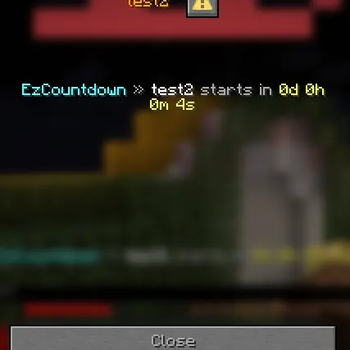
🔍 Analysis
- 👍 0.3% endorsement rate
- 🏆 #1159 of 1560 bukkit mods in this game by downloads
📋 About This Mod
# EzCountdown **EzCountdown** is the ultimate custom countdown timer plugin for Minecraft servers. Whether you’re launching a new map, running a flash sale, or celebrating a special event, EzCountdown lets you create, manage, and display any countdown you want, your way. Check out our latest project: (https://modrinth.com/plugin/pvpindex-battle) **Compatible with Spigot, Paper, and Bukkit 1.7-26.1 · Java 8+ · Action bar, boss bar, title, chat & scoreboard displays · PlaceholderAPI ready** (https://i.ibb.co/dskCvgLP/documentation-button-1.png)](https://ez-plugins.github.io/EzCountdown/) (https://i.ibb.co/Wpy2w1cH/support-button-1.png)](https://discord.gg/yWP95XfmBS) --- ## Why EzCountdown? - **Create any countdown** – Set up timers for launches, events, sales, or anything you can imagine. Fixed dates, durations, recurring, or manual, your choice. - **Flexible displays** – Show countdowns in the action bar, boss bar, title, chat, or scoreboard. Make your timers visible everywhere players look. - **Easy configuration** – Define countdowns in YAML, customize messages, and reload instantly—no coding required. - **Permission control** – Limit who can see or manage each countdown. - **PlaceholderAPI support** – Use countdown placeholders in any plugin or message. <iframe width="560" height="315" src="https://www.youtube-nocookie.com/embed/r12mMkx4F9U" title="YouTube video player" frameborder="0" allow="accelerometer; autoplay; clipboard-write; encrypted-media; gyroscope; picture-in-picture; web-share" allowfullscreen></iframe> --- ## Example: Custom Countdown Want a countdown for a special event? Just add it to `countdowns.yml`: ````yaml countdowns: event_launch: type: FIXED_DATE target: "2026-02-01 18:00" running: true display: types: - ACTION_BAR - TITLE update-interval: 1 visibility: "all" messages: format: "<gold>Event Launch</gold> <gray>in</gray> <aqua>{formatted}</aqua>" start: "<green>The event countdown has started!</green>" end: "<gold>🎉 The event has begun! </gold>" commands: end: - "broadcast <gold>The event is live!</gold>" zone: "UTC" ```` **Tip:** Use `/countdown create <name> <date|duration|manual|recurring>` to make new countdowns in-game! !(https://i.ibb.co/7tg3Tgz9/image.png) --- ## Quick Start 1. Drop `EzCountdown.jar` into your `plugins/` folder and start the server. 2. Edit `plugins/EzCountdown/countdowns.yml` to define your custom countdowns. 3. Use `/countdown list` to see active timers. 4. Reload changes instantly with `/countdown reload`. --- ## Commands & Permissions | Command | Description | Permission | | --- | --- | --- | | `/countdown create <name> <date\|duration\|manual\|recurring>` | Create a countdown. | `ezcountdown.admin` | | `/countdown start <name>` | Start a countdown. | `ezcountdown.admin` | | `/countdown stop <name>` | Stop a countdown. | `ezcountdown.admin` | | `/countdown delete <name>` | Delete a countdown. | `ezcountdown.admin` | | `/countdown list` | List countdowns. | `ezcountdown.use` | | `/countdown info <name>` | Show countdown details. | `ezcountdown.use` | | `/countdown reload` | Reload configuration files. | `ezcountdown.admin` | --- ## Countdown Types - **Fixed Date** – Counts down to a specific date/time. Example: `/countdown create launch 2026-02-01 18:00` - **Duration** – Runs for a set time (e.g., 2h). Example: `/countdown create sale duration 2h` - **Manual** – Timer starts only when triggered. Example: `/countdown create flashsale manual 15m` - **Recurring** – Repeats at set intervals (e.g., every week). Example: `/countdown create weekly recurring 7 18:00` --- ## Display Types - **ACTION_BAR** – Subtle, always-on timer above the hotbar. - **BOSS_BAR** – Dramatic bar at the top of the screen. - **TITLE** – Large center-screen titles for big moments. - **CHAT** – Periodic chat messages. - **SCOREBOARD** – Sidebar timer for ongoing events. **Mix and match display types per countdown!** --- ## Advanced Features - **Teleport players** at countdown start/end using named locations. - **Firework shows** for celebration moments. - **Custom messages and commands** for every countdown event. - **PlaceholderAPI** – Use `%ezcountdown_<name>_formatted%` and more in any plugin. --- ## Locations & Fireworks - Set teleport locations: `/ezcd locations add <name>` - Configure fireworks and teleports in `countdowns.yml` under `teleport:` and `firework:` sections. --- ## PlaceholderAPI Use these placeholders anywhere PlaceholderAPI is supported: - `%ezcountdown_<name>_formatted%` - `%ezcountdown_<name>_days%` - `%ezcountdown_<name>_hours%` - `%ezcountdown_<name>_minutes%` - `%ezcountdown_<name>_seconds%` --- **Make your next event legendary, create custom countdowns for anything, anytime!** [ [!(https://i.ibb.co/Wpy2w1cH/support-button-1.png)](https://discord.gg/yWP95XfmBS)
## Why EzCountdown?
- Create any countdown – Set up timers for launches, events, sales, or anything you can imagine. Fixed dates, durations, recurring, or manual, your choice.
- Flexible displays – Show countdowns in the action bar, boss bar, title, chat, or scoreboard. Make your timers visible everywhere players look.
- Easy configuration – Define countdowns in YAML, customize messages, and reload instantly—no coding required.
- Permission control – Limit who can see or manage each countdown.
- PlaceholderAPI support – Use countdown placeholders in any plugin or message.
## Example: Custom Countdown
Want a countdown for a special event? Just add it to `countdowns.yml`:
````yaml countdowns: event_launch: type: FIXED_DATE target: "2026-02-01 18:00" running: true
display: types: - ACTION_BAR - TITLE update-interval: 1 visibility: "all"
messages:
format: "
commands:
end:
- "broadcast
zone: "UTC" ````
Tip: Use `/countdown create ` to make new countdowns in-game!
!(https://i.ibb.co/7tg3Tgz9/image.png)
## Quick Start
1. Drop `EzCountdown.jar` into your `plugins/` folder and start the server. 2. Edit `plugins/EzCountdown/countdowns.yml` to define your custom countdowns. 3. Use `/countdown list` to see active timers. 4. Reload changes instantly with `/countdown reload`.
## Commands & Permissions
| Command | Description | Permission |
| --- | --- | --- |
| `/countdown create
## Countdown Types
- Fixed Date – Counts down to a specific date/time.
- Example: `/countdown create launch 2026-02-01 18:00`
- Duration – Runs for a set time (e.g., 2h).
- Example: `/countdown create sale duration 2h`
- Manual – Timer starts only when triggered.
- Example: `/countdown create flashsale manual 15m`
- Recurring – Repeats at set intervals (e.g., every week).
- Example: `/countdown create weekly recurring 7 18:00`
## Display Types
- ACTION_BAR – Subtle, always-on timer above the hotbar.
- BOSS_BAR – Dramatic bar at the top of the screen.
- TITLE – Large center-screen titles for big moments.
- CHAT – Periodic chat messages.
- SCOREBOARD – Sidebar timer for ongoing events.
Mix and match display types per countdown!
## Advanced Features
- Teleport players at countdown start/end using named locations.
- Firework shows for celebration moments.
- Custom messages and commands for every countdown event.
- PlaceholderAPI – Use `%ezcountdown_
_formatted%` and more in any plugin.
## Locations & Fireworks
- Set teleport locations: `/ezcd locations add
` - Configure fireworks and teleports in `countdowns.yml` under `teleport:` and `firework:` sections.
## PlaceholderAPI
Use these placeholders anywhere PlaceholderAPI is supported:
- `%ezcountdown_
_formatted%` - `%ezcountdown_
_days%` - `%ezcountdown_
_hours%` - `%ezcountdown_
_minutes%` - `%ezcountdown_
_seconds%`
Make your next event legendary, create custom countdowns for anything, anytime!
[![Try the other Mi
📊 Mod Details
- Game
- Minecraft Plugins
- Author
- Shadow48402
- Version
- 2.0.2
- Downloads
- 1,659
- Endorsements
- 5
- Category
- bukkit
- Created
- 1/18/2026
- Updated
- 7/7/2026
- Game Versions
- 1.13, 1.13.1, 1.13.2, 1.14, 1.14.1
- Tags
- game-mechanics, management, utility
🔧 How to Install Minecraft Plugins Mods
Download from Modrinth. Use Prism Launcher or drop into your mods folder.
📖 Full step-by-step install guide for Minecraft Plugins →
Visit the official mod page for specific installation instructions for this mod.
🎮 Need cheat codes or console commands? Check ur gaming wiki for Minecraft Plugins commands, item IDs, and more.
❓ Frequently Asked Questions
Which Minecraft Plugins versions does EzCountdown support?
The author lists 1.13, 1.13.1, 1.13.2, 1.14, 1.14.1, 1.14.2. Other versions may work but are untested by the author.
What is the latest version of EzCountdown?
Version 2.0.2, published 2026-07-07 with 1,659 downloads recorded at the source.
Keep browsing — more Minecraft Plugins mods await