Essential-PlayerInfo
⚪ Last updated 2023🖼️ Gallery (5 images)


🔍 Analysis
- 👍 1.6% endorsement rate — high engagement, a strong quality signal
- 🏆 #63 of 171 management mods in this game by downloads
📋 About This Mod
## Core Features ### Global PingList Display the player ID on the Minecraft server list. ! ### Global TabList Show global players on the TabList. - You can now customize the display mode and display message of global players. (see config) ! ### Connection Message Welcome message will be sent to every player when they connect to a register server. And provide a way to click to switch servers. - You can now customize the message in config file. ! ### Global Chat & ConnectionTips The most basic cross-server chat function. & Simple connection tips. - You can now click the __ to switch to the target server. ! ### Remember my initial connecting server A feature to let your players set the initial connecting server as they like. The default setting is "remember their last connected server". Players can use command to set the mode and server. - Set default mode - Description: If set to `preset`, players will connect to a specific server every time when they connect to the proxy. This initial server can be set by another command. If set to `last`, players will connect to the server they last exit. - Usage: `/remember mode <last, preset>` - Default: `last` - Set initial server - Description: Only work if the default mode is `preset`. Set the initial connecting server. - Usage: `/remember server <servername>` - Default: `null` (If null, players will connect to the default server of the proxy) Players can also use click to command with `/remember` or connection message. ! ## Optional Features ### Customize your message text You can change the custom text in the config file. You can use MiniMessage to color the message. You can use `%player%`, `%server%` ,`%previousServer%` and `%serverList%` to replace the variable. ### Command-to-broadcast For those who don't want their servers to be continuous global broadcasts, we provide an option to enable "command to broadcast". Which means the chat messages in these servers would be broadcast only when the beginning of the message is "#". : https://cdn.ussjackdaw.com/image/PingList.png : https://cdn.ussjackdaw.com/image/TabList2.png : https://cdn.ussjackdaw.com/image/ConnectMessage1.png : https://cdn.ussjackdaw.com/image/customText2.png : https://cdn.ussjackdaw.com/image/RememberMe1.png
## Core Features
### Global PingList
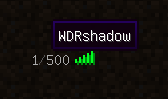
Display the player ID on the Minecraft server list.
### Global TabList
Show global players on the TabList.
- You can now customize the display mode and display message of global players. (see config)
### Connection Message
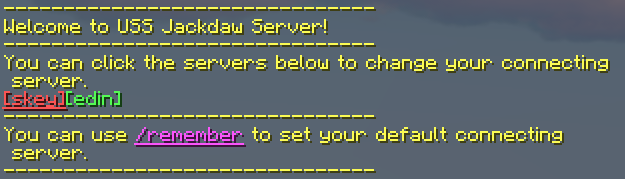
Welcome message will be sent to every player when they connect to a register server. And provide a way to click to switch servers.
- You can now customize the message in config file.
### Global Chat & ConnectionTips
The most basic cross-server chat function. & Simple connection tips.
- You can now click the __ to switch to the target server.
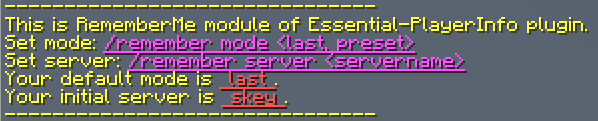
### Remember my initial connecting server
A feature to let your players set the initial connecting server as they like. The default setting is "remember their last connected server".
Players can use command to set the mode and server.
- Set default mode
- - Description: If set to `preset`, players will connect to a specific server every time when they connect to the
- proxy. This initial server can be set by another command. If set to `last`, players will connect to the server they
- last exit.
- - Usage: `/remember mode
- - Default: `last`
- Set initial server
- - Description: Only work if the default mode is `preset`. Set the initial connecting server.
- - Usage: `/remember server
` - - Default: `null` (If null, players will connect to the default server of the proxy)
Players can also use click to command with `/remember` or connection message.
## Optional Features
### Customize your message text
You can change the custom text in the config file. You can use MiniMessage to color the message.
You can use `%player%`, `%server%` ,`%previousServer%` and `%serverList%` to replace the variable.
### Command-to-broadcast
For those who don't want their servers to be continuous global broadcasts, we provide an option to enable "command to broadcast". Which means the chat messages in these servers would be broadcast only when the beginning of the message is "#".
: https://cdn.ussjackdaw.com/image/PingList.png
: https://cdn.ussjackdaw.com/image/TabList2.png
: https://cdn.ussjackdaw.com/image/ConnectMessage1.png
: https://cdn.ussjackdaw.com/image/customText2.png
: https://cdn.ussjackdaw.com/image/RememberMe1.png
📊 Mod Details
- Game
- Minecraft Plugins
- Author
- WDRshadow
- Version
- 3.0.1
- Downloads
- 674
- Endorsements
- 11
- Category
- management
- Created
- 1/13/2023
- Updated
- 1/12/2023
- Game Versions
- 1.13, 1.14, 1.15, 1.16, 1.17
- Tags
- management, optimization, social
🔧 How to Install Minecraft Plugins Mods
Download from Modrinth. Use Prism Launcher or drop into your mods folder.
📖 Full step-by-step install guide for Minecraft Plugins →
Visit the official mod page for specific installation instructions for this mod.
🎮 Need cheat codes or console commands? Check ur gaming wiki for Minecraft Plugins commands, item IDs, and more.
❓ Frequently Asked Questions
Which Minecraft Plugins versions does Essential-PlayerInfo support?
The author lists 1.13, 1.14, 1.15, 1.16, 1.17, 1.18. Other versions may work but are untested by the author.
What is the latest version of Essential-PlayerInfo?
Version 3.0.1, published 2023-01-12 with 674 downloads recorded at the source.
Keep browsing — more Minecraft Plugins mods await