EmotesChat
🟡 Updated this year🖼️ Gallery (3 images)


🔍 Analysis
- 👍 0.9% endorsement rate
- 🏆 #38 of 48 bungeecord mods in this game by downloads
📋 About This Mod
## What is EmotesChat EmotesChat is a plugin that allows players to send emotes in the chat. **PlaceholderAPI & MiniMessage Compatible** ### Example !(https://cdn.modrinth.com/data/CswonVxl/images/42c58ba8bde809822235131d3724bda5d616392a.png) ### Commands and permissions | Command | Description | Permission | | ---- | --- | --- | | /emoteschat | EmotesChat main command | emoteschat.reload | | /emotes | List available emotes | none | <details><summary>Bungee config</summary> ```yaml config: # Allow emotes usage on these commands (you can also use emoteschat.emotesoncommand.<command> permission) allow-on-commands: - "/message" - "/msg" - "/w" - "/whisper" - "/tell" - "/reply" - "/r" # Strip color tags on commands `§ca` -> `a`. Default: false strip-color-on-commands: false emotes: # This is an example emote. The section name is the ID of the emote. happy: # The text which will be replaced by the emote. code: ':happy:' # The text that will replace the code (compatible with legacy colors). emote: '☺' # The permission that the player needs to use the emote (leave in blank if you want it to be used by everyone). permission: 'emoteschat.emote.happy' heart: code: ':heart:' emote: '§c♡§r' # Remember to close colors as they affect the rest of the message. permission: '' messages: emotes-list-header: '§b§lYour emotes:' emotes-list-no-emotes: '§8No emotes.' emotes-list-emote-identifier: '%EMOTECODE% §e- §r%EMOTE%' ``` </details> <details><summary>Paper config</summary> ```yaml config: # Allow emotes usage on these commands (you can also use emoteschat.emotesoncommand.<command> permission) allow-on-commands: - "/message" - "/msg" - "/w" - "/whisper" - "/tell" - "/reply" - "/r" # Strip minimessage tags on commands `<red>a` -> `a`. Default: false strip-mm-on-commands: false emotes: # This is an example emote. The section name is the ID of the emote. happy: # The text which will be replaced by the emote. code: ':happy:' # The text that will replace the code (compatible with PlaceHolderAPI & MiniMessage). emote: '☺' # The permission that the player needs to use the emote (leave in blank if you want it to be used by everyone). permission: 'emoteschat.emote.happy' heart: code: ':heart:' emote: '<red>♡</red>' # Remember to close MiniMessage tags as they affect the rest of the message. permission: '' messages: emotes-list-header: '<aqua><bold>Your emotes:' emotes-list-no-emotes: '<dark_gray>No emotes.' emotes-list-emote-identifier: '%EMOTECODE% <yellow>-</yellow> %EMOTE%' ``` </details>
## What is EmotesChat
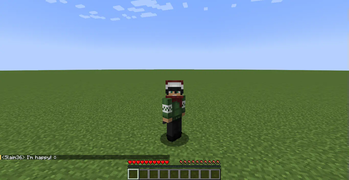
EmotesChat is a plugin that allows players to send emotes in the chat. PlaceholderAPI & MiniMessage Compatible
### Example !(https://cdn.modrinth.com/data/CswonVxl/images/42c58ba8bde809822235131d3724bda5d616392a.png)
### Commands and permissions
| Command | Description | Permission | | ---- | --- | --- | | /emoteschat | EmotesChat main command | emoteschat.reload | | /emotes | List available emotes | none |
Bungee config
```yaml
config:
# Allow emotes usage on these commands (you can also use emoteschat.emotesoncommand.
messages: emotes-list-header: '§b§lYour emotes:' emotes-list-no-emotes: '§8No emotes.' emotes-list-emote-identifier: '%EMOTECODE% §e- §r%EMOTE%'
```
Paper config
```yaml
config:
# Allow emotes usage on these commands (you can also use emoteschat.emotesoncommand.
messages:
emotes-list-header: '
```
📊 Mod Details
- Game
- Minecraft Plugins
- Author
- Zhamty
- Version
- 2.0
- Downloads
- 2,105
- Endorsements
- 19
- Category
- bungeecord
- Created
- 12/11/2022
- Updated
- 7/1/2026
- Game Versions
- 1.18, 1.18.1, 1.18.2, 1.19, 1.19.1
- Tags
- decoration, library, social
🔧 How to Install Minecraft Plugins Mods
Download from Modrinth. Use Prism Launcher or drop into your mods folder.
📖 Full step-by-step install guide for Minecraft Plugins →
Visit the official mod page for specific installation instructions for this mod.
🎮 Need cheat codes or console commands? Check ur gaming wiki for Minecraft Plugins commands, item IDs, and more.
❓ Frequently Asked Questions
Which Minecraft Plugins versions does EmotesChat support?
The author lists 1.18, 1.18.1, 1.18.2, 1.19, 1.19.1, 1.19.2. Other versions may work but are untested by the author.
What is the latest version of EmotesChat?
Version 2.0, published 2026-07-01 with 2,105 downloads recorded at the source.
Keep browsing — more Minecraft Plugins mods await