EasyRoads
🟡 Updated this year🖼️ Gallery (1 images)
🔍 Analysis
- 🏆 #163 of 313 game-mechanics mods in this game by downloads
📋 About This Mod
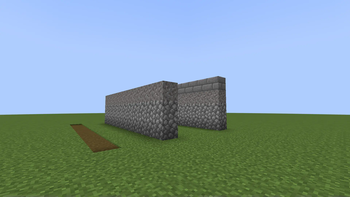
Transform your Minecraft server with EasyRoads! This plugin allows you to create and manage special roads that modify the speed of players and entities. Customize road properties and schemas, configure messages, and control affected entities with ease!
## Features
- Define roads with specific speeds and blocks.
- Adjust player and entity movement speeds based on their location on roads.
- Customizable messages for various actions.
- Simple commands for configuration management and road listing.
- Lightweight and easy to use.
- Supports non-player living entities (configurable).
- Configurable speed increase and decay rates.
- Detailed configuration options for maximum flexibility.
### Installation
1. Download the latest version of EasyRoads from the releases section. 2. Place the `EasyRoads.jar` file into your server's `plugins` directory. 3. Restart or reload your server to enable the plugin. 4. Configure the plugin by editing the `config.yml` file located in `plugins/EasyRoads/`.
### Configuration
The plugin uses a configuration file located in `plugins/EasyRoads/config.yml`. Key settings include:
- `speedIncreaseRate`: Rate at which the speed increases when on a road.
- `speedDecayRate`: Rate at which the speed decreases when off a road.
- `messages`: Customizable messages for various plugin actions.
- `roads`: Define roads with their respective speed and block types.
- `affectedEntities`: List of entity types affected by the road speeds.
### Example configuration:
```yaml # This is the main configuration file for the plugin # You can add more roads by adding more road names # and blocks to the list of blocks for each road
# maximum acceleration per tick speedIncreaseRate: 0. 1 # maximum deceleration per tick speedDecayRate: 1
# Customizable messages (you can use color codes) messages: onRoad: "&cYou are on a road!" noPermission: "&4You do not have permission to use this command." reloadSuccess: "&aConfiguration reloaded successfully." listHeader: "&6Roads:" help: header: "&bEasyRoads commands:" reload: "&7/easyroads reload - Reload the EasyRoads configuration." list: "&7/easyroads list - List all roads." help: "&7/easyroads help - Display this help message." invalidCommand: "&cInvalid subcommand. Use /easyroads help for available commands."
# Affected non-player living entities, may affect performance negatively # See https://hub.spigotmc.org/javadocs/bukkit/org/bukkit/entity/EntityType.html affectedEntities: - HORSE - DONKEY - MULE - SKELETON_HORSE - ZOMBIE_HORSE - CAMEL - PIG - STRIDER
# Road definitions roads: road1: speed: 0. 5 blocks: - DIRT_PATH road2: speed: 2 blocks: - GRAVEL - COBBLESTONE - COBBLESTONE road3: speed: 3 blocks: - ANY - GRAVEL - COBBLESTONE - COBBLESTONE
### Commands
```/easyroads help:``` Display the help message.
```/easyroads reload``` Reload the plugin configuration.
```/easyroads list``` List all configured roads.
### Permissions
```easyroads.reload``` Permission to reload the configuration.
```easyroads.list``` Permission to list all roads.
## Troubleshooting
If you encounter issues, check the server console for error messages and ensure that the configuration file is correctly formatted. For further assistance, feel free to open an issue on the GitHub repository.
## Contributing
This plugin was originally developed for my own role-playing and world-building server, but I decided to share it with the community. I don’t have a specific roadmap for future features, so if you have ideas or improvements, feel free to contribute. Contributions are always welcome fork the repository and submit a pull request, or open an issue if you find a bug.
This project is licensed under the MIT License.
📊 Mod Details
- Game
- Minecraft Plugins
- Author
- Tepeshini
- Version
- 1.1-release
- Downloads
- 236
- Endorsements
- 5
- Category
- game-mechanics
- Created
- 8/22/2024
- Updated
- 10/17/2025
- Game Versions
- 1.21.9
- Tags
- game-mechanics, technology, transportation
🔧 How to Install Minecraft Plugins Mods
Download from Modrinth. Use Prism Launcher or drop into your mods folder.
📖 Full step-by-step install guide for Minecraft Plugins →
Visit the official mod page for specific installation instructions for this mod.
🎮 Need cheat codes or console commands? Check ur gaming wiki for Minecraft Plugins commands, item IDs, and more.
❓ Frequently Asked Questions
Which Minecraft Plugins versions does EasyRoads support?
The author lists 1.21.9. Other versions may work but are untested by the author.
What is the latest version of EasyRoads?
Version 1.1-release, published 2025-10-17 with 236 downloads recorded at the source.
Keep browsing — more Minecraft Plugins mods await