EasyNiceTab
🟡 Updated this year🖼️ Gallery (3 images)

🔍 Analysis
- 🏆 #40 of 219 paper mods in this game by downloads
📋 About This Mod
# EasyNiceTab ## Description: EasyNiceTab is a minimalist plugin for Minecraft (Spigot/Paper/Purpur) version 1.21.x/26.1.X that allows you to manually update each player's TAB list. The plugin is lightweight, easy to configure, and does not require any external libraries. ## Announcement🟥!!!: Hi everyone... so this moment has come, Modrinth is banning all AI-generated Plugins/Mods. And yeah, this is generated too :. ## Main Features: – Updates the TAB list for all players when the /tabreload command is executed. – Supports Minecraft color codes (&a, &b, &c, etc.). – Uses custom placeholders for dynamic information. – TAB texts are fully configurable via config.yml. ## Supported Placeholders: – (name) — the player's nickname. – (ping) — the player's ping in milliseconds. – (ple) — number of online players. – (world) — the name of the world the player is currently in. - (PlayersLine) - Line where should be nicknames of players ## NEW Version 1.2: > Small changes to the config. (now you can choose the animation update time yourself) <details> <summary>Config</summary> ========================================== # EasyNiceTab v1.2 - Advanced Visual Config # ========================================== # This block is active when animation_enabled: false # (PlayersLine) marks where the player list will appear Normal TAB: - "&8&m-------&r &b&lMY SERVER &8&m-------" - " &7Welcome back, &f(name)&7!" - "(PlayersLine)" - "&3World: &f(world) &eOnline: &f(ple)" - "&8&m--------------------------" # Legacy mode — simple header/footer text at top and bottom of the tab Use Old Tab Type: false header: "&aWelcome, (name)!" footer-left: "&ePing: (ping)" footer-right: "&bPlayers: (ple) &dWorld: (world)" settings: # Set to false to disable animation and use the "Normal TAB" block above instead. # This now works correctly from config — no need to edit code. animation_enabled: true # Animation speed in ticks (20 ticks = 1 second). # You can write any number you want, e.g.: # 2 = very fast (2 ticks) # 5 = fast (5 ticks = 0.25s) # 10 = medium (10 ticks = 0.5s) # 20 = slow (20 ticks = 1s) # 40 = very slow (40 ticks = 2s) animation_speed_ticks: 10 frames: 1: - "&e&l> &6&lMY SERVER &e&l<" - "&7You are playing on &fMyServer" - "(PlayersLine)" - "&ePing: &f(ping)ms" - "&bVisit: &3www.example.com" 2: - "&6&l> &6&lMY SERVER &6&l<" - "&7You are playing on &fMyServer" - "(PlayersLine)" - "&6Ping: &f(ping)ms" - "&bVisit: &3www.example.com" 3: - "&6&l> &6&lMY SERVER &6&l<" - "&2Yo&7u are playing on &fMyServer" - "(PlayersLine)" - "&6Ping: &f(ping)ms" - "&bVisit: &3www.example.com" 4: - "&6&l> &6&lMY SERVER &6&l<" - "&7Yo&2u are &7playing on &fMyServer" - "(PlayersLine)" - "&6Ping: &f(ping)ms" - "&bVisit: &3www.example.com" 5: - "&6&l> &6&lMY SERVER &6&l<" - "&7You are &2play&7ing on &fMyServer" - "(PlayersLine)" - "&6Ping: &f(ping)ms" - "&bVisit: &3www.example.com" 6: - "&6&l> &6&lMY SERVER &6&l<" - "&7You are play&2ing &7on &fMyServer" - "(PlayersLine)" - "&6Ping: &f(ping)ms" - "&bVisit: &3www.example.com" 7: - "&6&l> &6&lMY SERVER &6&l<" - "&7You are playi&2ng on &fMyServer" - "(PlayersLine)" - "&6Ping: &f(ping)ms" - "&bVisit: &3www.example.com" 8: - "&6&l> &6&lMY SERVER &6&l<" - "&7You are playing on &6MyServer" - "(PlayersLine)" - "&6Ping: &f(ping)ms" - "&bVisit: &3www.example.com" # Placeholders: (name), (ping), (ple), (world) </details> > Now you can sync your settings via MySQL/MariaDB. Just apply changes to your config and run /tabreload. The plugin will save them to the database, and all other servers will automatically pull your config when you reload them. <details> <summary>database.yml</summary> # ========================================== # EasyNiceTab Database Configuration # ========================================== # Choose the storage type. # 'local' - Uses only the local config.yml (MySQL is disabled). # 'mysql' - Connects to MySQL/MariaDB to sync config.yml across multiple servers. storage_type: local mysql: host: "XX.XX.XX.XX" port: 3306 database: "easynicetab" username: "root" password: "password" # Set to true if your database server requires an SSL connection. # If you are hosting this locally or on a standard game host, 'false' is usually fine. useSSL: false # Note: You do not need to create any t
# EasyNiceTab
## Description: EasyNiceTab is a minimalist plugin for Minecraft (Spigot/Paper/Purpur) version 1. 21.x/26. 1. X that allows you to manually update each player's TAB list. The plugin is lightweight, easy to configure, and does not require any external libraries.
## Announcement🟥!!!: Hi everyone... so this moment has come, Modrinth is banning all AI-generated Plugins/Mods. And yeah, this is generated too :[. I have time until September to either fully Remake The Plugin Without AI (or using AI not as much) - Every Plugin - or to find another Platform where I can Post My Plugins. So Please Join my Discord Channel If you don't want to lose me :). I will try to remake The Plugin but I will be honest, it will be very hard. Thanks For Reading!
And yeah, the modpacks will not be deleted or anything like that, because they were made by myself :].
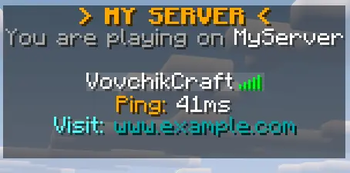
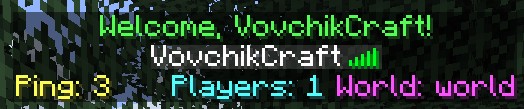
## Main Features: – Updates the TAB list for all players when the /tabreload command is executed. – Supports Minecraft color codes (&a, &b, &c, etc.). – Uses custom placeholders for dynamic information. – TAB texts are fully configurable via config.yml.
## Supported Placeholders: – (name) — the player's nickname. – (ping) — the player's ping in milliseconds. – (ple) — number of online players. – (world) — the name of the world the player is currently in. - (PlayersLine) - Line where should be nicknames of players ## NEW Version 1. 2: > Small changes to the config. (now you can choose the animation update time yourself)
Config
==========================================
# EasyNiceTab v1. 2 - Advanced Visual Config
# ==========================================
# This block is active when animation_enabled: false # (PlayersLine) marks where the player list will appear Normal TAB: - "&8&m-------&r &b&lMY SERVER &8&m-------" - " &7Welcome back, &f(name)&7!" - "(PlayersLine)" - "&3World: &f(world) &eOnline: &f(ple)" - "&8&m--------------------------"
# Legacy mode — simple header/footer text at top and bottom of the tab Use Old Tab Type: false header: "&aWelcome, (name)!" footer-left: "&ePing: (ping)" footer-right: "&bPlayers: (ple) &dWorld: (world)"
settings: # Set to false to disable animation and use the "Normal TAB" block above instead. # This now works correctly from config — no need to edit code. animation_enabled: true
# Animation speed in ticks (20 ticks = 1 second). # You can write any number you want, e.g.: # 2 = very fast (2 ticks) # 5 = fast (5 ticks = 0. 25s) # 10 = medium (10 ticks = 0. 5s) # 20 = slow (20 ticks = 1s) # 40 = very slow (40 ticks = 2s) animation_speed_ticks: 10
frames: 1: - "&e&l> &6&lMY SERVER &e&l<" - "&7You are playing on &fMyServer" - "(PlayersLine)" - "&ePing: &f(ping)ms" - "&bVisit: &3www.example.com" 2: - "&6&l> &6&lMY SERVER &6&l<" - "&7You are playing on &fMyServer" - "(PlayersLine)" - "&6Ping: &f(ping)ms" - "&bVisit: &3www.example.com" 3: - "&6&l> &6&lMY SERVER &6&l<" - "&2Yo&7u are playing on &fMyServer" - "(PlayersLine)" - "&6Ping: &f(ping)ms" - "&bVisit: &3www.example.com" 4: - "&6&l> &6&lMY SERVER &6&l<" - "&7Yo&2u are &7playing on &fMyServer" - "(PlayersLine)" - "&6Ping: &f(ping)ms" - "&bVisit: &3www.example.com" 5: - "&6&l> &6&lMY SERVER &6&l<" - "&7You are &2play&7ing on &fMyServer" - "(PlayersLine)" - "&6Ping: &f(ping)ms" - "&bVisit: &3www.example.com" 6: - "&6&l> &6&lMY SERVER &6&l<" - "&7You are play&2ing &7on &fMyServer" - "(PlayersLine)" - "&6Ping: &f(ping)ms" - "&bVisit: &3www.example.com" 7: - "&6&l> &6&lMY SERVER &6&l<" - "&7You are playi&2ng on &fMyServer" - "(PlayersLine)" - "&6Ping: &f(ping)ms" - "&bVisit: &3www.example.com" 8: - "&6&l> &6&lMY SERVER &6&l<" - "&7You are playing on &6MyServer" - "(PlayersLine)" - "&6Ping: &f(ping)ms" - "&bVisit: &3www.example.com"
# Placeholders: (name), (ping), (ple), (world) > Now you can sync your settings via MySQL/MariaDB. Just apply changes to your config and run /tabreload. The plugin will save them to the database, and all other servers will automatically pull your config when you reload them.
database.yml
# ==========================================
# EasyNiceTab Database Configuration
# ==========================================
# Choose the storage type. # 'local' - Uses only the local config.yml (MySQL is disabled). # 'mysql' - Connects to MySQL/MariaDB to sync config.yml across multiple servers. storage_type: local
mysql: host: "XX. XX. XX. XX" port: 3306 database: "easynicetab" username: "root" password: "password"
# Set to true if your database server requires an SSL connection. # If you are hosting this locally or on a standard game host, 'false' is usually fine. useSSL: false
# Note: You do not need to create any t
📊 Mod Details
- Game
- Minecraft Plugins
- Author
- VovchikCraft
- Version
- 1.2
- Downloads
- 306
- Endorsements
- 1
- Category
- paper
- Created
- 9/24/2025
- Updated
- 5/23/2026
- Game Versions
- 1.21, 1.21.1, 1.21.2, 1.21.3, 1.21.4
- Tags
- utility
🔧 How to Install Minecraft Plugins Mods
Download from Modrinth. Use Prism Launcher or drop into your mods folder.
📖 Full step-by-step install guide for Minecraft Plugins →
Visit the official mod page for specific installation instructions for this mod.
🎮 Need cheat codes or console commands? Check ur gaming wiki for Minecraft Plugins commands, item IDs, and more.
❓ Frequently Asked Questions
Which Minecraft Plugins versions does EasyNiceTab support?
The author lists 1.21, 1.21.1, 1.21.2, 1.21.3, 1.21.4, 1.21.5. Other versions may work but are untested by the author.
What is the latest version of EasyNiceTab?
Version 1.2, published 2026-05-23 with 306 downloads recorded at the source.
Keep browsing — more Minecraft Plugins mods await