Drawers
🟠 Updated over a year ago🖼️ Gallery (1 images)
🔍 Analysis
- 🏆 #13 of 219 paper mods in this game by downloads
📋 About This Mod
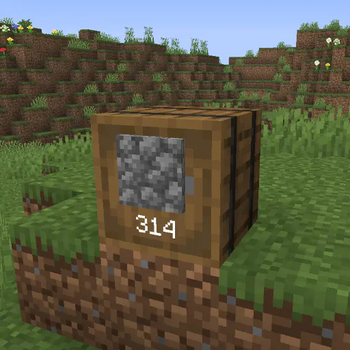
# Drawers A plugin that adds drawers to your Minecraft server for storing large quantities of a single item. !(https://raw.githubusercontent.com/funnyboy-roks/drawers/refs/heads/main/img/screenshot.png) ## Usage ### Server Admin 1. Install plugin jar into your `plugins/` folder 2. Restart your server The plugin can be configured in the `config.yml` and `lang.yml` files that get generated when the server starts. ### User To get started, craft a drawer by surrounding a chest with planks of any kind in the crafting table: !(https://raw.githubusercontent.com/funnyboy-roks/drawers/refs/heads/main/img/recipe.gif) > Note: This recipe can be configured Once you have the drawer, place it down (places like a barrel). Holding the stack of items that you wish to place into the drawer, right click the front. You can now interact with the drawer by doing the following: - right click - add the item in your hand - double right click - add all matching items in your inventory - left click - remove a single item - sneak + left click - remove a full stack of the item
A plugin that adds drawers to your Minecraft server for storing large quantities of a single item.
!(https://raw.githubusercontent.com/funnyboy-roks/drawers/refs/heads/main/img/screenshot.png)
### Server Admin
1. Install plugin jar into your `plugins/` folder 2. Restart your server
The plugin can be configured in the `config.yml` and `lang.yml` files that get generated when the server starts.
To get started, craft a drawer by surrounding a chest with planks of any kind in the crafting table:
!(https://raw.githubusercontent.com/funnyboy-roks/drawers/refs/heads/main/img/recipe.gif)
> Note: This recipe can be configured
Once you have the drawer, place it down (places like a barrel).
Holding the stack of items that you wish to place into the drawer, right click the front.
You can now interact with the drawer by doing the following: - right click - add the item in your hand - double right click - add all matching items in your inventory - left click - remove a single item - sneak + left click - remove a full stack of the item
📊 Mod Details
- Game
- Minecraft Plugins
- Author
- funnyboy-roks
- Version
- 1.1.0
- Downloads
- 335
- Endorsements
- 3
- Category
- paper
- Created
- 8/1/2025
- Updated
- 9/23/2025
- Game Versions
- 1.20, 1.20.1, 1.20.2, 1.20.3, 1.20.4
- Tags
- storage, technology, utility
🔧 How to Install Minecraft Plugins Mods
Download from Modrinth. Use Prism Launcher or drop into your mods folder.
📖 Full step-by-step install guide for Minecraft Plugins →
Visit the official mod page for specific installation instructions for this mod.
🎮 Need cheat codes or console commands? Check ur gaming wiki for Minecraft Plugins commands, item IDs, and more.
❓ Frequently Asked Questions
Which Minecraft Plugins versions does Drawers support?
The author lists 1.20, 1.20.1, 1.20.2, 1.20.3, 1.20.4, 1.20.5. Other versions may work but are untested by the author.
What is the latest version of Drawers?
Version 1.1.0, published 2025-09-23 with 335 downloads recorded at the source.
Keep browsing — more Minecraft Plugins mods await