Dis2FA
🟡 Updated this year🖼️ Gallery (10 images)
🔍 Analysis
- 🏆 #118 of 1080 bukkit mods in this game by downloads
📋 About This Mod
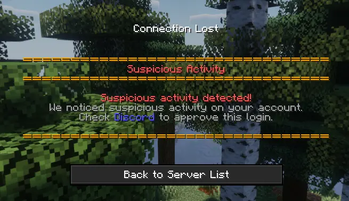
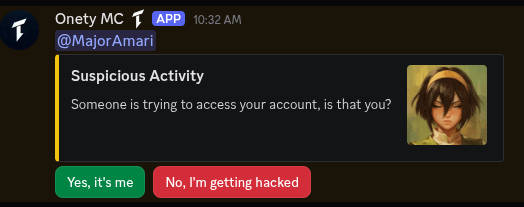
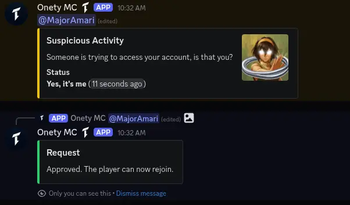
# Dis2FA Secure your offline-mode Minecraft server with Discord-based two-factor authentication. Players link their Discord account to their Minecraft account — and any device change requires Discord approval before they can join again. ## How it works 1. A player joins for the first time and gets kicked with a one-time code 2. They send the code to the bot (DM or configured channel) 3. Their Discord account is linked to their Minecraft UUID 4. On future joins they're let straight in — unless their device changes 5. If a new device is detected, an approval request is posted to Discord before they can join ## Features - **Discord-based verification** — uses a bot your players already have - **Device approval** — IP-based fingerprinting flags logins from new devices - **Discord role gating** — restrict access to players with a specific role - **Ban sync** — Discord bans can carry over to Minecraft and vice versa - **Chat bridge** — two-way chat between Discord and Minecraft - **Web config editor** — edit your config from a browser via `/da web` with magic link login - **Standalone** — built-in JDA, no DiscordSRV or other plugins required - **SQLite storage** — all links and device requests persist automatically ## Compatibility | Platform | Version | Jar | |----------|---------|-----| | Bukkit / Spigot / Purpur | 1.18.2+ | `Dis2FA-bukkit-<version>.jar` | | Paper | 1.20.2+ | `Dis2FA-paper-<version>.jar` | | Folia | 1.20.2+ | `Dis2FA-folia-<version>.jar` | ## Requirements - Java 17+ - A Discord bot token ## Setup 1. Pick the correct jar for your server type 2. Drop it into `plugins/` and start the server once to generate `config.yml` 3. Add your bot token and channel IDs to `config.yml` 4. Restart the server 5. Verify everything is working with `/da status` ## Links - (https://github.com/Majoramari/Dis2FA) - (https://github.com/Majoramari/Dis2FA/issues)
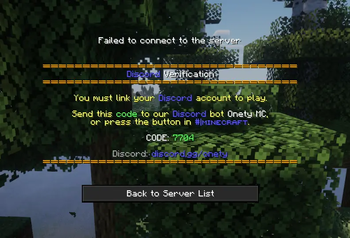
Secure your offline-mode Minecraft server with Discord-based two-factor authentication. Players link their Discord account to their Minecraft account — and any device change requires Discord approval before they can join again.
## How it works
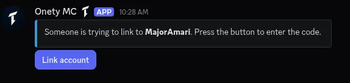
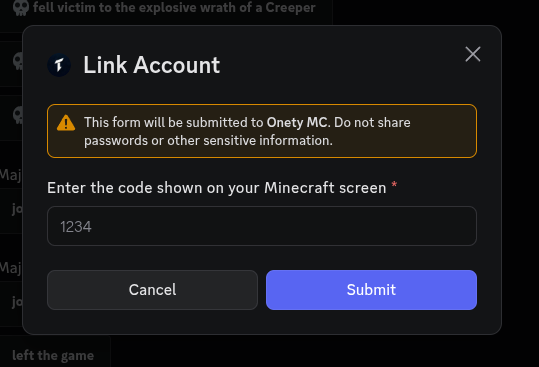
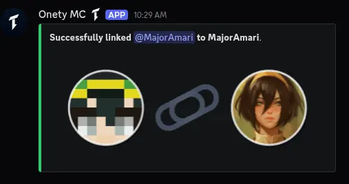
1. A player joins for the first time and gets kicked with a one-time code 2. They send the code to the bot (DM or configured channel) 3. Their Discord account is linked to their Minecraft UUID 4. On future joins they're let straight in — unless their device changes 5. If a new device is detected, an approval request is posted to Discord before they can join
## Features
- Discord-based verification — uses a bot your players already have
- Device approval — IP-based fingerprinting flags logins from new devices
- Discord role gating — restrict access to players with a specific role
- Ban sync — Discord bans can carry over to Minecraft and vice versa
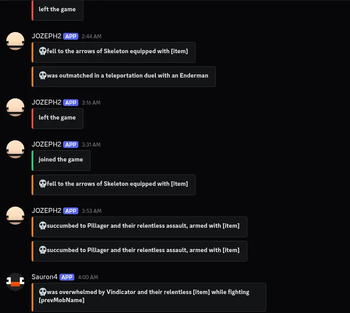
- Chat bridge — two-way chat between Discord and Minecraft
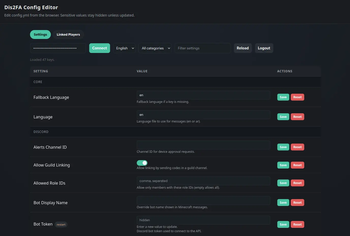
- Web config editor — edit your config from a browser via `/da web` with magic link login
- Standalone — built-in JDA, no DiscordSRV or other plugins required
- SQLite storage — all links and device requests persist automatically
## Compatibility
| Platform | Version | Jar |
|----------|---------|-----|
| Bukkit / Spigot / Purpur | 1. 18. 2+ | `Dis2FA-bukkit-
## Requirements
- Java 17+
- A Discord bot token
1. Pick the correct jar for your server type 2. Drop it into `plugins/` and start the server once to generate `config.yml` 3. Add your bot token and channel IDs to `config.yml` 4. Restart the server 5. Verify everything is working with `/da status`
- (https://github.com/Majoramari/Dis2FA)
- (https://github.com/Majoramari/Dis2FA/issues)
📊 Mod Details
- Game
- Minecraft Plugins
- Author
- Majoramari
- Version
- 1.5.2
- Downloads
- 72
- Endorsements
- 0
- Category
- bukkit
- Created
- 3/24/2026
- Updated
- 3/20/2026
- Game Versions
- 1.18, 1.18.1, 1.18.2
- Tags
- management, social, utility
🔧 How to Install Minecraft Plugins Mods
Download from Modrinth. Use Prism Launcher or drop into your mods folder.
📖 Full step-by-step install guide for Minecraft Plugins →
Visit the official mod page for specific installation instructions for this mod.
🎮 Need cheat codes or console commands? Check ur gaming wiki for Minecraft Plugins commands, item IDs, and more.
❓ Frequently Asked Questions
Which Minecraft Plugins versions does Dis2FA support?
The author lists 1.18, 1.18.1, 1.18.2. Other versions may work but are untested by the author.
What is the latest version of Dis2FA?
Version 1.5.2, published 2026-03-20 with 72 downloads recorded at the source.
Keep browsing — more Minecraft Plugins mods await