DialogDSL
🟡 Updated this year🖼️ Gallery (2 images)
🔍 Analysis
- 🏆 #19 of 20 library mods in this game by downloads
📋 About This Mod
~~Make Dialog Great Again~~ !(https://cdn.modrinth.com/data/cached_images/2cdf73d03b68d098f4d67825017e7d9413d2a42a.png) !(https://cdn.modrinth.com/data/cached_images/083d9828beeac55b0131f7bea9ff1a0b46343c35.png) <details> <summary>简体中文</summary> # Paper Dialog DSL > 我实在是受够 `.build()` 了,因此产生了这个项目 Paper Dialog DSL 是一个专为 Paper 1.21.10+ 对话框 API (Dialog API) 打造的 Kotlin 声明式 UI 框架。它彻底消灭了繁琐的 Java Builder 嵌套、生命周期样板代码和危险的组件覆盖问题,带给你极其丝滑、类型安全的 UI 编写体验。 查看项目源码及 `test` 包中的示范用法获取更多帮助,直接拉到本地研究也可以,我不太喜欢写README,嗯 ## 对比 在原生 Paper API 中写一个带有输入框的对话框,你得这么写: **原生写法:** ```kotlin val oldDialog = Dialog.create { dialogBuilder -> dialogBuilder.empty() .base( DialogBase.builder(mm.deserialize("Title")) .canCloseWithEscape(true) .inputs( listOf( DialogInput.numberRange( "test2", mm.deserialize("<aqua>输入数字"), 0f, 100f ) .initial(0f) .build(), DialogInput.bool( "test", mm.deserialize("勾选<sprite:blocks:block/stone>") ).build(), DialogInput.text( "test3", mm.deserialize("<sprite:\"minecraft:items\":item/porkchop>请输入文本") ).build() ) ) .build() ) .type( DialogType.notice( ActionButton.create( mm.deserialize("1 right"), mm.deserialize("2 right"), 100, DialogAction.customClick( { view, audience -> val test2 = view.getFloat("test2") ?: return@customClick audience.sendMessage(mm.deserialize("test2: $test2")) }, ClickCallback.Options.builder() .uses(-1) .lifetime(Duration.ofMinutes(5)) .build() ) ) ) ) } ``` **使用这个DSL的写法:** ```kotlin val newDialog = DialogSetup { DialogContent(mm.deserialize("Title")) { canCloseWithEscape(true) NumRangeInput("test2", mm.deserialize("<aqua>输入数字"), 0f to 100f, 0f, 1.0f, 300) BoolInput("test", mm.deserialize("勾选<sprite:blocks:block/stone>")) TextInput("test3", mm.deserialize("<sprite:\"minecraft:items\":item/porkchop>请输入文本")) } DialogType(UIType.NOTICE) { Button( mm.deserialize("1 right"), mm.deserialize("2 right"), 100, -1, Duration.ofMinutes(5) ) { view, audience -> val test2 = view.getFloat("test2") ?: return@Button audience.sendMessage(mm.deserialize("test2: $test2")) } } } ``` --- ## 导入 `build.gradle.kts`: ```kotlin repositories { mavenCentral() maven { url = uri("https://jitpack.io") } } dependencies { implementation("com.github.Axiumyuyu:PaperDialogDSL:Tag") } ``` --- ## 快速开始 有一个还没写完的用法在(https://github.com/Axiumyuyu/PaperDialogDSL/blob/master/USAGE.md) ### 1. 创建主UI 使用 `DialogSetup { ... }` 块来声明一个静态的注册表对话框。框架将 UI 划分为两个区域:`DialogContent` (展示与输入区) 和 `DialogType` (底部按钮路由区)。 ```kotlin val MainMenuUI = DialogSetup { // 【上半区:展示与输入】 DialogContent(text("服务器主菜单")) { // 直接调用原生方法 (Escape Hatch) canCloseWithEscape(true) // 渲染文本与物品 Text(text("欢迎来到服务器!请填写或选择以下操作:")) ItemDisplay(ItemType.DIAMOND.createItemStack()) // 渲染交互输入组件 (自动堆叠在展示内容下方) TextInput("player_name", text("你的昵称")) BoolInput("agree_rules", text("同意服务器规则")) NumRangeInput("age", text("你的年龄"), 1f to 100f) } // 【下半区:操作路由】 DialogType(UIType.MULTI_ACTION, columns = 2) { // 独立的退出按钮 ExitButton(text("关闭"), text("点击退出"), 100) // 常规回调按钮 Button(text("提交"), text("保存数据"), 100) { view, audience -> val name = view.getText("player_name") val agree = view.getBoolean("agree_rules") audience.sendMessage(text("收到提交:$name, 同意规则:$agree")) } } } ``` ### 2. 注册 在你的 `PluginBootstrap` 中,使用提供的 `registerDialog` 扩展函数,将繁琐的 5 层泛型参数压缩为一行代码: ```kotlin class MyPluginBootstrap : PluginBootstrap { override fun bootstrap(context: BootstrapContext) { val manager = context.lifecycleManager manager.registerDialog(NamespacedKey("playertd","test"), newDialog) } } ``` ### 3. 动态对话框 由于Paper 的bug((https://github.com/PaperMC/Paper/issues/13555)),目前无法在 Bootstrap 阶段使用 `ItemDisplay` ,如果必须使用,则不能在Bootstrap阶段注册,只能使用动态对话框。
~~Make Dialog Great Again~~
!(https://cdn.modrinth.com/data/cached_images/2cdf73d03b68d098f4d67825017e7d9413d2a42a.png)
!(https://cdn.modrinth.com/data/cached_images/083d9828beeac55b0131f7bea9ff1a0b46343c35.png)
简体中文
# Paper Dialog DSL
> 我实在是受够 `.build()` 了,因此产生了这个项目
Paper Dialog DSL 是一个专为 Paper 1. 21. 10+ 对话框 API (Dialog API) 打造的 Kotlin 声明式 UI 框架。它彻底消灭了繁琐的 Java Builder 嵌套、生命周期样板代码和危险的组件覆盖问题,带给你极其丝滑、类型安全的 UI 编写体验。
查看项目源码及 `test` 包中的示范用法获取更多帮助,直接拉到本地研究也可以,我不太喜欢写README,嗯
在原生 Paper API 中写一个带有输入框的对话框,你得这么写:
原生写法:
```kotlin
val oldDialog = Dialog.create { dialogBuilder ->
dialogBuilder.empty()
.base(
DialogBase.builder(mm.deserialize("Title"))
.canCloseWithEscape(true)
.inputs(
listOf(
DialogInput.numberRange(
"test2",
mm.deserialize("
DialogInput.text(
"test3",
mm.deserialize("
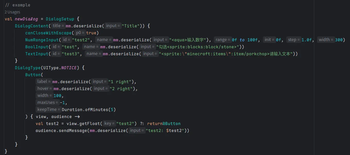
使用这个DSL的写法:
```kotlin
val newDialog = DialogSetup {
DialogContent(mm.deserialize("Title")) {
canCloseWithEscape(true)
NumRangeInput("test2", mm.deserialize("
`build.gradle.kts`:
```kotlin repositories { mavenCentral() maven { url = uri("https://jitpack.io") } }
dependencies { implementation("com.github. Axiumyuyu:PaperDialogDSL:Tag") }
有一个还没写完的用法在(https://github.com/Axiumyuyu/PaperDialogDSL/blob/master/USAGE.md)
### 1. 创建主UI
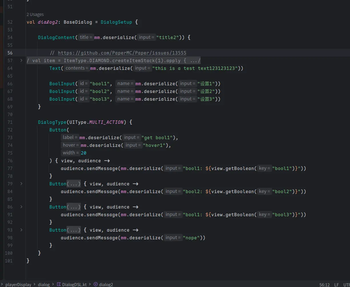
使用 `DialogSetup { ... }` 块来声明一个静态的注册表对话框。框架将 UI 划分为两个区域:`DialogContent` (展示与输入区) 和 `DialogType` (底部按钮路由区)。
val MainMenuUI = DialogSetup {
// 【上半区:展示与输入】 DialogContent(text("服务器主菜单")) { // 直接调用原生方法 (Escape Hatch) canCloseWithEscape(true)
// 渲染文本与物品 Text(text("欢迎来到服务器!请填写或选择以下操作:")) ItemDisplay(ItemType. DIAMOND.createItemStack())
// 渲染交互输入组件 (自动堆叠在展示内容下方) TextInput("player_name", text("你的昵称")) BoolInput("agree_rules", text("同意服务器规则")) NumRangeInput("age", text("你的年龄"), 1f to 100f) }
// 【下半区:操作路由】 DialogType(UIType. MULTI_ACTION, columns = 2) { // 独立的退出按钮 ExitButton(text("关闭"), text("点击退出"), 100)
// 常规回调按钮 Button(text("提交"), text("保存数据"), 100) { view, audience -> val name = view.getText("player_name") val agree = view.getBoolean("agree_rules") audience.sendMessage(text("收到提交:$name, 同意规则:$agree")) } } }
在你的 `PluginBootstrap` 中,使用提供的 `registerDialog` 扩展函数,将繁琐的 5 层泛型参数压缩为一行代码:
class MyPluginBootstrap : PluginBootstrap { override fun bootstrap(context: BootstrapContext) { val manager = context.lifecycleManager manager.registerDialog(NamespacedKey("playertd","test"), newDialog) } }
### 3. 动态对话框
由于Paper 的bug((https://github.com/PaperMC/Paper/issues/13555)),目前无法在 Bootstrap 阶段使用 `ItemDisplay` ,如果必须使用,则不能在Bootstrap阶段注册,只能使用动态对话框。
📊 Mod Details
- Game
- Minecraft Plugins
- Author
- Axiumyuyu
- Version
- 2.2.0
- Downloads
- 39
- Endorsements
- 0
- Category
- library
- Created
- 6/20/2026
- Updated
- 6/18/2026
- Game Versions
- 1.21.11, 26.1, 26.1.1, 26.1.2, 26.2
- Tags
- library
🔧 How to Install Minecraft Plugins Mods
Download from Modrinth. Use Prism Launcher or drop into your mods folder.
📖 Full step-by-step install guide for Minecraft Plugins →
Visit the official mod page for specific installation instructions for this mod.
🎮 Need cheat codes or console commands? Check ur gaming wiki for Minecraft Plugins commands, item IDs, and more.
❓ Frequently Asked Questions
Which Minecraft Plugins versions does DialogDSL support?
The author lists 1.21.11, 26.1, 26.1.1, 26.1.2, 26.2. Other versions may work but are untested by the author.
What is the latest version of DialogDSL?
Version 2.2.0, published 2026-06-18 with 39 downloads recorded at the source.
Keep browsing — more Minecraft Plugins mods await