DeathLog_By_FeDen Update 2.0
🟡 Updated this year🖼️ Gallery (5 images)
🔍 Analysis
- 🏆 #468 of 1080 bukkit mods in this game by downloads
📋 About This Mod
# DeathLog - Death History & Item Recovery Lightweight death history and item recovery plugin for Paper/Spigot servers with **SQL database storage**. DeathLog is a lightweight admin plugin for Paper/Spigot that stores player death history directly in a **database**, displays lost items through a convenient GUI, and allows staff to safely restore lost items. Instead of constantly reading and rewriting large YAML files, **each death is stored as an individual database record**. This provides better performance, faster death history access, and makes DeathLog suitable for servers with large amounts of death history. ### 🗄️ Database Storage DeathLog supports: * **SQLite** — default * **MySQL** * **MariaDB** * **PostgreSQL** Database operations use a connection pool and are executed asynchronously, keeping SQL queries away from the Minecraft main thread. Existing YAML death data can be **automatically migrated to the database** on the first launch. Original YAML files are backed up and are not automatically deleted. --- <iframe width="560" height="315" src="https://www.youtube-nocookie.com/embed/QNqSsSK2qcg" title="YouTube video player" frameborder="0" allow="accelerometer; autoplay; clipboard-write; encrypted-media; gyroscope; picture-in-picture; web-share" allowfullscreen></iframe> --- # ✨ Features * **SQL database storage** * SQLite, MySQL, MariaDB and PostgreSQL support * Asynchronous database operations * Connection pooling with HikariCP * SQL pagination for death history * Automatic YAML → SQL migration * Automatic migration backup * Logs player deaths using `PlayerDeathEvent` * Death history GUI * View lost items for each death * Full `ItemStack` saving: * meta * NBT * enchantments * lore * custom item data * Saves: * world * coordinates * death time * yaw/pitch * Detects: * death cause * killer * player / mob / projectile * Teleport staff to death locations * Restore items directly through GUI * Inventory free-space check before restore * One-time restore protection * Logs the administrator who restored items * Removes tracked world drops after restore * Removes items from players who picked up someone else's death loot * Removes equipped stolen items from: * armor slots * offhand * Removes placed blocks created from death loot * Attempts block rollback at death location * Configurable death limit per player with FIFO cleanup * Player opt-out system for death saving * Pending restore support * EN/RU language support * Configurable prefix and core settings --- # 📜 Commands ```bash /deathlog ``` Open your death history. ```bash /deathlog <player> ``` Open another player's death history. ```bash /deathlog clear ``` Clear your death history. ```bash /deathlog clear <player> ``` Clear another player's death history. ```bash /deathlog nosave <deathId> ``` Used by the opt-out button to remove a saved death. --- # 🔑 Permissions By default, only OP has access. ```txt deathlog.view ``` Access your own history. ```txt deathlog.others ``` View and manage other players' histories. ```txt deathlog.restore ``` Restore items. --- # ♻️ Restore ## Before Restore * Player must be online when required by configuration * Free inventory space is checked * Death must not already be restored * Death data is loaded directly from the database ## After Restore * Items are returned to the dead player * Armor is restored to armor slots if available * Offhand items are restored to the offhand slot if free * Inventory items return to original slots if available * Occupied slots fallback to free inventory space * Tracked drops are removed from the world * Picked-up items are removed from other players * Equipped stolen items are removed from: * inventory * armor * offhand * Blocks placed from death loot are removed * Restore administrator is logged If a restore operation fails, the death record is **not removed**, preventing accidental data loss. --- # 💀 Death Saving After death, the player receives a chat message: ```txt Death info saved for staff. ``` ## Behavior * If the player does nothing: * the death remains saved for staff * If the player clicks: ```txt ``` the death record is deleted from the database and hidden from staff. --- # ⚙️ Config File: ```txt plugins/DeathLog/config.yml ``` ```yml language: "en" prefix: "&8 &7" database: type: SQLITE host: localhost port: 3306 database: deathlog username: root password: "" ssl: false file: deaths.db pool-size: 10 storage: max_deaths_per_player: 10 date_format: "dd.MM.yyyy HH:mm:ss" auto_save_on_death: true allow_player_opt_out: true restore: require_player_online: true check_inventory_space: true one_time_restore: true remove_world_drops: true remove_picked_items: true remove_picked_items_on_join: true remove_placed_blocks: true block_rollback: true notify_target: true tracking: dropped_item_sear
# DeathLog - Death History & Item Recovery
Lightweight death history and item recovery plugin for Paper/Spigot servers with SQL database storage.
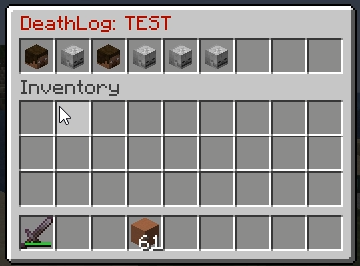
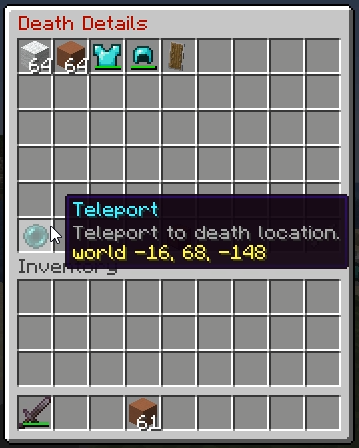
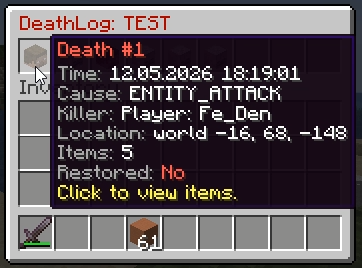
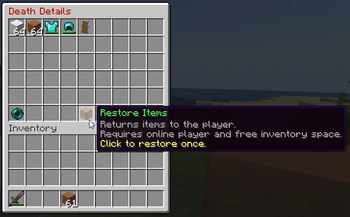
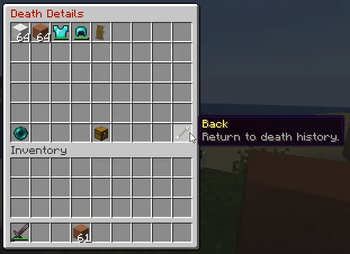
DeathLog is a lightweight admin plugin for Paper/Spigot that stores player death history directly in a database, displays lost items through a convenient GUI, and allows staff to safely restore lost items.
Instead of constantly reading and rewriting large YAML files, each death is stored as an individual database record. This provides better performance, faster death history access, and makes DeathLog suitable for servers with large amounts of death history.
### 🗄️ Database Storage
DeathLog supports:
SQLite — default MySQL MariaDB PostgreSQL
Database operations use a connection pool and are executed asynchronously, keeping SQL queries away from the Minecraft main thread.
Existing YAML death data can be automatically migrated to the database on the first launch. Original YAML files are backed up and are not automatically deleted.
# ✨ Features
SQL database storage SQLite, MySQL, MariaDB and PostgreSQL support Asynchronous database operations Connection pooling with HikariCP SQL pagination for death history Automatic YAML → SQL migration Automatic migration backup Logs player deaths using `PlayerDeathEvent` Death history GUI View lost items for each death Full `ItemStack` saving:
meta NBT enchantments lore custom item data Saves:
world coordinates death time yaw/pitch Detects:
death cause killer player / mob / projectile Teleport staff to death locations Restore items directly through GUI Inventory free-space check before restore One-time restore protection Logs the administrator who restored items Removes tracked world drops after restore Removes items from players who picked up someone else's death loot Removes equipped stolen items from:
armor slots offhand Removes placed blocks created from death loot Attempts block rollback at death location Configurable death limit per player with FIFO cleanup Player opt-out system for death saving Pending restore support EN/RU language support Configurable prefix and core settings
# 📜 Commands
```bash /deathlog ```
Open your death history.
```bash
/deathlog
Open another player's death history.
```bash /deathlog clear ```
Clear your death history.
```bash
/deathlog clear
Clear another player's death history.
```bash
/deathlog nosave
Used by the opt-out button to remove a saved death.
# 🔑 Permissions
By default, only OP has access.
```txt deathlog.view ```
Access your own history.
```txt deathlog.others ```
View and manage other players' histories.
```txt deathlog.restore ```
Restore items.
# ♻️ Restore
## Before Restore
Player must be online when required by configuration Free inventory space is checked Death must not already be restored Death data is loaded directly from the database
## After Restore
Items are returned to the dead player Armor is restored to armor slots if available Offhand items are restored to the offhand slot if free Inventory items return to original slots if available Occupied slots fallback to free inventory space Tracked drops are removed from the world Picked-up items are removed from other players Equipped stolen items are removed from:
inventory armor offhand Blocks placed from death loot are removed Restore administrator is logged
If a restore operation fails, the death record is not removed, preventing accidental data loss.
# 💀 Death Saving
After death, the player receives a chat message:
```txt Death info saved for staff. ```
## Behavior
If the player does nothing:
the death remains saved for staff If the player clicks:
the death record is deleted from the database and hidden from staff.
# ⚙️ Config
```txt plugins/DeathLog/config.yml ```
```yml language: "en" prefix: "&8[&cDeathLog&8] &7"
database: type: SQLITE host: localhost port: 3306 database: deathlog username: root password: "" ssl: false file: deaths.db pool-size: 10
storage: max_deaths_per_player: 10 date_format: "dd. MM.yyyy HH:mm:ss" auto_save_on_death: true allow_player_opt_out: true
restore: require_player_online: true check_inventory_space: true one_time_restore: true remove_world_drops: true remove_picked_items: true remove_picked_items_on_join: true remove_placed_blocks: true block_rollback: true notify_target: true
tracking: dropped_item_sear
📊 Mod Details
- Game
- Minecraft Plugins
- Author
- FeDen
- Version
- 2.0
- Downloads
- 57
- Endorsements
- 2
- Category
- bukkit
- Created
- 5/13/2026
- Updated
- 8/20/2026
- Game Versions
- 1.20, 1.20.1, 1.20.2, 1.20.3, 1.20.4
- Tags
- game-mechanics, management, utility
🔧 How to Install Minecraft Plugins Mods
Download from Modrinth. Use Prism Launcher or drop into your mods folder.
📖 Full step-by-step install guide for Minecraft Plugins →
Visit the official mod page for specific installation instructions for this mod.
🎮 Need cheat codes or console commands? Check ur gaming wiki for Minecraft Plugins commands, item IDs, and more.
❓ Frequently Asked Questions
Which Minecraft Plugins versions does DeathLog_By_FeDen Update 2.0 support?
The author lists 1.20, 1.20.1, 1.20.2, 1.20.3, 1.20.4, 1.20.5. Other versions may work but are untested by the author.
What is the latest version of DeathLog_By_FeDen Update 2.0?
Version 2.0, published 2026-08-20 with 57 downloads recorded at the source.
Keep browsing — more Minecraft Plugins mods await