Dead Body
🟡 Updated this year🖼️ Gallery (4 images)
🔍 Analysis
- 👍 0.7% endorsement rate
- 🏆 #54 of 262 game-mechanics mods in this game by downloads
📋 About This Mod
!(https://i.imgur.com/P9lLRra.png) # Dead Body ## Supports **Minecraft 1.21+** **Version 26.1.2** **Real bodies. Real loot. Real consequences.** Built to work with (https://www.spigotmc.org/resources/death-smart-spectating-killcam-effects.133321/) for advanced spectating and death messages. Dead Body transforms Minecraft death into a persistent, physical gameplay event. Instead of items scattering across the ground, players and mobs leave behind fully lootable corpses with poses, models, nameplates, animations, and in-game configuration tools. Designed for modern Paper / Spigot 1.21+ servers with performance, reliability, and immersion in mind. ## Wiki <a href="https://blockarsenal.com/wiki/dead-body" style="display:inline-flex;align-items:center;gap:16px;padding:14px 22px;border:1px solid #ff4d4d;border-radius:12px;background:#120909;color:#ff6b6b;text-decoration:none;font-family:Arial,sans-serif;box-shadow:0 0 18px rgba(255,77,77,.32);"> <img src="https://blockarsenal.com/_next/image?url=%2Fbrand%2Fbaerror.png&w=96&q=90" alt="Block Arsenal" width="68" height="68" style="display:block;width:68px;height:68px;object-fit:contain;"> <span style="margin:0;font-size:28px;line-height:1.05;font-weight:900;letter-spacing:.6px;color:#ff6b6b;">FULL GUIDE & WIKI</span> </a> !(https://i.imgur.com/6TIslyE.png) ## Features - **Lootable Corpses** — Items are captured at death and stored inside a corpse container. - **Multiple Render Modes** — ArmorStand, ItemDisplay, PlayerModel, and Mob model rendering. - **In-Game GUI Editor** — Configure behavior, visuals, permissions, and rules in-game. - **Pose Studio** — Create and preview custom corpse poses directly in the world. - **Death Cause Mapping** — Apply different poses depending on how an entity died. - **Animated Despawn** — Corpses can sink, spin, scale down, dissolve, jitter, or vanish. - **Mob Corpses** — Vanilla mobs can leave behind bodies. - **MythicMobs Support** — Whitelist or blacklist custom mobs. - **Combat Logging** — Optional logout-death handling for combat disconnects. - **Reliable Cleanup** — Safeguards prevent orphaned entities, displays, and containers. - **Smart Placement** — Corpses adjust to slabs, carpets, stairs, uneven terrain, and builds. !(https://i.imgur.com/BpdXu7a.png) ## Showcase ### ArmorStand !(https://s13.gifyu.com/images/bvC8u.gif) **A fallen player leaves behind a physical body that stores their inventory and can be looted by others.** ### Player Models !(https://cdn.modrinth.com/data/cached_images/aa70c7252c7e04f16b7e7be705a1a7716a49f47c_0.webp) !(https://s13.gifyu.com/images/bvC84.gif) **Full player models rendered on the ground with armor, held items, and custom poses applied.** ### Display Models !(https://cdn.modrinth.com/data/cached_images/079ab081c2c7582a2cb5761d39d4d237112635b8_0.webp) **Use resource-pack models to render custom corpse visuals with modern Display entities.** ### Mob Corpses !(https://cdn.modrinth.com/data/cached_images/2652eadb6022d32d65a2e492aec93e7f9b2a88f4_0.webp) **Vanilla mobs, including zombies, villagers, animals, and bosses, can leave behind corpses.** ### MythicMobs !(https://cdn.modrinth.com/data/cached_images/35180a12a216834405047aa54d6894109b0d17b9_0.webp) **Whitelist or blacklist specific Mythic mobs to avoid conflicts with other death systems.** ### GUI Editor !(https://s13.gifyu.com/images/bvC8R.gif) A comprehensive GUI lets administrators configure nearly every part of the plugin in-game. ### Pose Studio !(https://s13.gifyu.com/images/bvVu1.gif) Adjust translation, rotation, and scale for custom corpse models with real-time preview tools. ### Despawn !(https://s13.gifyu.com/images/bvC8l.gif) Corpses can disappear with cinematic animations like sinking, spinning, shrinking, or dissolving. ### Nameplates !(https://cdn.modrinth.com/data/cached_images/36bc2765904e6e066ef644c35429d22b4421bf6a.png) Optional nameplates can show corpse ownership and a live despawn countdown. ### Death Poses !(https://cdn.modrinth.com/data/cached_images/aa70c7252c7e04f16b7e7be705a1a7716a49f47c_0.webp) Configure different corpse poses depending on the cause of death. !(https://i.imgur.com/yyPHEc1.png) ## Config Dead Body gives server owners deep configuration control: - Select corpse render type: ArmorStand, ItemDisplay, or PlayerModel - Automatically scale corpses based on entity size - Define loot access permissions - Configure timed despawn or despawn-on-empty behavior - Customize nameplate style - Adjust corpse interaction hitboxes - Assign custom poses per death cause - Map Mythic mobs to special behaviors - Use GUI configuration or YAML editing !(https://i.imgur.com/bE1DWtO.png)
!(https://i.imgur.com/P9lLRra.png)
# Dead Body
## Supports
Minecraft 1. 21+ Version 26. 1. 2
Real bodies. Real loot. Real consequences.
Built to work with (https://www.spigotmc.org/resources/death-smart-spectating-killcam-effects. 133321/) for advanced spectating and death messages.
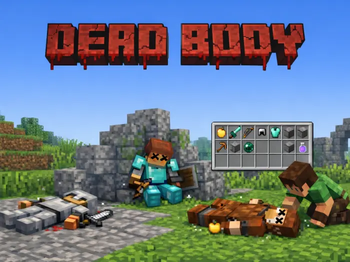
Dead Body transforms Minecraft death into a persistent, physical gameplay event.
Instead of items scattering across the ground, players and mobs leave behind fully lootable corpses with poses, models, nameplates, animations, and in-game configuration tools.
Designed for modern Paper / Spigot 1. 21+ servers with performance, reliability, and immersion in mind.

!(https://i.imgur.com/6TIslyE.png)
## Features
- Lootable Corpses — Items are captured at death and stored inside a corpse container.
- Multiple Render Modes — ArmorStand, ItemDisplay, PlayerModel, and Mob model rendering.
- In-Game GUI Editor — Configure behavior, visuals, permissions, and rules in-game.
- Pose Studio — Create and preview custom corpse poses directly in the world.
- Death Cause Mapping — Apply different poses depending on how an entity died.
- Animated Despawn — Corpses can sink, spin, scale down, dissolve, jitter, or vanish.
- Mob Corpses — Vanilla mobs can leave behind bodies.
- MythicMobs Support — Whitelist or blacklist custom mobs.
- Combat Logging — Optional logout-death handling for combat disconnects.
- Reliable Cleanup — Safeguards prevent orphaned entities, displays, and containers.
- Smart Placement — Corpses adjust to slabs, carpets, stairs, uneven terrain, and builds.
!(https://i.imgur.com/BpdXu7a.png)
## Showcase
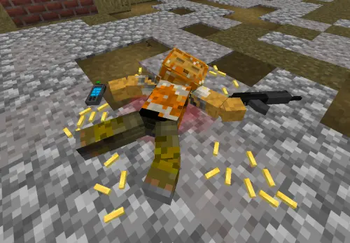
### ArmorStand
!(https://s13.gifyu.com/images/bvC8u.gif)
A fallen player leaves behind a physical body that stores their inventory and can be looted by others.
### Player Models
!(https://cdn.modrinth.com/data/cached_images/aa70c7252c7e04f16b7e7be705a1a7716a49f47c_0.webp)
!(https://s13.gifyu.com/images/bvC84.gif)
Full player models rendered on the ground with armor, held items, and custom poses applied.
### Display Models
!(https://cdn.modrinth.com/data/cached_images/079ab081c2c7582a2cb5761d39d4d237112635b8_0.webp)
Use resource-pack models to render custom corpse visuals with modern Display entities.
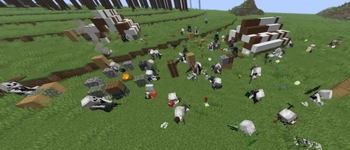
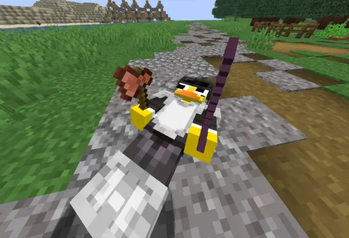
### Mob Corpses
!(https://cdn.modrinth.com/data/cached_images/2652eadb6022d32d65a2e492aec93e7f9b2a88f4_0.webp)
Vanilla mobs, including zombies, villagers, animals, and bosses, can leave behind corpses.
### MythicMobs
!(https://cdn.modrinth.com/data/cached_images/35180a12a216834405047aa54d6894109b0d17b9_0.webp)
Whitelist or blacklist specific Mythic mobs to avoid conflicts with other death systems.
### GUI Editor
!(https://s13.gifyu.com/images/bvC8R.gif)
A comprehensive GUI lets administrators configure nearly every part of the plugin in-game.
### Pose Studio
!(https://s13.gifyu.com/images/bvVu1.gif)
Adjust translation, rotation, and scale for custom corpse models with real-time preview tools.
### Despawn
!(https://s13.gifyu.com/images/bvC8l.gif)
Corpses can disappear with cinematic animations like sinking, spinning, shrinking, or dissolving.
### Nameplates
!(https://cdn.modrinth.com/data/cached_images/36bc2765904e6e066ef644c35429d22b4421bf6a.png)
Optional nameplates can show corpse ownership and a live despawn countdown.
### Death Poses
!(https://cdn.modrinth.com/data/cached_images/aa70c7252c7e04f16b7e7be705a1a7716a49f47c_0.webp)
Configure different corpse poses depending on the cause of death.
!(https://i.imgur.com/yyPHEc1.png)
Dead Body gives server owners deep configuration control:
- Select corpse render type: ArmorStand, ItemDisplay, or PlayerModel
- Automatically scale corpses based on entity size
- Define loot access permissions
- Configure timed despawn or despawn-on-empty behavior
- Customize nameplate style
- Adjust corpse interaction hitboxes
- Assign custom poses per death cause
- Map Mythic mobs to special behaviors
- Use GUI configuration or YAML editing
!(https://i.imgur.com/bE1DWtO.png)
📊 Mod Details
- Game
- Minecraft Plugins
- Author
- duq
- Version
- 1.1.5
- Downloads
- 769
- Endorsements
- 5
- Category
- game-mechanics
- Created
- 5/26/2026
- Updated
- 6/2/2026
- Game Versions
- 1.21, 1.21.1, 1.21.2, 1.21.3, 1.21.4
- Tags
- game-mechanics, mobs, utility
🔧 How to Install Minecraft Plugins Mods
Download from Modrinth. Use Prism Launcher or drop into your mods folder.
📖 Full step-by-step install guide for Minecraft Plugins →
Visit the official mod page for specific installation instructions for this mod.
🎮 Need cheat codes or console commands? Check ur gaming wiki for Minecraft Plugins commands, item IDs, and more.
❓ Frequently Asked Questions
Which Minecraft Plugins versions does Dead Body support?
The author lists 1.21, 1.21.1, 1.21.2, 1.21.3, 1.21.4, 1.21.5. Other versions may work but are untested by the author.
What is the latest version of Dead Body?
Version 1.1.5, published 2026-06-02 with 769 downloads recorded at the source.
Keep browsing — more Minecraft Plugins mods await