Damage Indicator
🟡 Updated this year🖼️ Gallery (2 images)

🔍 Analysis
- 🏆 #139 of 219 paper mods in this game by downloads
📋 About This Mod
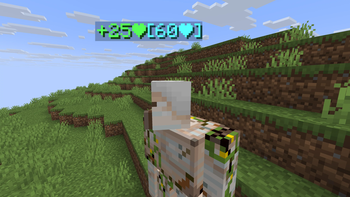
# <p align="center">DamageIndicator</p> <p align="center"> <img src="https://raw.githubusercontent.com/intergrav/devins-badges/0a3449fd26bf1375d2c5c26f096c8f30aa358766/assets/cozy/supported/paper_vector.svg" alt="paper"> <img src="https://raw.githubusercontent.com/intergrav/devins-badges/0a3449fd26bf1375d2c5c26f096c8f30aa358766/assets/cozy/supported/purpur_vector.svg" alt="purpur"> <a href="https://modrinth.com/plugin/gainexpdisplay/"> <img src="https://raw.githubusercontent.com/intergrav/devins-badges/0a3449fd26bf1375d2c5c26f096c8f30aa358766/assets/cozy-minimal/available/modrinth_vector.svg" alt="modrinth"> </a> <a href="https://www.spigotmc.org/resources/damage-indicator-1-21-3-26-1-2.135211/"> <img src="https://raw.githubusercontent.com/intergrav/devins-badges/0a3449fd26bf1375d2c5c26f096c8f30aa358766/assets/cozy-minimal/available/spigot_vector.svg" alt="spigot"> </a> <a href="https://hangar.papermc.io/PunJarrr/DamageIndicator_/"> <img src="https://raw.githubusercontent.com/intergrav/devins-badges/0a3449fd26bf1375d2c5c26f096c8f30aa358766/assets/cozy-minimal/available/hangar_vector.svg" alt="hangar"> </a> </p> A lightweight Minecraft plugin that displays floating damage and heal indicators above entities when they take damage or recover health. ## ✨ Features - Shows damage dealt as floating text above the entity's head - Shows healing received with a distinct color - Fully customizable text format using MiniMessage - Configurable number format — integer or precise decimal - Configurable display duration, scale, and billboard mode - Blacklist specific entity types from showing indicators - Lightweight and performance-friendly ## ⚙️ Configuration - All settings are configurable in `config.yml`. - All messages are fully customizable in translation files using (https://docs.papermc.io/adventure/minimessage/format/#standard-tags) format. ```yaml # Plugin settings settings: # The language file to use from the /lang folder (e.g. en_US). language: en_US # Customize the damage and heal text displayed above mobs when they are damaged or healed. text-format: # Placeholders: # {damage} - The amount of damage dealt to the mob. # {heal} - The amount of healing received by the mob. # {current} - The mob's current health after the damage or heal is applied. # {max} - The mob's maximum health. # The text to display when a mob is damaged. Use {damage} to show the damage amount. damage: "<red>-{damage}❤<aqua>" # The text to display when a mob is healed. Use {heal} to show the heal amount. heal: "<green>+{heal}❤<aqua>" # The duration (in ticks) that the text will be displayed (1 second = 20 ticks). display-duration: 10 # The format used for numbers in the displayed text. # Options: int (e.g. 5), double (e.g. 5.25) number-format: int # Settings for the text display entity. text-display: # The scale of the text display (1.0 = default size). scale: 1.0 # The billboard mode of the text display. # Options: CENTER (always faces the player), VERTICAL (rotates only on the Y-axis) billboard: CENTER # The location where the text will be displayed above the mob's head. text-location: # The vertical offset (in blocks) from the mob's head where the text will be displayed. vertical-offset: 0.5 # The radius (in blocks) around the mob's head where the text will be displayed. radius: 0.5 # The list of entities that are blacklisted from showing damage or heal indicators. blacklisted-entities: - PLAYER ``` ## 📚 Commands & Permissions | Command | Permission | Description | | ----------------------------- | ---------------------------- | ------------------------ | | ```/damageindicator reload``` | ```damageindicator.reload``` | Reload the configuration. | > Aliases: /di reload
#
DamageIndicator




## ✨ Features
- Shows damage dealt as floating text above the entity's head
- Shows healing received with a distinct color
- Fully customizable text format using MiniMessage
- Configurable number format — integer or precise decimal
- Configurable display duration, scale, and billboard mode
- Blacklist specific entity types from showing indicators
- Lightweight and performance-friendly
## ⚙️ Configuration
- All settings are configurable in `config.yml`.
- All messages are fully customizable in translation files using (https://docs.papermc.io/adventure/minimessage/format/#standard-tags) format.
```yaml # Plugin settings settings: # The language file to use from the /lang folder (e.g. en_US). language: en_US
# Customize the damage and heal text displayed above mobs when they are damaged or healed. text-format: # Placeholders: # {damage} - The amount of damage dealt to the mob. # {heal} - The amount of healing received by the mob. # {current} - The mob's current health after the damage or heal is applied. # {max} - The mob's maximum health.
# The text to display when a mob is damaged. Use {damage} to show the damage amount.
damage: "
# The duration (in ticks) that the text will be displayed (1 second = 20 ticks). display-duration: 10
# The format used for numbers in the displayed text. # Options: int (e.g. 5), double (e.g. 5. 25) number-format: int
# Settings for the text display entity. text-display: # The scale of the text display (1. 0 = default size). scale: 1. 0 # The billboard mode of the text display. # Options: CENTER (always faces the player), VERTICAL (rotates only on the Y-axis) billboard: CENTER
# The location where the text will be displayed above the mob's head. text-location: # The vertical offset (in blocks) from the mob's head where the text will be displayed. vertical-offset: 0. 5 # The radius (in blocks) around the mob's head where the text will be displayed. radius: 0. 5
# The list of entities that are blacklisted from showing damage or heal indicators. blacklisted-entities: - PLAYER ```
## 📚 Commands & Permissions
| Command | Permission | Description | | ----------------------------- | ---------------------------- | ------------------------ | | ```/damageindicator reload``` | ```damageindicator.reload``` | Reload the configuration. |
> Aliases: /di reload
📊 Mod Details
- Game
- Minecraft Plugins
- Author
- PunJarrr
- Version
- 1.0.0
- Downloads
- 213
- Endorsements
- 2
- Category
- paper
- Created
- 5/16/2026
- Updated
- 5/14/2026
- Game Versions
- 1.21.3, 1.21.4, 1.21.5, 1.21.6, 1.21.7
- Tags
- utility
🔧 How to Install Minecraft Plugins Mods
Download from Modrinth. Use Prism Launcher or drop into your mods folder.
📖 Full step-by-step install guide for Minecraft Plugins →
Visit the official mod page for specific installation instructions for this mod.
🎮 Need cheat codes or console commands? Check ur gaming wiki for Minecraft Plugins commands, item IDs, and more.
❓ Frequently Asked Questions
Which Minecraft Plugins versions does Damage Indicator support?
The author lists 1.21.3, 1.21.4, 1.21.5, 1.21.6, 1.21.7, 1.21.8. Other versions may work but are untested by the author.
What is the latest version of Damage Indicator?
Version 1.0.0, published 2026-05-14 with 213 downloads recorded at the source.
Keep browsing — more Minecraft Plugins mods await