Polls
🟡 Updated this year🖼️ Gallery (3 images)
🔍 Analysis
- 🏆 #359 of 599 bukkit mods in this game by downloads
📋 About This Mod
# Polls > A lightweight in-game polling plugin for Bukkit, Spigot, Paper, and Folia. > > 轻量、直观的游戏内民意投票插件,支持 Bukkit、Spigot、Paper 和 Folia。 Players can browse polls, inspect live results, and vote through an inventory GUI. Poll creation and administration are handled entirely in game, with no web panel or external database required. 玩家可以通过 GUI 浏览议题、查看实时票数并参与投票。议题创建与管理也可在游戏内完成,不需要网页面板或外部数据库。 **Requirements / 运行要求:** Minecraft `1.21.4+` · Java `21+` (https://github.com/CubeX-MC/Polls) · (https://github.com/CubeX-MC/Polls/issues) --- ## Features / 核心功能 - **Private guided input:** Chat messages used to create or edit a poll are captured by the plugin and never sent to public chat.<br> **私密引导输入:** 创建或编辑议题时,聊天框输入会被插件捕获,不会发送到公共聊天。 - **Fully in-game workflow:** Create, browse, vote, and manage polls through guided chat input and inventory GUIs.<br> **完整游戏内流程:** 创建、浏览、投票和管理都通过聊天引导与 GUI 完成。 - **One player, one vote:** UUID-based vote tracking prevents duplicate votes and vote changes.<br> **一人一票:** 使用玩家 UUID 防止重复投票,投票后不可更改。 - **Live results:** The detail view shows vote counts, percentages, progress bars, and the player's own choice.<br> **实时结果:** 详情界面展示票数、百分比、进度条以及玩家自己的选择。 - **Flexible polls:** Each poll supports 2 to 9 options with a title, description, option details, and duration.<br> **灵活议题:** 每个议题支持 2 至 9 个选项,可设置标题、描述、选项说明和截止时长。 - **Administration tools:** Administrators can edit the title or description, extend the deadline, or delete a poll.<br> **管理员工具:** 管理员可修改标题、描述、截止时间,或删除议题。 - **End notifications:** Online administrators receive a result summary when a poll ends.<br> **结束通知:** 议题结束后,在线管理员会收到票数和占比摘要。 - **Local persistence:** SQLite stores poll data locally and automatically removes expired records according to the configuration.<br> **本地持久化:** 使用 SQLite 保存数据,并按配置自动清理过期记录。 - **Multi-platform scheduling:** Paper and Folia use region-aware scheduling APIs, while Bukkit and Spigot use the compatible scheduler.<br> **多平台调度:** Paper 和 Folia 使用区域调度 API,Bukkit 与 Spigot 使用兼容调度器。 - **Built-in languages:** Switch between English (`en_US`) and Simplified Chinese (`zh_CN`) in `config.yml`.<br> **内置语言:** 可在 `config.yml` 中切换英文(`en_US`)和简体中文(`zh_CN`)。 --- ## Screenshots / 界面预览 ### Poll browser / 议题列表 !(https://raw.githubusercontent.com/CubeX-MC/Polls/main/images/20260714-045849.png) Active and ended polls are displayed in separate sections with independent pagination. 进行中与已结束议题分区展示,并分别支持翻页。 ### Poll details and results / 议题详情与结果 !(https://raw.githubusercontent.com/CubeX-MC/Polls/main/images/20260714-045852.jpg) Players can inspect option descriptions, live counts, percentages, and their own vote. 玩家可以查看选项说明、实时票数、百分比以及自己的投票记录。 ### Option editor / 选项管理 !(https://raw.githubusercontent.com/CubeX-MC/Polls/main/images/20260714-045843.jpg) Poll creators can add, review, or remove options before submitting the poll. At least two options are required. 创建议题时可添加、查看或移除选项,至少需要两个选项。 --- ## Workflow / 使用流程 ### Vote / 参与投票 1. Run `/polls` to open the main interface. 2. Select an active or ended poll. 3. Click an option to vote, or inspect the final results. 中文说明:输入 `/polls` 打开主界面,选择议题后即可投票或查看最终结果。 ### Create a poll / 创建议题 1. Click **Create Poll** in the bottom-right corner of the main interface. 2. Enter the title, description, and duration in chat. Supported examples include `30m`, `12h`, and `3d`. 3. Add 2 to 9 options and optional descriptions. 4. Confirm the poll in the option editor. The guided setup captures every input privately before publishing the poll. 中文说明:点击主界面右下角的“提交新议题”,按聊天提示填写标题、描述、截止时长与选项,最后在选项管理界面确认提交。所有输入均为私密输入。 --- ## Commands / 命令 | Command / 命令 | Description / 说明 | |---|---| | `/polls` | Open the polls GUI / 打开投票主界面 | ## Permissions / 权限 | Permission / 权限 | Default / 默认值 | Description / 说明 | |---|---|---| | `polls.submit` | Everyone / 所有玩家 | Create polls / 创建投票议题 | | `polls.vote` | Everyone / 所有玩家 | Cast votes / 参与投票 | | `polls.admin` | OP | Edit, extend, or delete polls / 编辑、延期或删除议题 | The administrator permission node can be changed in `config.yml`. 管理员权限节点可在 `config.yml` 中修改。 --- ## Compatibility / 兼容性 | Platform / 平台 | Version / 支持版本 | Runtime / 运行方式 | |---|---|---| | Bukkit | `1.21.4+` | Compatible Bukkit scheduler / Bukkit 兼容调度器 | | Spigot | `1.21.4+` | Compatible Bukkit scheduler / Bukkit 兼容调度器 | | Paper | `1.21.4+` | Adventure API and region schedulers / Adventure API 与区域调度器 | | Folia | `1.21.4+` | Native entity, global, and async schedulers / 原生实体、全局与异步调度器 | The platform adapter is selected automatically. On Folia, the plugin fails safely instead of falling back to an incompatible Bukkit scheduler. 插件会自动选择平台适配器。在 Folia 环境中,如果适配器初始化失败,插件会安全停止,而不会回退到不兼容的 Bukkit 调度器。 --- ## Installation / 安装 1. Download a `Polls-*.jar` compatible with your server version. 2. Place the JAR in the server's `plugins/` directory. 3. Restart the server. 4. Edit
> A lightweight in-game polling plugin for Bukkit, Spigot, Paper, and Folia. > > 轻量、直观的游戏内民意投票插件,支持 Bukkit、Spigot、Paper 和 Folia。
Players can browse polls, inspect live results, and vote through an inventory GUI. Poll creation and administration are handled entirely in game, with no web panel or external database required.
玩家可以通过 GUI 浏览议题、查看实时票数并参与投票。议题创建与管理也可在游戏内完成,不需要网页面板或外部数据库。
Requirements / 运行要求: Minecraft `1. 21. 4+` · Java `21+`
(https://github.com/CubeX-MC/Polls) · (https://github.com/CubeX-MC/Polls/issues)
## Features / 核心功能
- Private guided input: Chat messages used to create or edit a poll are captured by the plugin and never sent to public chat.
私密引导输入: 创建或编辑议题时,聊天框输入会被插件捕获,不会发送到公共聊天。 - Fully in-game workflow: Create, browse, vote, and manage polls through guided chat input and inventory GUIs.
完整游戏内流程: 创建、浏览、投票和管理都通过聊天引导与 GUI 完成。 - One player, one vote: UUID-based vote tracking prevents duplicate votes and vote changes.
一人一票: 使用玩家 UUID 防止重复投票,投票后不可更改。 - Live results: The detail view shows vote counts, percentages, progress bars, and the player's own choice.
实时结果: 详情界面展示票数、百分比、进度条以及玩家自己的选择。 - Flexible polls: Each poll supports 2 to 9 options with a title, description, option details, and duration.
灵活议题: 每个议题支持 2 至 9 个选项,可设置标题、描述、选项说明和截止时长。 - Administration tools: Administrators can edit the title or description, extend the deadline, or delete a poll.
管理员工具: 管理员可修改标题、描述、截止时间,或删除议题。 - End notifications: Online administrators receive a result summary when a poll ends.
结束通知: 议题结束后,在线管理员会收到票数和占比摘要。 - Local persistence: SQLite stores poll data locally and automatically removes expired records according to the configuration.
本地持久化: 使用 SQLite 保存数据,并按配置自动清理过期记录。 - Multi-platform scheduling: Paper and Folia use region-aware scheduling APIs, while Bukkit and Spigot use the compatible scheduler.
多平台调度: Paper 和 Folia 使用区域调度 API,Bukkit 与 Spigot 使用兼容调度器。 - Built-in languages: Switch between English (`en_US`) and Simplified Chinese (`zh_CN`) in `config.yml`.
内置语言: 可在 `config.yml` 中切换英文(`en_US`)和简体中文(`zh_CN`)。
## Screenshots / 界面预览
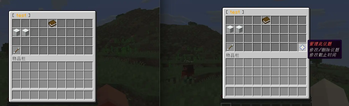
### Poll browser / 议题列表
!(https://raw.githubusercontent.com/CubeX-MC/Polls/main/images/20260714-045849.png)
Active and ended polls are displayed in separate sections with independent pagination.
进行中与已结束议题分区展示,并分别支持翻页。
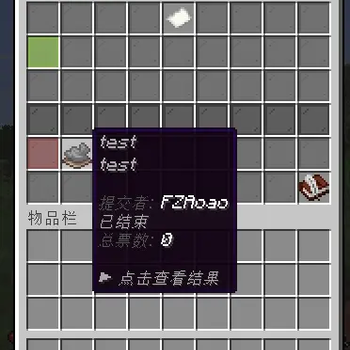
### Poll details and results / 议题详情与结果
!(https://raw.githubusercontent.com/CubeX-MC/Polls/main/images/20260714-045852.jpg)
Players can inspect option descriptions, live counts, percentages, and their own vote.
玩家可以查看选项说明、实时票数、百分比以及自己的投票记录。
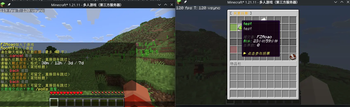
### Option editor / 选项管理
!(https://raw.githubusercontent.com/CubeX-MC/Polls/main/images/20260714-045843.jpg)
Poll creators can add, review, or remove options before submitting the poll. At least two options are required.
创建议题时可添加、查看或移除选项,至少需要两个选项。
## Workflow / 使用流程
### Vote / 参与投票
1. Run `/polls` to open the main interface. 2. Select an active or ended poll. 3. Click an option to vote, or inspect the final results.
中文说明:输入 `/polls` 打开主界面,选择议题后即可投票或查看最终结果。
### Create a poll / 创建议题
1. Click Create Poll in the bottom-right corner of the main interface. 2. Enter the title, description, and duration in chat. Supported examples include `30m`, `12h`, and `3d`. 3. Add 2 to 9 options and optional descriptions. 4. Confirm the poll in the option editor.
The guided setup captures every input privately before publishing the poll.
中文说明:点击主界面右下角的“提交新议题”,按聊天提示填写标题、描述、截止时长与选项,最后在选项管理界面确认提交。所有输入均为私密输入。
## Commands / 命令
| Command / 命令 | Description / 说明 | |---|---| | `/polls` | Open the polls GUI / 打开投票主界面 |
## Permissions / 权限
| Permission / 权限 | Default / 默认值 | Description / 说明 | |---|---|---| | `polls.submit` | Everyone / 所有玩家 | Create polls / 创建投票议题 | | `polls.vote` | Everyone / 所有玩家 | Cast votes / 参与投票 | | `polls.admin` | OP | Edit, extend, or delete polls / 编辑、延期或删除议题 |
The administrator permission node can be changed in `config.yml`.
管理员权限节点可在 `config.yml` 中修改。
## Compatibility / 兼容性
| Platform / 平台 | Version / 支持版本 | Runtime / 运行方式 | |---|---|---| | Bukkit | `1. 21. 4+` | Compatible Bukkit scheduler / Bukkit 兼容调度器 | | Spigot | `1. 21. 4+` | Compatible Bukkit scheduler / Bukkit 兼容调度器 | | Paper | `1. 21. 4+` | Adventure API and region schedulers / Adventure API 与区域调度器 | | Folia | `1. 21. 4+` | Native entity, global, and async schedulers / 原生实体、全局与异步调度器 |
The platform adapter is selected automatically. On Folia, the plugin fails safely instead of falling back to an incompatible Bukkit scheduler.
插件会自动选择平台适配器。在 Folia 环境中,如果适配器初始化失败,插件会安全停止,而不会回退到不兼容的 Bukkit 调度器。
## Installation / 安装
1. Download a `Polls-*.jar` compatible with your server version. 2. Place the JAR in the server's `plugins/` directory. 3. Restart the server. 4. Edit
📊 Mod Details
- Game
- Minecraft Plugins
- Author
- angushushu
- Version
- 1.2.0-beta.1
- Downloads
- 17
- Endorsements
- 0
- Category
- bukkit
- Created
- 8/7/2026
- Updated
- 7/25/2026
- Game Versions
- 1.21, 1.21.1, 1.21.2, 1.21.3, 1.21.4
- Tags
- game-mechanics, management
🔧 How to Install Minecraft Plugins Mods
Download from Modrinth. Use Prism Launcher or drop into your mods folder.
📖 Full step-by-step install guide for Minecraft Plugins →
Visit the official mod page for specific installation instructions for this mod.
🎮 Need cheat codes or console commands? Check ur gaming wiki for Minecraft Plugins commands, item IDs, and more.
❓ Frequently Asked Questions
Which Minecraft Plugins versions does Polls support?
The author lists 1.21, 1.21.1, 1.21.2, 1.21.3, 1.21.4, 1.21.5. Other versions may work but are untested by the author.
What is the latest version of Polls?
Version 1.2.0-beta.1, published 2026-07-25 with 17 downloads recorded at the source.
Keep browsing — more Minecraft Plugins mods await