CustomWorldHeight
🟡 Updated this year🖼️ Gallery (1 images)
🔍 Analysis
- 👍 0.4% endorsement rate
- 🏆 #517 of 1560 bukkit mods in this game by downloads
📋 About This Mod
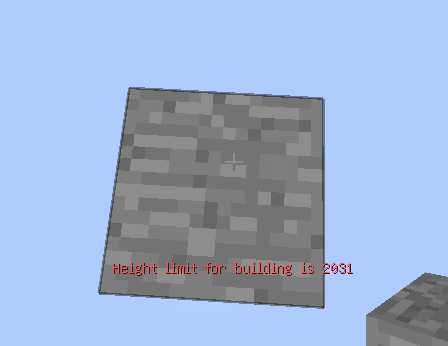
# CustomWorldHeight **CustomWorldHeight** is a plugin for Paper that allows you to modify the height of the Minecraft world. It provides an easy and efficient way to extend or limit the vertical dimensions of your world for creative builds, gameplay tweaks, or server optimization. Github page: (https://github.com/Lumine1909/CustomWorldHeight) # Important > This plugin is similar to the vanilla datapack, so there will be some similar issues as the datapack one. > > Once you set the height of a certain world, it will be VERY DANGEROUS to shirk the world height, all the data will lose. > > Expand the height is relatively unharmful, but if you decrease the min-Y, new chunks will be different from already generated chunks. > > Increasing the height will only cause the chunk's height map to be recalculated, and all the data will be properly preserved. ## Features - Customize the height of your Minecraft world. - Seamless integration with Paper. - Easy-to-configure settings for server administrators. ## Installation Follow these steps to install the plugin: 1. Download the latest release of **CustomWorldHeight** from the (https://github.com/Lumine1909/CustomWorldHeight/releases/latest) page. 2. Place the downloaded `.jar` file into your server's `plugins` folder, start the server. 3. After plugin generated the config template it will automatically disable, please finish the config. 4. Restart your Minecraft server, and the configured world's height will be modified. ## API Usage ```kotlin repositories { mavenCentral() } dependencies { compileOnly("io.github.lumine1909:CustomWorldHeight-API:0.0.1") } ``` ```java public void modifyHeight() { /* All of these works only if the world is not loaded yet! This is not a permanent modification! If you want to set permanently, store the height data with your plugin and SET IT ON EACH STARTUP! */ // Set the height of overworld WorldHeightService.get().registerWorld( Identifier.of("demo", "height1"), "world", new Height(1088, -64, 512, Height.CloudHeight.DEFAULT), BaseDimensionType.OVERWORLD ); // Set the height of all worlds start with "test_" WorldHeightService.get().registerRegex( Identifier.of("demo", "height2"), "test_\\w+", new Height(1088, -64, 512, Height.CloudHeight.DEFAULT), BaseDimensionType.CUSTOM ); } ``` ## Configuration ```yaml # You can set to anything you want (), will be used to generate Identifier (ResourceLocation) example-namespace: # Set the height for certain world, you need set it to the world name you want to modify the height world: 'example-world-value' # Min Y position min-y: -64 # Height (max Y position = min-y + height - 1) height: 1024 # Height for Chorus Fruit teleport and etc., cannot be greater than height. See Minecraft wiki#DimensionType for details logical-height: 512 # Height for the cloud (empty -> do not have cloud, default -> use default height) # This feature only works on 1.21.6+ cloud-height: 'default' # For 'overworld', 'the_nether', 'the_end', 'overworld_cave', this will use built in data to generate before world is initializing dimension-type: 'overworld' # You can set to anything you want (), will be used to generate Identifier (ResourceLocation) example-regex: # This plugin also support Regex matching regex: '^test_\w+' # Min Y position min-y: -64 # Height (max Y position = min-y + height - 1) height: 1024 # Height for Chorus Fruit teleport and etc., cannot be greater than height. See Minecraft wiki#DimensionType for details logical-height: 512 # Height for the cloud (empty -> do not have cloud, default -> use default height) # This feature only works on 1.21.6+ cloud-height: 256 # This will let the plugin process registration data when world load dimension-type: 'custom' ``` ## License This project is licensed under the (https://github.com/Lumine1909/CustomWorldHeight/blob/main/LICENSE). The (https://github.com/Lumine1909/CustomWorldHeight/tree/main/api) part is licensed under the (https://github.com/Lumine1909/CustomWorldHeight/tree/main/api/LICENSE). ## Support If you encounter any issues or have questions, feel free to open an (https://github.com/Lumine1909/CustomWorldHeight/issues). --- (https://bstats.org/signatures/bukkit/CustomWorldHeight.svg)](https://bstats.org/plugin/bukkit/CustomWorldHeight/26056)
# CustomWorldHeight
CustomWorldHeight is a plugin for Paper that allows you to modify the height of the Minecraft world. It provides an easy and efficient way to extend or limit the vertical dimensions of your world for creative builds, gameplay tweaks, or server optimization.
Github page: (https://github.com/Lumine1909/CustomWorldHeight)
# Important
> This plugin is similar to the vanilla datapack, so there will be some similar issues as the datapack one. > > Once you set the height of a certain world, it will be VERY DANGEROUS to shirk the world height, all the data will lose. > > Expand the height is relatively unharmful, but if you decrease the min-Y, new chunks will be different from already generated chunks. > > Increasing the height will only cause the chunk's height map to be recalculated, and all the data will be properly preserved.
## Features
- Customize the height of your Minecraft world.
- Seamless integration with Paper.
- Easy-to-configure settings for server administrators.
## Installation
Follow these steps to install the plugin:
1. Download the latest release of CustomWorldHeight from the (https://github.com/Lumine1909/CustomWorldHeight/releases/latest) page. 2. Place the downloaded `.jar` file into your server's `plugins` folder, start the server. 3. After plugin generated the config template it will automatically disable, please finish the config. 4. Restart your Minecraft server, and the configured world's height will be modified.
## API Usage ```kotlin repositories { mavenCentral() } dependencies { compileOnly("io.github.lumine1909:CustomWorldHeight-API:0. 0. 1") } ``` ```java public void modifyHeight() { / All of these works only if the world is not loaded yet! This is not a permanent modification! If you want to set permanently, store the height data with your plugin and SET IT ON EACH STARTUP! /
// Set the height of overworld WorldHeightService.get().registerWorld( Identifier.of("demo", "height1"), "world", new Height(1088, -64, 512, Height. CloudHeight. DEFAULT), BaseDimensionType. OVERWORLD ); // Set the height of all worlds start with "test_" WorldHeightService.get().registerRegex( Identifier.of("demo", "height2"), "test_\\w+", new Height(1088, -64, 512, Height. CloudHeight. DEFAULT), BaseDimensionType. CUSTOM ); } ```
## Configuration
```yaml # You can set to anything you want (), will be used to generate Identifier (ResourceLocation) example-namespace:
# Set the height for certain world, you need set it to the world name you want to modify the height world: 'example-world-value'
# Min Y position min-y: -64
# Height (max Y position = min-y + height - 1) height: 1024
# Height for Chorus Fruit teleport and etc., cannot be greater than height. See Minecraft wiki#DimensionType for details logical-height: 512
# Height for the cloud (empty -> do not have cloud, default -> use default height) # This feature only works on 1. 21. 6+ cloud-height: 'default'
# For 'overworld', 'the_nether', 'the_end', 'overworld_cave', this will use built in data to generate before world is initializing dimension-type: 'overworld'
# You can set to anything you want (), will be used to generate Identifier (ResourceLocation) example-regex:
# This plugin also support Regex matching regex: '^test_\w+'
# Min Y position min-y: -64
# Height (max Y position = min-y + height - 1) height: 1024
# Height for Chorus Fruit teleport and etc., cannot be greater than height. See Minecraft wiki#DimensionType for details logical-height: 512
# Height for the cloud (empty -> do not have cloud, default -> use default height) # This feature only works on 1. 21. 6+ cloud-height: 256
# This will let the plugin process registration data when world load dimension-type: 'custom' ```
This project is licensed under the (https://github.com/Lumine1909/CustomWorldHeight/blob/main/LICENSE). The (https://github.com/Lumine1909/CustomWorldHeight/tree/main/api) part is licensed under the (https://github.com/Lumine1909/CustomWorldHeight/tree/main/api/LICENSE).
If you encounter any issues or have questions, feel free to open an (https://github.com/Lumine1909/CustomWorldHeight/issues).
- --
- [!(https://bstats.org/signatures/bukkit/CustomWorldHeight.svg)](https://bstats.org/plugin/bukkit/CustomWorldHeight/26056)
📊 Mod Details
- Game
- Minecraft Plugins
- Author
- Lumine1909
- Version
- 2.2.0
- Downloads
- 5,121
- Endorsements
- 18
- Category
- bukkit
- Created
- 6/9/2025
- Updated
- 6/22/2026
- Game Versions
- 1.20.5, 1.20.6, 1.21, 1.21.1, 1.21.2
- Tags
- management, utility, worldgen
🔧 How to Install Minecraft Plugins Mods
Download from Modrinth. Use Prism Launcher or drop into your mods folder.
📖 Full step-by-step install guide for Minecraft Plugins →
Visit the official mod page for specific installation instructions for this mod.
🎮 Need cheat codes or console commands? Check ur gaming wiki for Minecraft Plugins commands, item IDs, and more.
❓ Frequently Asked Questions
Which Minecraft Plugins versions does CustomWorldHeight support?
The author lists 1.20.5, 1.20.6, 1.21, 1.21.1, 1.21.2, 1.21.3. Other versions may work but are untested by the author.
What is the latest version of CustomWorldHeight?
Version 2.2.0, published 2026-06-22 with 5,121 downloads recorded at the source.
Keep browsing — more Minecraft Plugins mods await