CrashShop
🟡 Updated this year🖼️ Gallery (4 images)

🔍 Analysis
- 🏆 #41 of 92 economy mods in this game by downloads
📋 About This Mod
# <p align="center"><img src="https://cdn.modrinth.com/data/O13iRO5M/images/fc09f00985a22bbaf4684ee3065e2db7438f2553.png" width="50%" /></p> ### <p align="center">The ultimate lightweight, GUI-based shop solution for modern Minecraft servers.</p> <div align="center"> (https://img.shields.io/badge/CodeRefactor-A%2B-success?style=for-the-badge)](https://www.codefactor.io/repository/github/crashwho/crashshop) </div> <p align="center"> <img src="https://img.shields.io/badge/Minecraft-1.21+-green.svg" alt="Minecraft Version"> <img src="https://img.shields.io/badge/Dependency-Vault-blue.svg" alt="Vault Required"> </p> --- ## 🌟 About CrashShop **CrashShop** is designed for server administrators who value simplicity, performance, and a seamless user experience. Forget complex chat commands; give your players a high-quality **GUI-based shopping experience** that integrates perfectly with your server economy. Whether you are running a Survival, Skyblock, or Creative network, CrashShop provides the tools to build a robust economy without the overhead of heavy, bloated plugins. --- ## ✨ Features * **Intuitive GUI:** Clean and easy-to-navigate menus for buying and selling items. * **Economy Integration:** Fully compatible with **Vault** and most major economy providers. * **Customizable Shops:** Create multiple shop categories (Blocks, Tools, Food, etc.). * **Admin Tools:** Manage prices and inventory directly in-game or via config. * **Performance First:** Optimized code to ensure zero impact on your server's TPS. * **Message Customization:** Change every string to match your server's theme and language. --- ## 📸 Screenshots <div align="center"> <img src="https://cdn.modrinth.com/data/O13iRO5M/images/fd684d9b42d6797875b2842c0fb1ff0701366719.png" width="45%" /> <img src="https://cdn.modrinth.com/data/O13iRO5M/images/d2e450e483db3dbc3899b3017badd2d7b7873fd9.png" width="45%" /> <img src="https://cdn.modrinth.com/data/O13iRO5M/images/bb7069bc26180e8f59e35278589aadffa2035445.png" width="45%" /> </div> --- ## 🛠️ Commands & Permissions | Command | Permission | Description | | :--- | :--- | :--- | | `/shop` | `crashshop.use` | Opens the main shop menu. | | `/shop open <shop>` | `crashshop.use` | Opens a specific category. | | `/shop reload` | `crashshop.reload` | Reloads the configuration files. | | `/sellall` | `crashshop.sellall` | Sell every item you can sell in your inventory. | --- ## 🚀 Installation 1. **Download** the latest `.jar` file from the Versions tab. 2. Ensure you have **(https://www.spigotmc.org/resources/vault.34315/)** installed on your server. 3. Place `CrashShop.jar` into your server's `/plugins/` folder. 4. **Restart** your server to generate the configuration files. 5. Customize your items in all the files and you're ready to go! --- ## ⚙️ Configuration > **Note:** CrashShop requires an economy plugin (like EssentialsX or CoinsEngine) and **Vault** to function correctly. <details> <summary><b>Click to view Default Configuration (config.yml)</b></summary> ```yaml # _____ _ _____ _ # / ____| | | / ____| | # | | _ __ __ _ ___| |__ | (___ | |__ ___ _ __ # | | | '__/ _` |/ __| '_ \ \___ \| '_ \ / _ \| '_ \ # | |____| | | (_| | (__| | | |____) | | | | (_) | |_) | # \_____|_| \__,_|\___|_| |_|_____/|_| |_|\___/| .__/ # | | # |_| #Every item can have these characteristic: #diamond_sword: <-- Item ID # material: DIAMOND_SWORD <-- Only mandatory feature # amount: 2 <-- Default is 1 # displayname: "<aqua>OP Diamond Sword" <-- Minimessage Support! # custom-model-data: 0 <-- Giving an item a custom model throw a texture pack # item-model: "opsword" # enchantments: <-- You can give any enchantment you want! # minecraft:sharpness: 5 # lore: # - <red>this sword is OP! # glow: true <-- Default is false # commands: # enabled: true <-- Default is false # give: "give <player> minecraft:diamond 1" general-items: back: material: ARROW displayname: "<red>Previous Page" next: material: ARROW displayname: "<green>Next Page" main: material: BARRIER displayname: "<red>Back" slot: 49 filler: enabled: true material: BLACK_STAINED_GLASS_PANE displayname: "" ``` </details> <details> <summary><b>ores.yml (One of the 5 built-in category)</b></summary> ```yaml #Here items have two more parameters: #Slot: the slot where you want to place the item #Page: the page where the item should be id: ore #Category identifier title: 'ᴏʀᴇ' rows: 6 #Total slots of the inventory: 54 (Double Chest) items: coal: material: COAL displayname: "<gradient:black:gray>Coal</gradient>" slot: 10 page: 0 buy-price: 20.0 sell-price: 2.0 custom-model-data: 4 item-model: "yay" enchantments: minecraft:sharpness:5 lore: - "" - " <gray>│ <white>Type:
#

The ultimate lightweight, GUI-based shop solution for modern Minecraft servers.
[!(https://img.shields.io/badge/CodeRefactor-A%2B-success?style=for-the-badge)](https://www.codefactor.io/repository/github/crashwho/crashshop)


## 🌟 About CrashShop CrashShop is designed for server administrators who value simplicity, performance, and a seamless user experience. Forget complex chat commands; give your players a high-quality GUI-based shopping experience that integrates perfectly with your server economy.
Whether you are running a Survival, Skyblock, or Creative network, CrashShop provides the tools to build a robust economy without the overhead of heavy, bloated plugins.
## ✨ Features Intuitive GUI: Clean and easy-to-navigate menus for buying and selling items. Economy Integration: Fully compatible with Vault and most major economy providers. Customizable Shops: Create multiple shop categories (Blocks, Tools, Food, etc.). Admin Tools: Manage prices and inventory directly in-game or via config. Performance First: Optimized code to ensure zero impact on your server's TPS. Message Customization: Change every string to match your server's theme and language.
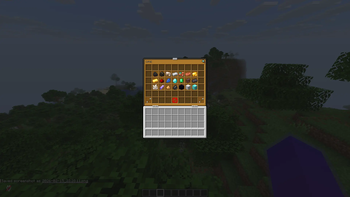
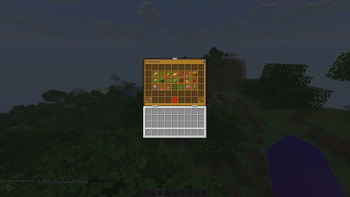
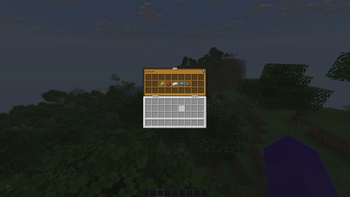
## 📸 Screenshots


## 🛠️ Commands & Permissions
| Command | Permission | Description |
| :--- | :--- | :--- |
| `/shop` | `crashshop.use` | Opens the main shop menu. |
| `/shop open
## 🚀 Installation 1. Download the latest `.jar` file from the Versions tab. 2. Ensure you have (https://www.spigotmc.org/resources/vault. 34315/) installed on your server. 3. Place `CrashShop.jar` into your server's `/plugins/` folder. 4. Restart your server to generate the configuration files. 5. Customize your items in all the files and you're ready to go!
## ⚙️ Configuration
> Note: CrashShop requires an economy plugin (like EssentialsX or CoinsEngine) and Vault to function correctly.
Click to view Default Configuration (config.yml)
```yaml
# _____ _ _____ _
# / ____| | | / ____| |
# | | _ __ __ _ ___| |__ | (___ | |__ ___ _ __
# | | | '__/ _` |/ __| '_ \ \___ \| '_ \ / _ \| '_ \
# | |____| | | (_| | (__| | | |____) | | | | (_) | |_) |
# \_____|_| \__,_|\___|_| |_|_____/|_| |_|\___/| .__/
# | |
# |_|
#Every item can have these characteristic:
#diamond_sword: <-- Item ID
# material: DIAMOND_SWORD <-- Only mandatory feature
# amount: 2 <-- Default is 1
# displayname: "ores.yml (One of the 5 built-in category)
```yaml
#Here items have two more parameters:
#Slot: the slot where you want to place the item
#Page: the page where the item should be
id: ore #Category identifier
title: 'ᴏʀᴇ'
rows: 6 #Total slots of the inventory: 54 (Double Chest)
items:
coal:
material: COAL
displayname: "
📊 Mod Details
- Game
- Minecraft Plugins
- Author
- CrashhWho
- Version
- 1.0.5
- Downloads
- 246
- Endorsements
- 1
- Category
- economy
- Created
- 2/16/2026
- Updated
- 6/2/2026
- Game Versions
- 1.21, 1.21.1, 1.21.2, 1.21.3, 1.21.4
- Tags
- economy, game-mechanics, technology
🔧 How to Install Minecraft Plugins Mods
Download from Modrinth. Use Prism Launcher or drop into your mods folder.
📖 Full step-by-step install guide for Minecraft Plugins →
Visit the official mod page for specific installation instructions for this mod.
🎮 Need cheat codes or console commands? Check ur gaming wiki for Minecraft Plugins commands, item IDs, and more.
❓ Frequently Asked Questions
Which Minecraft Plugins versions does CrashShop support?
The author lists 1.21, 1.21.1, 1.21.2, 1.21.3, 1.21.4, 1.21.5. Other versions may work but are untested by the author.
What is the latest version of CrashShop?
Version 1.0.5, published 2026-06-02 with 246 downloads recorded at the source.
Keep browsing — more Minecraft Plugins mods await