CountryBanners
🟡 Updated this year🖼️ Gallery (1 images)
🔍 Analysis
- 🏆 #28 of 55 decoration mods in this game by downloads
📋 About This Mod
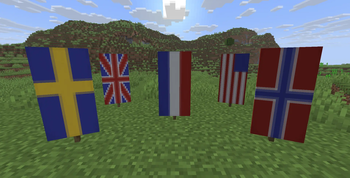
# CountryBanners CountryBanners is a plugin that adds country flag banners to your server. Players automatically receive their own country's flag when they join, detected from their IP address. Over 30 flags are included, created using Minecraft's built-in banner patterns. You can configure when and how players receive their flag, either only on their first join or every time they connect. You can also choose where the banner is placed, whether that's on their head, in their main hand, off-hand, or just added to their inventory. The banner's display name and rarity are configurable too, and the patterns used to make each flag can be hidden so the item looks clean. It is also possible to register your own banners. !(https://i.imgur.com/ydqkDXr.png) Country detection is handled through MaxMind, a free geolocation service. To set it up, create a free account at (https://www.maxmind.com/en/geolite2/signup), go to Manage License Keys, generate a new key, and paste your Account ID and License Key into the config file. **Quick links:** - (https://github.com/justEli/CountryBanners) - (https://discord.gg/fVwCETj) - (https://ko-fi.com/justeli) !(https://discordapp.com/api/guilds/755814688041992292/widget.png?style=banner2) ## Commands | Command | Description | | -------- | -------- | | `/cbanners give <country_code>` | Give a country's flag banner to yourself. | | `/cbanners register <country_code> <country_name>` | Register the banner in your hand for a specific country. | | `/cbanners reload` | Reload the configuration and load new banners. | | `/cbanners version` | Show the current and latest available version. | ## Default config ```yml banner: # Display name of every banner. # {country} = placeholder for country name name: 'Flag of {country}' # Rarity of the flag banners. # 'common' = white # 'uncommon' = yellow # 'rare' = aqua # 'epic' = light purple rarity: 'uncommon' patterns: # Hide the list of banner patterns that were used to make the banner. hide: true # Credentials for retrieving country codes from IP addresses. This plugin uses a service # called MaxMind, which requires the registration of a FREE account. Please create an # account at https://www.maxmind.com/en/geolite2/signup, go to 'Manage license keys', and # 'Generate new license key'. Then add the 'Account ID' and 'License Key' down here. maxmind: account-id: 0 # i.e. 123456 license-key: '' # i.e. xxxxxx_xxxxxxxxxxxxxxxxxxxxxxxxxxxxx_xxx # Events when a player will be given their country banner. # 'first_join' = only when a player joins for the first time # 'join' = every time a player joins the server enabled-events: # The position to hand out the banner to. # 'helmet' = on their head # 'main_hand' = in their main hand # 'off_hand' = in their off-hand # 'inventory' = to their inventory hand-out-position: 'helmet' # Show a message on start-up when an update is available for the plugin. notify-on-update: true ```
# CountryBanners CountryBanners is a plugin that adds country flag banners to your server. Players automatically receive their own country's flag when they join, detected from their IP address. Over 30 flags are included, created using Minecraft's built-in banner patterns.
You can configure when and how players receive their flag, either only on their first join or every time they connect. You can also choose where the banner is placed, whether that's on their head, in their main hand, off-hand, or just added to their inventory. The banner's display name and rarity are configurable too, and the patterns used to make each flag can be hidden so the item looks clean. It is also possible to register your own banners.
!(https://i.imgur.com/ydqkDXr.png)
Country detection is handled through MaxMind, a free geolocation service. To set it up, create a free account at (https://www.maxmind.com/en/geolite2/signup), go to Manage License Keys, generate a new key, and paste your Account ID and License Key into the config file.
Quick links: - (https://github.com/justEli/CountryBanners) - (https://discord.gg/fVwCETj) - (https://ko-fi.com/justeli)
!(https://discordapp.com/api/guilds/755814688041992292/widget.png?style=banner2)
## Commands
| Command | Description |
| -------- | -------- |
| `/cbanners give
## Default config ```yml banner: # Display name of every banner. # {country} = placeholder for country name name: 'Flag of {country}' # Rarity of the flag banners. # 'common' = white # 'uncommon' = yellow # 'rare' = aqua # 'epic' = light purple rarity: 'uncommon' patterns: # Hide the list of banner patterns that were used to make the banner. hide: true
# Credentials for retrieving country codes from IP addresses. This plugin uses a service # called MaxMind, which requires the registration of a FREE account. Please create an # account at https://www.maxmind.com/en/geolite2/signup, go to 'Manage license keys', and # 'Generate new license key'. Then add the 'Account ID' and 'License Key' down here. maxmind: account-id: 0 # i.e. 123456 license-key: '' # i.e. xxxxxx_xxxxxxxxxxxxxxxxxxxxxxxxxxxxx_xxx
# Events when a player will be given their country banner. # 'first_join' = only when a player joins for the first time # 'join' = every time a player joins the server enabled-events: ['first_join']
# The position to hand out the banner to. # 'helmet' = on their head # 'main_hand' = in their main hand # 'off_hand' = in their off-hand # 'inventory' = to their inventory hand-out-position: 'helmet'
# Show a message on start-up when an update is available for the plugin. notify-on-update: true ```
📊 Mod Details
- Game
- Minecraft Plugins
- Author
- justEli
- Version
- 1.0
- Downloads
- 55
- Endorsements
- 3
- Category
- decoration
- Created
- 5/31/2026
- Updated
- 5/26/2026
- Game Versions
- 1.21.10, 1.21.11, 26.1, 26.1.1, 26.1.2
- Tags
- decoration
🔧 How to Install Minecraft Plugins Mods
Download from Modrinth. Use Prism Launcher or drop into your mods folder.
📖 Full step-by-step install guide for Minecraft Plugins →
Visit the official mod page for specific installation instructions for this mod.
🎮 Need cheat codes or console commands? Check ur gaming wiki for Minecraft Plugins commands, item IDs, and more.
❓ Frequently Asked Questions
Which Minecraft Plugins versions does CountryBanners support?
The author lists 1.21.10, 1.21.11, 26.1, 26.1.1, 26.1.2, 26.2. Other versions may work but are untested by the author.
What is the latest version of CountryBanners?
Version 1.0, published 2026-05-26 with 55 downloads recorded at the source.
Keep browsing — more Minecraft Plugins mods await