CoreStructuresX
🟡 Updated this year🖼️ Gallery (1 images)
🔍 Analysis
- 🏆 #182 of 183 adventure mods in this game by downloads
📋 About This Mod
# CoreStructuresX CoreStructuresX is a Paper-only modular structure plugin for Minecraft servers. It lets administrators build structures from validated WorldEdit or FastAsyncWorldEdit schematic packs, then expand them through marked connection points in automatic or player-proximity mode. The goal is to make modular structures controlled, repeatable, and recoverable without tying them to world generation. Every structure is started manually by an administrator, while pack settings define how its modules can continue to expand. For pack authoring, marker formats, configuration examples, commands, and troubleshooting, visit the (https://wiki-corestructuresx.icewolf23x.dev/). <p align="center"> <img src="https://www.pngall.com/wp-content/uploads/8/Warning-Stamp-PNG.png" alt="Warning: Work in Progress" width="650"> </p> > CoreStructuresX is currently under active development and should be considered a **work in progress**. > > The plugin is not yet feature-complete and may contain bugs, incomplete functionality, unexpected behavior, or breaking issues. Future updates may modify commands, configuration files, pack formats, marker behavior, persistence data, expansion logic, or other parts of the plugin without maintaining full backward compatibility. > > Before using CoreStructuresX on a production server: > > * test the plugin and all structure packs in a separate environment; > * keep regular backups of worlds, pack files, configuration files, and instance JSON data; > * review release notes before updating; > * do not assume that configurations or structures created with an earlier version will continue to work unchanged. > > CoreStructuresX is currently recommended primarily for testing, development, and controlled environments. ## What CoreStructuresX Does * Loads modular structure packs from the plugin data folder. * Uses WorldEdit or FastAsyncWorldEdit `.schem` files as structure modules. * Validates pack files, schematic references, marker signs, groups, and placement settings before a structure starts. * Uses `` marker signs for origins, module connectors, and post-paste console commands. * Supports weighted schematic groups, fallback groups, and closing groups. * Supports `AUTOMATIC` and `PLAYER_PROXIMITY` expansion modes. * Checks transformed schematic bounds to prevent unwanted module overlap. * Supports optional block whitelist checks and connector lookahead checks. * Pastes large schematics through configurable chunked jobs. * Can pause automatic expansion when server TPS or MSPT crosses configured limits. * Persists instances, generated modules, connectors, triggers, and command state in JSON. * Includes administration commands for validation, pack listing, structure starts, and instance management. --- ## Stats (https://icewolf23x.github.io/CoreX-Badges/corestructuresx/paper-chart.svg)](https://bstats.org/plugin/bukkit/CoreStructuresX-paper) ## How To Use Install CoreStructuresX together with WorldEdit or FastAsyncWorldEdit on a Paper server, then start the server once to generate the plugin folders and default `config.yml`. Create a pack under `plugins/CoreStructuresX/packs/<pack-id>/` with its YAML definitions, schematic files, and `` marker signs. Run `/csx validate` and correct every reported error before starting the structure with `/csx start <pack-id>`. Structures are not added to biome, chunk, seed, or terrain generation. An administrator always chooses when and where the first module is placed. Because CoreStructuresX is still under active development, test new packs and plugin updates on a separate server before using them in an existing production world. ## Modular Structure Packs Each pack defines one structure type and separates its responsibilities across focused files: * `pack.yml` identifies the pack and its referenced files. * `structure.yml` controls the start group, generation mode, placement rules, limits, and performance settings. * `groups.yml` defines weighted schematic candidates, fallback groups, and closing groups. * `commands.yml` defines optional weighted console commands used by command markers. * `schematics/` contains the WorldEdit or FAWE `.schem` modules. Strict validation prevents invalid packs from starting. This catches missing files, unresolved groups, invalid markers, unsupported settings, and other authoring problems before blocks are pasted into the world. Validation reduces the risk of invalid placements but does not guarantee that a pack is free from logical, visual, or runtime problems. Pack authors should always test complete expansion paths before public or production use. ## Marker-Driven Expansion CoreStructuresX reads three marker types from signs saved inside schematics: * `ORIGIN` defines the module placement origin. If it is omitted, the saved schematic clipboard origin is used by default. * `CONNECTOR` creates a one-use expansion point linke
# CoreStructuresX
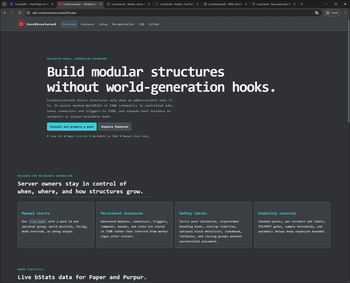
CoreStructuresX is a Paper-only modular structure plugin for Minecraft servers. It lets administrators build structures from validated WorldEdit or FastAsyncWorldEdit schematic packs, then expand them through marked connection points in automatic or player-proximity mode.
The goal is to make modular structures controlled, repeatable, and recoverable without tying them to world generation. Every structure is started manually by an administrator, while pack settings define how its modules can continue to expand.
For pack authoring, marker formats, configuration examples, commands, and troubleshooting, visit the (https://wiki-corestructuresx.icewolf23x.dev/).

> CoreStructuresX is currently under active development and should be considered a work in progress. > > The plugin is not yet feature-complete and may contain bugs, incomplete functionality, unexpected behavior, or breaking issues. Future updates may modify commands, configuration files, pack formats, marker behavior, persistence data, expansion logic, or other parts of the plugin without maintaining full backward compatibility. > > Before using CoreStructuresX on a production server: > > test the plugin and all structure packs in a separate environment; > keep regular backups of worlds, pack files, configuration files, and instance JSON data; > review release notes before updating; > do not assume that configurations or structures created with an earlier version will continue to work unchanged. > > CoreStructuresX is currently recommended primarily for testing, development, and controlled environments.
## What CoreStructuresX Does
Loads modular structure packs from the plugin data folder. Uses WorldEdit or FastAsyncWorldEdit `.schem` files as structure modules. Validates pack files, schematic references, marker signs, groups, and placement settings before a structure starts. Uses `` marker signs for origins, module connectors, and post-paste console commands. Supports weighted schematic groups, fallback groups, and closing groups. Supports `AUTOMATIC` and `PLAYER_PROXIMITY` expansion modes. Checks transformed schematic bounds to prevent unwanted module overlap. Supports optional block whitelist checks and connector lookahead checks. Pastes large schematics through configurable chunked jobs. Can pause automatic expansion when server TPS or MSPT crosses configured limits. Persists instances, generated modules, connectors, triggers, and command state in JSON. Includes administration commands for validation, pack listing, structure starts, and instance management.
[!(https://icewolf23x.github.io/CoreX-Badges/corestructuresx/paper-chart.svg)](https://bstats.org/plugin/bukkit/CoreStructuresX-paper)
## How To Use
Install CoreStructuresX together with WorldEdit or FastAsyncWorldEdit on a Paper server, then start the server once to generate the plugin folders and default `config.yml`.
Create a pack under `plugins/CoreStructuresX/packs/
Structures are not added to biome, chunk, seed, or terrain generation. An administrator always chooses when and where the first module is placed.
Because CoreStructuresX is still under active development, test new packs and plugin updates on a separate server before using them in an existing production world.
## Modular Structure Packs
Each pack defines one structure type and separates its responsibilities across focused files:
`pack.yml` identifies the pack and its referenced files. `structure.yml` controls the start group, generation mode, placement rules, limits, and performance settings. `groups.yml` defines weighted schematic candidates, fallback groups, and closing groups. `commands.yml` defines optional weighted console commands used by command markers. `schematics/` contains the WorldEdit or FAWE `.schem` modules.
Strict validation prevents invalid packs from starting. This catches missing files, unresolved groups, invalid markers, unsupported settings, and other authoring problems before blocks are pasted into the world.
Validation reduces the risk of invalid placements but does not guarantee that a pack is free from logical, visual, or runtime problems. Pack authors should always test complete expansion paths before public or production use.
## Marker-Driven Expansion
CoreStructuresX reads three marker types from signs saved inside schematics:
`ORIGIN` defines the module placement origin. If it is omitted, the saved schematic clipboard origin is used by default. * `CONNECTOR` creates a one-use expansion point linke
📊 Mod Details
- Game
- Minecraft Plugins
- Author
- IceWolf23X
- Version
- 2026.1.0
- Downloads
- 2
- Endorsements
- 1
- Category
- adventure
- Created
- 8/27/2026
- Updated
- 8/2/2026
- Game Versions
- 1.21, 1.21.1, 1.21.2, 1.21.3, 1.21.4
- Tags
- adventure, decoration, management
🔧 How to Install Minecraft Plugins Mods
Download from Modrinth. Use Prism Launcher or drop into your mods folder.
📖 Full step-by-step install guide for Minecraft Plugins →
Visit the official mod page for specific installation instructions for this mod.
🎮 Need cheat codes or console commands? Check ur gaming wiki for Minecraft Plugins commands, item IDs, and more.
❓ Frequently Asked Questions
Which Minecraft Plugins versions does CoreStructuresX support?
The author lists 1.21, 1.21.1, 1.21.2, 1.21.3, 1.21.4, 1.21.5. Other versions may work but are untested by the author.
What is the latest version of CoreStructuresX?
Version 2026.1.0, published 2026-08-02 with 2 downloads recorded at the source.
Keep browsing — more Minecraft Plugins mods await