Command Visibility Plugin
🟠 Updated over a year ago🖼️ Gallery (1 images)
🔍 Analysis
- 👍 0.6% endorsement rate
- 🏆 #60 of 171 management mods in this game by downloads
📋 About This Mod
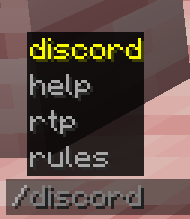
### CommandVisibilityPlugin ### Description: CommandVisibilityPlugin is a simple yet powerful plugin for Minecraft servers that allows you to control which commands players can see in their `/tab` and `/help` lists. This plugin helps server administrators manage visibility of commands, ensuring players only see commands they have permission to use. Additionally, the plugin includes an option to bypass visibility restrictions for administrators or trusted players using specific permissions. Its a free option for Plugin Hide Pro ### Features: - **Control Command Visibility:** - The plugin allows server administrators to define which commands players can see in `/tab` (tab-completion) and `/help` commands. - You can specify commands to show for specific players or groups, based on their permissions. - **Bypass Option for Admins:** - Players with the `commandvisibility.bypass` permission will see **all commands** (ignoring any visibility restrictions). - **Configurable via `config.yml`:** - You can easily customize the list of commands that should be shown using the `shown-commands` section in `config.yml`. - Add or remove commands from the list as needed. - **Reload Command:** - The plugin includes a `/commandvisibility reload` command, which reloads the configuration without needing to restart the server. - Only players with the `commandvisibility.reload` permission can execute this command to refresh the plugin’s settings. - **Permissions Integration:** - Fully compatible with **LuckPerms** for managing permissions. - You can assign permissions like `commandvisibility.reload` and `commandvisibility.bypass` to control command visibility and reload access. ### **Installation:** 1. **Download the Plugin:** - Download the `CommandVisibilityPlugin.jar` file. 2. **Add to Plugins Folder:** - Place the downloaded `CommandVisibilityPlugin.jar` file into the `plugins/` folder of your Minecraft server. 3. **Restart the Server:** - Restart your Minecraft server to load the plugin. This will automatically generate a `config.yml` file in the plugin's folder. 4. **Edit the Configuration:** - Open `plugins/CommandVisibilityPlugin/config.yml`. - Add or remove commands from the `shown-commands` list that you want players to see. Example: ```yaml shown-commands: - rtp - discord - help - rules - msg ``` ### **Permissions:** 1. **`commandvisibility.bypass`**: - **Purpose**: Grants players the ability to **see all commands**, bypassing the visibility restrictions. - **Usage**: Assign this permission to trusted players or admins who should always see all commands, regardless of the configuration. - **Example**: `/lp user <username> permission set commandvisibility.bypass true`
### CommandVisibilityPlugin
### Description:
CommandVisibilityPlugin is a simple yet powerful plugin for Minecraft servers that allows you to control which commands players can see in their `/tab` and `/help` lists. This plugin helps server administrators manage visibility of commands, ensuring players only see commands they have permission to use. Additionally, the plugin includes an option to bypass visibility restrictions for administrators or trusted players using specific permissions. Its a free option for Plugin Hide Pro
### Features:
- Control Command Visibility:
- - The plugin allows server administrators to define which commands players can see in `/tab` (tab-completion) and `/help` commands.
- - You can specify commands to show for specific players or groups, based on their permissions.
- Bypass Option for Admins:
- - Players with the `commandvisibility.bypass` permission will see all commands (ignoring any visibility restrictions).
- Configurable via `config.yml`:
- - You can easily customize the list of commands that should be shown using the `shown-commands` section in `config.yml`.
- - Add or remove commands from the list as needed.
- Reload Command:
- - The plugin includes a `/commandvisibility reload` command, which reloads the configuration without needing to restart the server.
- - Only players with the `commandvisibility.reload` permission can execute this command to refresh the plugin’s settings.
- Permissions Integration:
- - Fully compatible with LuckPerms for managing permissions.
- - You can assign permissions like `commandvisibility.reload` and `commandvisibility.bypass` to control command visibility and reload access.
### Installation:
1. Download the Plugin: - Download the `CommandVisibilityPlugin.jar` file.
2. Add to Plugins Folder: - Place the downloaded `CommandVisibilityPlugin.jar` file into the `plugins/` folder of your Minecraft server.
3. Restart the Server: - Restart your Minecraft server to load the plugin. This will automatically generate a `config.yml` file in the plugin's folder.
4. Edit the Configuration: - Open `plugins/CommandVisibilityPlugin/config.yml`. - Add or remove commands from the `shown-commands` list that you want players to see. Example: ```yaml shown-commands: - rtp - discord - help - rules - msg ```
### Permissions:
1. `commandvisibility.bypass`:
- Purpose: Grants players the ability to see all commands, bypassing the visibility restrictions.
- Usage: Assign this permission to trusted players or admins who should always see all commands, regardless of the configuration.
- Example: `/lp user
📊 Mod Details
- Game
- Minecraft Plugins
- Author
- oafachBene
- Version
- 1.20.1
- Downloads
- 689
- Endorsements
- 4
- Category
- management
- Created
- 4/18/2025
- Updated
- 4/13/2025
- Game Versions
- 1.20.1
- Tags
- management, technology, utility
🔧 How to Install Minecraft Plugins Mods
Download from Modrinth. Use Prism Launcher or drop into your mods folder.
📖 Full step-by-step install guide for Minecraft Plugins →
Visit the official mod page for specific installation instructions for this mod.
🎮 Need cheat codes or console commands? Check ur gaming wiki for Minecraft Plugins commands, item IDs, and more.
❓ Frequently Asked Questions
Which Minecraft Plugins versions does Command Visibility Plugin support?
The author lists 1.20.1. Other versions may work but are untested by the author.
What is the latest version of Command Visibility Plugin?
Version 1.20.1, published 2025-04-13 with 689 downloads recorded at the source.
Keep browsing — more Minecraft Plugins mods await