Combat Log Detector Plugin
🟠 Updated over a year ago🖼️ Gallery (1 images)
🔍 Analysis
- 👍 0.0% endorsement rate
- 🏆 #1427 of 1560 bukkit mods in this game by downloads
📋 About This Mod
## Combat Log Detector Plugin !(https://cdn.modrinth.com/data/cached_images/ce17fc194545e963a54fabda6e050d20ec9aa2bc_0.webp) **Version**: 1.0.0 **Minecraft Version**: 1.16.5 **Platform**: Spigot **Developed with Java 8** ### Overview: The Combat Log Detector plugin helps server administrators detect players who combat log (leave the server during PvP). It provides essential features like combat detection, monitoring combat logs, and integration with Discord for notifications. This plugin doesn't punish or kill players for combat logging, but it provides valuable information to admins. ### Key Features: - **Combat Detection**: Tracks player interactions during PvP. Players are tagged as "in combat" for 10 seconds after hitting or being hit. - **Combat Log Detection**: Monitors player activity and detects when players quit during combat. It will not punish or kill the player but will log the event for admin review. - **Discord Integration**: Sends real-time notifications to Discord using webhooks when a player combat logs. The message includes: - Player name - World name - Coordinates (X, Y, Z) ### Configuration: - The plugin's Discord webhook URL can be configured in the `config.yml` file. - When the plugin is first installed, the `config.yml` file will be generated, where you can add your Discord webhook URL. ### Installation: 1. Place the JAR file in the `plugins` folder of your Spigot server. 2. Start the server to generate the `config.yml` file. 3. Open the `config.yml` file and add your Discord webhook URL. 4. Restart the server to apply the settings. ### Compatibility: - **Minecraft Version**: 1.16.5 - **API**: Spigot 1.16.5 (Compatible with most Minecraft servers) - **Java Version**: Java 8 ### License: This plugin is open-source and free to use. Contributions are welcome!
- Version
- 1. 0. 0
- Minecraft Version
- 1. 16. 5
- Platform
- Spigot
### Overview: The Combat Log Detector plugin helps server administrators detect players who combat log (leave the server during PvP). It provides essential features like combat detection, monitoring combat logs, and integration with Discord for notifications. This plugin doesn't punish or kill players for combat logging, but it provides valuable information to admins.
### Key Features: - Combat Detection: Tracks player interactions during PvP. Players are tagged as "in combat" for 10 seconds after hitting or being hit.
- Combat Log Detection:
- Monitors player activity and detects when players quit during combat. It will not punish or kill the player but will log the event for admin review.
- Discord Integration:
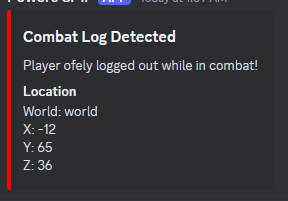
- Sends real-time notifications to Discord using webhooks when a player combat logs. The message includes:
- - Player name
- - World name
- - Coordinates (X, Y, Z)
### Configuration: - The plugin's Discord webhook URL can be configured in the `config.yml` file. - When the plugin is first installed, the `config.yml` file will be generated, where you can add your Discord webhook URL.
### Installation: 1. Place the JAR file in the `plugins` folder of your Spigot server. 2. Start the server to generate the `config.yml` file. 3. Open the `config.yml` file and add your Discord webhook URL. 4. Restart the server to apply the settings.
### Compatibility: - Minecraft Version: 1. 16. 5 - API: Spigot 1. 16. 5 (Compatible with most Minecraft servers) - Java Version: Java 8
### License: This plugin is open-source and free to use. Contributions are welcome!
📊 Mod Details
- Game
- Minecraft Plugins
- Author
- periklis20m
- Version
- 1.1.0
- Downloads
- 1,221
- Endorsements
- 0
- Category
- bukkit
- Created
- 12/30/2024
- Updated
- 1/5/2025
- Game Versions
- 1.16, 1.16.1, 1.16.2, 1.16.3, 1.16.4
- Tags
- management, storage, technology
🔧 How to Install Minecraft Plugins Mods
Download from Modrinth. Use Prism Launcher or drop into your mods folder.
📖 Full step-by-step install guide for Minecraft Plugins →
Visit the official mod page for specific installation instructions for this mod.
🎮 Need cheat codes or console commands? Check ur gaming wiki for Minecraft Plugins commands, item IDs, and more.
❓ Frequently Asked Questions
Which Minecraft Plugins versions does Combat Log Detector Plugin support?
The author lists 1.16, 1.16.1, 1.16.2, 1.16.3, 1.16.4, 1.16.5. Other versions may work but are untested by the author.
What is the latest version of Combat Log Detector Plugin?
Version 1.1.0, published 2025-01-05 with 1,221 downloads recorded at the source.
Keep browsing — more Minecraft Plugins mods await