CloudProtections
🟡 Updated this year🖼️ Gallery (1 images)
🔍 Analysis
- 🏆 #114 of 235 management mods in this game by downloads
📋 About This Mod
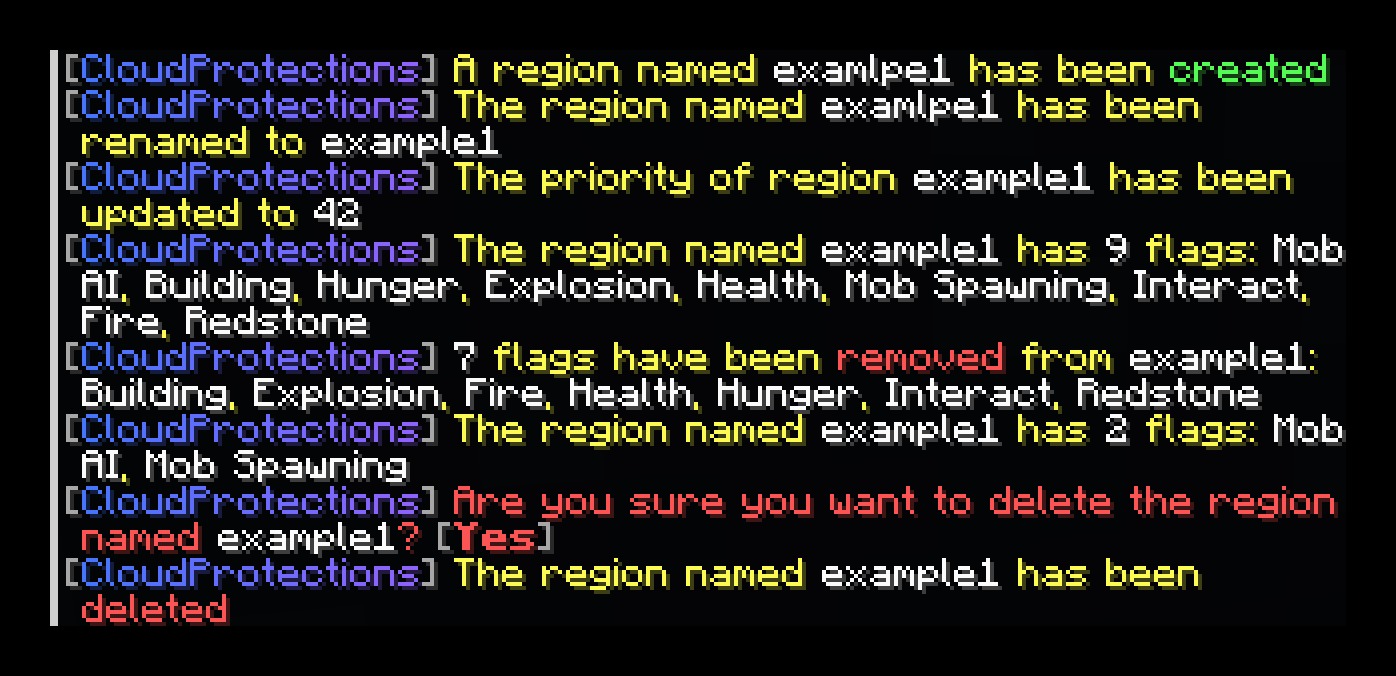
# CloudProtections Minecraft paper plugin for protecting spherical/cubic regions from mobs/players. ## Download Info > Note: Depends on (https://modrinth.com/project/commandapi) and (https://modrinth.com/project/cloudcore). ## Usage - Use `/cprots list` to list all protection regions - Use `/cprots create <box|sphere> <id> <pos1> <pos2|radius> ` to create a cubic or spherical region - A created region is protected from all flags by default - Use `/cprots modify <region> delete` to delete a specific region - Use `/cprots modify <region> rename <id>` to rename a specific region - Use `/cprots modify <region> flags <add|remove> <flag1> ...` to add or remove specific flags from a specific region - Use `/cprots modify <region> flags list` to list the flags currently active for the specific region - Use `/cprots modify <region> exclusions <add|remove> <uuid>` to add or remove specific exclusions from a specific region - The specified UUID may be the UUID of an entity which is ignored by this region - Use `/cprots modify <region> exclusions list` to list the exclusions currently active for the specific region - Use `/cprots modify <region> priority <priority>` to change the priority of regions - This is useful for nesting multiple regions - The higher the priority, the more the specific region has to say about wether a specific interaction is allowed or not <details> <summary><strong>Using this as API</strong></summary> ### Dependency Add the following to your `build.gradle.kts`: ```kotlin repositories { maven("https://repo.cloudcraftmc.de/releases/") } dependencies { compileOnly("dev.booky:cloudprotections:{VERSION}") } ``` ### Usage You can get the `ProtectionsManager` instance using bukkit's `ServicesManager`. For updating regions use `ProtectionsManager#updateRegions`. This instantly saves the updated regions to file. Creating a new region can be done using `new ProtectionRegion`. Exclusions and region flags are modifiable, the area, id and priority is not modifiable. </details>
# CloudProtections
Minecraft paper plugin for protecting spherical/cubic regions from mobs/players.
## Download Info
> Note: Depends on (https://modrinth.com/project/commandapi) and (https://modrinth.com/project/cloudcore).
- Use `/cprots list` to list all protection regions
- Use `/cprots create
]` to create a cubic or spherical region - - A created region is protected from all flags by default
- Use `/cprots modify
delete` to delete a specific region - Use `/cprots modify
rename ` to rename a specific region - Use `/cprots modify
flags [ ] [ ] ...` to add or remove specific flags from a specific region - Use `/cprots modify
flags list` to list the flags currently active for the specific region - Use `/cprots modify
exclusions ` to add or remove specific exclusions from a specific region - - The specified UUID may be the UUID of an entity which is ignored by this region
- Use `/cprots modify
exclusions list` to list the exclusions currently active for the specific region - Use `/cprots modify
priority ` to change the priority of regions - - This is useful for nesting multiple regions
- - The higher the priority, the more the specific region has to say about wether a specific interaction is allowed or not
Using this as API
### Dependency
Add the following to your `build.gradle.kts`:
```kotlin repositories { maven("https://repo.cloudcraftmc.de/releases/") }
dependencies { compileOnly("dev.booky:cloudprotections:{VERSION}") } ```
You can get the `ProtectionsManager` instance using bukkit's `ServicesManager`. For updating regions use `ProtectionsManager#updateRegions`. This instantly saves the updated regions to file. Creating a new region can be done using `new ProtectionRegion`. Exclusions and region flags are modifiable, the area, id and priority is not modifiable.
📊 Mod Details
- Game
- Minecraft Plugins
- Author
- booky10
- Version
- 1.0.6
- Downloads
- 242
- Endorsements
- 1
- Category
- management
- Created
- 10/6/2024
- Updated
- 10/9/2025
- Game Versions
- 1.21.10
- Tags
- management
🔧 How to Install Minecraft Plugins Mods
Download from Modrinth. Use Prism Launcher or drop into your mods folder.
📖 Full step-by-step install guide for Minecraft Plugins →
Visit the official mod page for specific installation instructions for this mod.
🎮 Need cheat codes or console commands? Check ur gaming wiki for Minecraft Plugins commands, item IDs, and more.
❓ Frequently Asked Questions
Which Minecraft Plugins versions does CloudProtections support?
The author lists 1.21.10. Other versions may work but are untested by the author.
What is the latest version of CloudProtections?
Version 1.0.6, published 2025-10-09 with 242 downloads recorded at the source.
Keep browsing — more Minecraft Plugins mods await