LightChatWelcomer
🟠 Updated over a year ago🖼️ Gallery (2 images)
🔍 Analysis
- 🏆 #940 of 1224 bukkit mods in this game by downloads
📋 About This Mod
# Light Chat Welcomer Simple Spigot/Bukkit plugin to display custom join messages you can specify colorful message on first or latter joins for player in config # Configuration Example ```yml # plugins/LightChatWelcomer/config.yml first-join-message: "&red&Welcome to the server! %player%, look to (https://example.com Click here)" welcome-back-message: "&yellow&Welcome back to the server! You were last seen on %lastseen%" ``` # Variables - `%player%` variable to get user name - `%lastseen%` to get formatted date of user last login (only avaliable in `welcome-back-message`) # Colors You can specify text color in few ways: ``` &6Text # gold color ``` or by color name ``` &gold&Text ``` - Full color list: https://minecraft.fandom.com/wiki/Formatting_codes # Links You can add clickable links like: ``` (blue https://example.com Hover message) ``` !(https://github.com/user-attachments/assets/72443fc8-d215-41bf-ab8a-9fa53547d88e) !(https://github.com/user-attachments/assets/9d8c1985-5ac0-4b41-b6ec-59c122ef4b12) or run commands on text click ``` (/help) ``` - For advanced formatting take a look at https://github.com/Phoenix616/MineDown
# Light Chat Welcomer
Simple Spigot/Bukkit plugin to display custom join messages
you can specify colorful message on first or latter joins for player in config
# Configuration Example
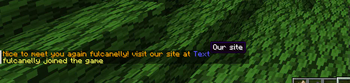
# plugins/LightChatWelcomer/config.yml first-join-message: "&red&Welcome to the server! %player%, look to [&blue&Hello](https://example.com Click here)"
welcome-back-message: "&yellow&Welcome back to the server! You were last seen on %lastseen%"
# Variables
- `%player%` variable to get user name
- `%lastseen%` to get formatted date of user last login (only avaliable in `welcome-back-message`)
You can specify text color in few ways:
``` &6Text # gold color ```
or by color name
``` &gold&Text ```
- Full color list: https://minecraft.fandom.com/wiki/Formatting_codes
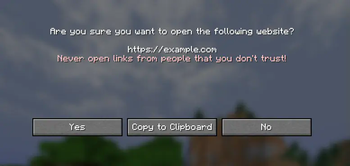
You can add clickable links like:
``` (blue https://example.com Hover message) ```
!(https://github.com/user-attachments/assets/72443fc8-d215-41bf-ab8a-9fa53547d88e) !(https://github.com/user-attachments/assets/9d8c1985-5ac0-4b41-b6ec-59c122ef4b12)
or run commands on text click
``` (/help) ```
- For advanced formatting take a look at https://github.com/Phoenix616/MineDown
📊 Mod Details
- Game
- Minecraft Plugins
- Author
- fulcanelly
- Version
- 1.2.1
- Downloads
- 93
- Endorsements
- 3
- Category
- bukkit
- Created
- 5/20/2025
- Updated
- 5/13/2025
- Game Versions
- 1.11, 1.11.1, 1.11.2, 1.12, 1.12.1
- Tags
- management, social, utility
🔧 How to Install Minecraft Plugins Mods
Download from Modrinth. Use Prism Launcher or drop into your mods folder.
📖 Full step-by-step install guide for Minecraft Plugins →
Visit the official mod page for specific installation instructions for this mod.
🎮 Need cheat codes or console commands? Check ur gaming wiki for Minecraft Plugins commands, item IDs, and more.
❓ Frequently Asked Questions
Which Minecraft Plugins versions does LightChatWelcomer support?
The author lists 1.11, 1.11.1, 1.11.2, 1.12, 1.12.1, 1.12.2. Other versions may work but are untested by the author.
What is the latest version of LightChatWelcomer?
Version 1.2.1, published 2025-05-13 with 93 downloads recorded at the source.
Keep browsing — more Minecraft Plugins mods await