CDisc Music
🟡 Updated this year🖼️ Gallery (1 images)
🔍 Analysis
- 👍 0.4% endorsement rate
- 🏆 #215 of 367 adventure mods in this game by downloads
📋 About This Mod
# 🎵 CDisc Music **Turn any track from the internet into a real, playable music disc in Minecraft.** Drop it in a jukebox and everyone nearby hears it through proximity voice chat — the closer you stand, the louder it gets. Supports **YouTube, Spotify, SoundCloud, Yandex Music, VK, TikTok** and more. --- ## ✨ Features - 🎧 **Custom discs from anywhere** — create a disc from a search query or a direct link. - 📡 **True proximity audio** — the music plays from the jukebox and fades with distance. No global spam, no plugin messages — just sound in the world. - 🔊 **Two voice backends** — works with **Simple Voice Chat** *or* **Plasmo Voice**. Pick whichever your server already runs. - 🎛️ **In-game player GUI** — right-click a playing jukebox to open a full player: play / pause, seek ±5 s, previous / next track, and repeat modes. - 📀 **Disc queue system** — load up to **42 discs** into one jukebox and let them play back-to-back. Choose what happens to a finished disc (keep it, eject it, or move it to the end) and set repeat to **off / whole queue / single track**. - 📊 **Now-Playing boss bar** — sneak near a jukebox to see the current track and a progress bar that fills as it plays. - 🔦 **Beacon range boost** — build a beacon pyramid under a jukebox to extend how far the music can be heard (bigger pyramid = bigger range). - 🌍 **Many sources** — YouTube, SoundCloud, Spotify, Yandex Music, VK, TikTok, Bandcamp, Vimeo, Twitch, Mixcloud, and direct HTTP streams. --- ## 📥 Requirements - **(https://modrinth.com/plugin/simple-voice-chat)** *or* **(https://modrinth.com/plugin/plasmo-voice)** — required (one of them) Drop the plugin (and the voice-chat plugin) into your server's `plugins/` folder and restart. Players need the matching voice-chat **client mod** installed to hear anything. --- ## Stats: https://bstats.org/plugin/bukkit/CDisc%20Music --- ## 🚀 How to use ### 1. Create a disc Hold any music disc in your hand and run: ``` /cdisc create <search or link> ``` Examples: - `/cdisc create yt:never gonna give you up` — search YouTube - `/cdisc create https://youtu.be/dQw4w9WgXcQ` — a direct link - `/cdisc create sc:lofi hip hop` — search SoundCloud The disc in your hand becomes a **custom CDisc** with the track baked in — its name and author show up in the tooltip. From here it's a normal item: carry it, trade it, store it in a chest, give it to a friend. > Tip: a link that contains a playlist (`...&list=...`) automatically plays just the single track it points to. ### 2. Play it Put the custom disc into a **jukebox**, exactly like a vanilla record. The track streams through the voice chat and plays **from the jukebox itself** — walk away and it fades out, walk closer and it gets louder. Everyone in range hears the same thing, in sync. ### 3. See what's playing — the boss bar **Sneak (Shift) while looking at the jukebox.** A bar appears at the top of your screen showing `Author - Track ` and fills up as the song plays. It stays until you sneak at the jukebox again — so you can turn away and it keeps updating. This also "arms" the jukebox for the next step. ### 4. Open the player — right-click While the boss bar is showing, **right-click the jukebox** to open the player GUI: - ⏯️ **Play / Pause** - ⏪⏩ **Seek −5s / +5s** (or click the info item to type an exact timecode in chat) - ⏮️⏭️ **Previous / Next track** in the queue - 🔁 **Repeat**: off → whole queue → single track - 📀 **Open the disc queue** - 🔦 **Sound range** (beacon boost — see below) > ⚠️ Right-clicking **without** sneaking first ejects the disc, just like vanilla. Sneak first, then right-click, to open the player. ### 5. Build a queue A single jukebox can hold a whole playlist. - **Shift + right-click** a playing jukebox (or hit the queue button in the player) to open the **queue GUI**. - Drop custom discs into the **42 cells** — they play top-to-bottom, one after another. - Click a disc to jump straight to it — confirm with the **green wool**, cancel with the **red wool**. - The **played-disc policy** button decides what happens to each disc once it finishes: - **Keep in the queue** — it stays where it is. - **Eject** — it pops out of the jukebox. - **Move to the end** — it goes to the back, so the queue keeps cycling through your discs. - Combine the policy with **repeat (queue / track)** for endless playback. ### 6. Extend the range with a beacon Build a **beacon pyramid** under the jukebox (you don't even need the beacon block — just the pyramid). Then open the player and click **Sound range** to raise the level: | Pyramid level | Extra range | | --- | --- | | 1 | +16 blocks | | 2 | +32 blocks | | 3 | +64 blocks | !(https://cdn.modrinth.com/data/cached_images/9615566c277f8ac203e6e4416838e74b38a3415d.gif) Perfect for a town square, an arena, or a club. The boost is added on top of the base distance from `config.yml`. ### 7. Breaking the jukeb
# 🎵 CDisc Music
Turn any track from the internet into a real, playable music disc in Minecraft. Drop it in a jukebox and everyone nearby hears it through proximity voice chat — the closer you stand, the louder it gets.
Supports YouTube, Spotify, SoundCloud, Yandex Music, VK, TikTok and more.
## ✨ Features
- 🎧 Custom discs from anywhere — create a disc from a search query or a direct link.
- 📡 True proximity audio — the music plays from the jukebox and fades with distance. No global spam, no plugin messages — just sound in the world.
- 🔊 Two voice backends — works with Simple Voice Chat or Plasmo Voice. Pick whichever your server already runs.
- 🎛️ In-game player GUI — right-click a playing jukebox to open a full player: play / pause, seek ±5 s, previous / next track, and repeat modes.
- 📀 Disc queue system — load up to 42 discs into one jukebox and let them play back-to-back. Choose what happens to a finished disc (keep it, eject it, or move it to the end) and set repeat to off / whole queue / single track.
- 📊 Now-Playing boss bar — sneak near a jukebox to see the current track and a progress bar that fills as it plays.
- 🔦 Beacon range boost — build a beacon pyramid under a jukebox to extend how far the music can be heard (bigger pyramid = bigger range).
- 🌍 Many sources — YouTube, SoundCloud, Spotify, Yandex Music, VK, TikTok, Bandcamp, Vimeo, Twitch, Mixcloud, and direct HTTP streams.
## 📥 Requirements
- *(https://modrinth.com/plugin/simple-voice-chat)** or (https://modrinth.com/plugin/plasmo-voice)** — required (one of them)
Drop the plugin (and the voice-chat plugin) into your server's `plugins/` folder and restart. Players need the matching voice-chat client mod installed to hear anything.
## Stats: https://bstats.org/plugin/bukkit/CDisc%20Music
## 🚀 How to use
### 1. Create a disc Hold any music disc in your hand and run:
```
/cdisc create
Examples: - `/cdisc create yt:never gonna give you up` — search YouTube - `/cdisc create https://youtu.be/dQw4w9WgXcQ` — a direct link - `/cdisc create sc:lofi hip hop` — search SoundCloud
The disc in your hand becomes a custom CDisc with the track baked in — its name and author show up in the tooltip. From here it's a normal item: carry it, trade it, store it in a chest, give it to a friend.
> Tip: a link that contains a playlist (`...&list=...`) automatically plays just the single track it points to.
### 2. Play it Put the custom disc into a jukebox, exactly like a vanilla record. The track streams through the voice chat and plays from the jukebox itself — walk away and it fades out, walk closer and it gets louder. Everyone in range hears the same thing, in sync.
### 3. See what's playing — the boss bar Sneak (Shift) while looking at the jukebox. A bar appears at the top of your screen showing `Author - Track ` and fills up as the song plays. It stays until you sneak at the jukebox again — so you can turn away and it keeps updating.
This also "arms" the jukebox for the next step.
### 4. Open the player — right-click While the boss bar is showing, right-click the jukebox to open the player GUI:
- ⏯️ Play / Pause
- ⏪⏩ Seek −5s / +5s (or click the info item to type an exact timecode in chat)
- ⏮️⏭️ Previous / Next track in the queue
- 🔁 Repeat: off → whole queue → single track
- 📀 Open the disc queue
- 🔦 Sound range (beacon boost — see below)
> ⚠️ Right-clicking without sneaking first ejects the disc, just like vanilla. Sneak first, then right-click, to open the player.
### 5. Build a queue A single jukebox can hold a whole playlist.
- Shift + right-click a playing jukebox (or hit the queue button in the player) to open the queue GUI.
- Drop custom discs into the 42 cells — they play top-to-bottom, one after another.
- Click a disc to jump straight to it — confirm with the green wool, cancel with the red wool.
- The played-disc policy button decides what happens to each disc once it finishes:
- - Keep in the queue — it stays where it is.
- - Eject — it pops out of the jukebox.
- - Move to the end — it goes to the back, so the queue keeps cycling through your discs.
- Combine the policy with repeat (queue / track) for endless playback.
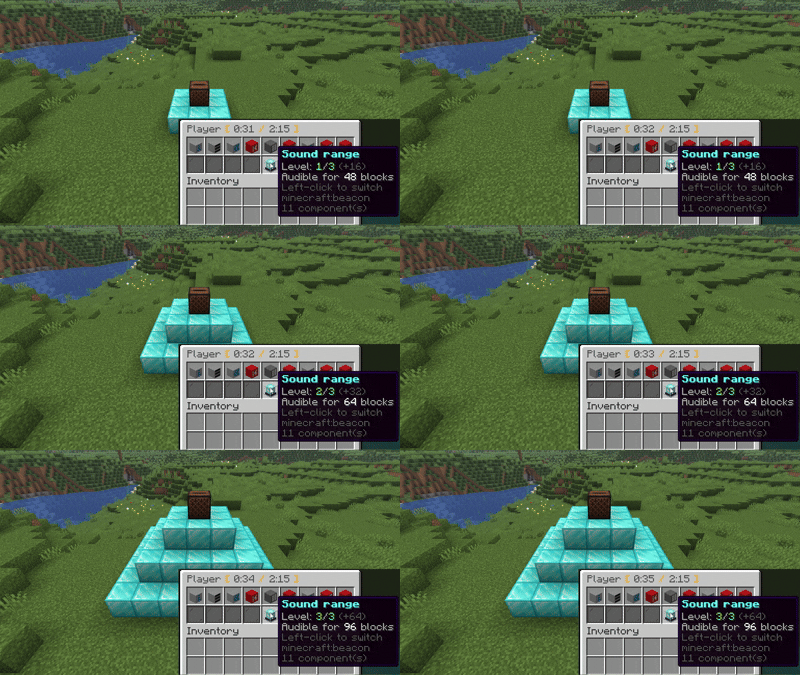
### 6. Extend the range with a beacon Build a beacon pyramid under the jukebox (you don't even need the beacon block — just the pyramid). Then open the player and click Sound range* to raise the level:
| Pyramid level | Extra range | | --- | --- | | 1 | +16 blocks | | 2 | +32 blocks | | 3 | +64 blocks |
!(https://cdn.modrinth.com/data/cached_images/9615566c277f8ac203e6e4416838e74b38a3415d.gif)
Perfect for a town square, an arena, or a club. The boost is added on top of the base distance from `config.yml`.
### 7. Breaking the jukeb
📊 Mod Details
- Game
- Minecraft Plugins
- Author
- valkdzx
- Version
- 1.8.0
- Downloads
- 2,483
- Endorsements
- 9
- Category
- adventure
- Created
- 11/23/2025
- Updated
- 8/27/2026
- Game Versions
- 1.20, 1.20.1, 1.20.2, 1.20.3, 1.20.4
- Tags
- adventure, social, utility
🔧 How to Install Minecraft Plugins Mods
Download from Modrinth. Use Prism Launcher or drop into your mods folder.
📖 Full step-by-step install guide for Minecraft Plugins →
Visit the official mod page for specific installation instructions for this mod.
🎮 Need cheat codes or console commands? Check ur gaming wiki for Minecraft Plugins commands, item IDs, and more.
❓ Frequently Asked Questions
Which Minecraft Plugins versions does CDisc Music support?
The author lists 1.20, 1.20.1, 1.20.2, 1.20.3, 1.20.4, 1.20.5. Other versions may work but are untested by the author.
What is the latest version of CDisc Music?
Version 1.8.0, published 2026-08-27 with 2,483 downloads recorded at the source.
Keep browsing — more Minecraft Plugins mods await