CBubbles
🟡 Updated this year🖼️ Gallery (2 images)

🔍 Analysis
- 🏆 #222 of 378 game-mechanics mods in this game by downloads
📋 About This Mod
# ⭐ ChatBubbles **ChatBubbles** is a lightweight visual chat plugin for modern Minecraft servers. It shows player messages as floating text bubbles above their head, making chat feel more alive, social and easy to follow. Made by **PupillaViola**. If you find any bug, contact me on Discord: **pupillaviolaalt** --- # ⭐ ChatBubbles Simple, clean and lightweight chat bubbles for Paper. When a player sends a chat message, ChatBubbles displays it above the player as a floating bubble for a short time. It is designed for server owners who want a small visual upgrade without installing a big chat system, database or external service. No bloat. No NMS. No database. Just clean floating chat bubbles. --- ## ✨ Features * 💬 Floating chat bubbles above players * 🌍 Multi-language support * 🎨 MiniMessage bubble formatting * 👁️ Option to show or hide your own bubble * 📏 Configurable range, duration and message length * ⚡ Lightweight local file storage * 🔁 Reload support * 🔐 Permission support * 🛡️ No NMS * 📁 No database required * 🔒 No telemetry or hidden remote uploads --- ## 🎮 Commands ```text /chatbubbles toggle /chatbubbles on /chatbubbles off /chatbubbles test <message> /chatbubbles reload /chatbubbles lang <language> ``` Aliases: ```text /cbubble /cbubbles ``` --- ## 🌍 Languages Available languages: ```text it en es fr custom ``` Language aliases are also supported, such as: ```text ita eng esp spa fra it_IT en_US es_ES fr_FR ``` Use: ```text /chatbubbles lang it /chatbubbles lang en /chatbubbles lang es /chatbubbles lang fr ``` --- ## 🔐 Permissions ```text chatbubbles.use chatbubbles.toggle chatbubbles.test chatbubbles.reload chatbubbles.lang ``` --- ## 🧩 Bubble Placeholders You can use these placeholders inside the bubble format: ```text <player> <message> <newline> ``` Player messages are inserted safely, so players cannot inject MiniMessage tags into the bubble. --- ## 📦 Installation 1. Download the plugin jar. 2. Put it inside your server `plugins` folder. 3. Restart the server. 4. Edit the generated config if needed. 5. Use `/chatbubbles reload`. --- ## ✅ Compatibility ChatBubbles is designed for modern server environments. * ✅ Paper * ✅ Minecraft 1.20.1-26.2 * ✅ No NMS * ✅ No required database --- ## 🔒 Privacy and Data ChatBubbles only uses local server files. The plugin does not intentionally upload player data to any remote server. Stored data is limited to simple local plugin settings, such as player bubble toggle preferences. --- ## 👤 Author Made by **PupillaViola**
# ⭐ ChatBubbles
ChatBubbles is a lightweight visual chat plugin for modern Minecraft servers.
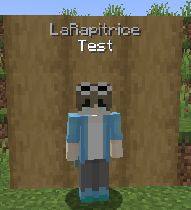
It shows player messages as floating text bubbles above their head, making chat feel more alive, social and easy to follow.
Made by PupillaViola.
If you find any bug, contact me on Discord: pupillaviolaalt
# ⭐ ChatBubbles
Simple, clean and lightweight chat bubbles for Paper.
When a player sends a chat message, ChatBubbles displays it above the player as a floating bubble for a short time.
It is designed for server owners who want a small visual upgrade without installing a big chat system, database or external service.
No bloat. No NMS. No database. Just clean floating chat bubbles.
## ✨ Features
💬 Floating chat bubbles above players 🌍 Multi-language support 🎨 MiniMessage bubble formatting 👁️ Option to show or hide your own bubble 📏 Configurable range, duration and message length ⚡ Lightweight local file storage 🔁 Reload support 🔐 Permission support 🛡️ No NMS 📁 No database required 🔒 No telemetry or hidden remote uploads
## 🎮 Commands
```text
/chatbubbles toggle
/chatbubbles on
/chatbubbles off
/chatbubbles test
```text /cbubble /cbubbles ```
## 🌍 Languages
Available languages:
```text it en es fr custom ```
Language aliases are also supported, such as:
```text ita eng esp spa fra it_IT en_US es_ES fr_FR ```
```text /chatbubbles lang it /chatbubbles lang en /chatbubbles lang es /chatbubbles lang fr ```
## 🔐 Permissions
```text chatbubbles.use chatbubbles.toggle chatbubbles.test chatbubbles.reload chatbubbles.lang ```
## 🧩 Bubble Placeholders
You can use these placeholders inside the bubble format:
```text
Player messages are inserted safely, so players cannot inject MiniMessage tags into the bubble.
## 📦 Installation
1. Download the plugin jar. 2. Put it inside your server `plugins` folder. 3. Restart the server. 4. Edit the generated config if needed. 5. Use `/chatbubbles reload`.
## ✅ Compatibility
ChatBubbles is designed for modern server environments.
✅ Paper ✅ Minecraft 1. 20. 1-26. 2 ✅ No NMS * ✅ No required database
## 🔒 Privacy and Data
ChatBubbles only uses local server files.
The plugin does not intentionally upload player data to any remote server.
Stored data is limited to simple local plugin settings, such as player bubble toggle preferences.
## 👤 Author
Made by PupillaViola
📊 Mod Details
- Game
- Minecraft Plugins
- Author
- PupillaViola
- Version
- ChatBubbles-1.0.0-1.20.x
- Downloads
- 50
- Endorsements
- 1
- Category
- game-mechanics
- Created
- 7/25/2026
- Updated
- 7/3/2026
- Game Versions
- 1.20, 1.20.1, 1.20.2, 1.20.3, 1.20.4
- Tags
- game-mechanics, social, technology
🔧 How to Install Minecraft Plugins Mods
Download from Modrinth. Use Prism Launcher or drop into your mods folder.
📖 Full step-by-step install guide for Minecraft Plugins →
Visit the official mod page for specific installation instructions for this mod.
🎮 Need cheat codes or console commands? Check ur gaming wiki for Minecraft Plugins commands, item IDs, and more.
❓ Frequently Asked Questions
Which Minecraft Plugins versions does CBubbles support?
The author lists 1.20, 1.20.1, 1.20.2, 1.20.3, 1.20.4, 1.20.5. Other versions may work but are untested by the author.
What is the latest version of CBubbles?
Version ChatBubbles-1.0.0-1.20.x, published 2026-07-03 with 50 downloads recorded at the source.
Keep browsing — more Minecraft Plugins mods await