Capture Biomes
🟡 Updated this year🖼️ Gallery (9 images)



🔍 Analysis
- 🏆 #330 of 383 adventure mods in this game by downloads
📋 About This Mod
# Capture Biomes (https://img.shields.io/badge/Java-21-brightgreen)](https://www.java.com/) (https://img.shields.io/badge/Minecraft_Java_Edition-1.21.5_to_26.1.x-blue)](https://www.minecraft.net/de-de/article/minecraft-java-edition-26-1-2) (https://img.shields.io/badge/API-PaperMC-white)](https://papermc.io/) (https://img.shields.io/badge/bStats-Active-blue)](https://bstats.org/plugin/bukkit/CaptureBiomes/30340) (https://img.shields.io/badge/Type-Plugin-yellow)](#) (https://img.shields.io/badge/License-GPLv3-lightgrey)](https://www.gnu.org/licenses/gpl-3.0.en.html#license-text) (https://img.shields.io/badge/Open%20Source-Yes-brightgreen)](https://opensource.org/) (https://img.shields.io/badge/GitHub-Repository-181717?logo=github)](https://github.com/mxiwbr/capture-biomes) Ever dreamed of bringing a snowy tundra to your sunny desert world? Or maybe turn your forest into a swampy wonderland? With **Capture Biomes**, you can bottle up any biome and unleash it anywhere – reshape your own Minecraft world exactly the way you want! ## Features 🧪 Capture any biome in a **Biome Potion** using a Beacon 🎨 Potion colors, names, and descriptions match the captured biome 📏 Bigger Biome Potions depending on the Beacon pyramid size ⚙️ Full configuration support in the `config.yml` ## Usage 1. Place a Beacon and power it with the usual pyramid 2. Drop the required amount of XP bottles on top of the beacon: - Tier 1 Beacon + 16 XP bottles → 4x4 Biome Potion - Tier 2 Beacon + 32 XP bottles → 8x8 Biome Potion - Tier 3 Beacon + 48 XP bottles → 16x16 Biome Potion - Tier 4 Beacon + 64 XP bottles → 32x32 Biome Potion 3. The beacon automatically creates a **Biome Potion** of the biome in which the beacon is located 4. Throw the potion on the ground in another biome to change the biome in the area The tier of the Beacon depends on the size of the pyramid: - 1 layer → Tier 1 - 2 layers → Tier 2 - 3 layers → Tier 3 - 4 layers → Tier 4 ## Installation 1. Download the latest .jar from (https://modrinth.com/project/capture-biomes/versions) or (https://github.com/mxiwbr/capture-biomes/releases) 2. Place it in your server's `plugins` folder 3. (Optional) Configure the plugin via `config.yml` and restart the server or use the plugin's reload command ## Potion Size The size of a Biome Potion depends on the tier of the beacon used to create it. When thrown, the potion affects a cuboid of `size` × `size` × `size` blocks, `size` being the matching value for the Beacon tier (configurable in the `config.yml`). **Example:** A potion created on a tier 2 Beacon affects an area of 8 × 8 × 8 blocks, with the location where the potion lands as the center. **Height behavior:** - If there is a solid block above the center coordinate (e.g. in a cave), the biome extends up to **`size` blocks above that block**. - If there is no solid block above the center, the biome extends up to the **world's maximum height**. - The biome always extends **`size` blocks below the point where the potion lands**. - The amount of blocks to extend up- and downwards is **configurable in the config.yml** by modifying the `y-offset-multiplier`. ## Commands | Command | Description | Permission | |-------------------------------------------------|---------------------------------------------------------------------------------------------------------------------|------------| | `/capturebiomes disable` | Disables the plugin. | OP | | `/capturebiomes enable` | Enables the plugin. | OP | | `/capturebiomes givebiomepotion <biome> <tier>` | Gives a Biome Potion of the specified biome and tier.<br>**Example:** `/capturebiomes givebiomepotion snowy_taiga 3` | OP | | `/capturebiomes reloadconfig` | Reloads the plugin’s configuration (`config.yml`). | OP | | `/capturebiomes resetconfig` | Resets the plugin’s configuration (`config.yml`) and automatically reloads it. | OP | | `/capturebiomes help` | Shows this command overview in the ingame chat. | OP | | `/biome` | Shows the biome you are currently standing in. | Everyone | ## Supported Versions - PaperMC on Minecraft Versions 1.21.5 - 26.1.2 - PurpurMC on Minecraft Versions 1.21.5 - 26.1
# Capture Biomes
[!(https://img.shields.io/badge/Java-21-brightgreen)](https://www.java.com/) [!(https://img.shields.io/badge/Minecraft_Java_Edition-1. 21. 5_to_26. 1.x-blue)](https://www.minecraft.net/de-de/article/minecraft-java-edition-26-1-2) [!(https://img.shields.io/badge/API-PaperMC-white)](https://papermc.io/) [!(https://img.shields.io/badge/bStats-Active-blue)](https://bstats.org/plugin/bukkit/CaptureBiomes/30340) [!(https://img.shields.io/badge/Type-Plugin-yellow)](#) [!(https://img.shields.io/badge/License-GPLv3-lightgrey)](https://www.gnu.org/licenses/gpl-3. 0.en.html#license-text) [!(https://img.shields.io/badge/Open%20Source-Yes-brightgreen)](https://opensource.org/) [!(https://img.shields.io/badge/GitHub-Repository-181717?logo=github)](https://github.com/mxiwbr/capture-biomes)
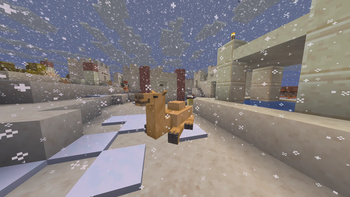
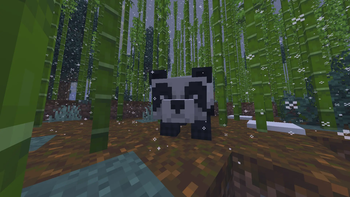
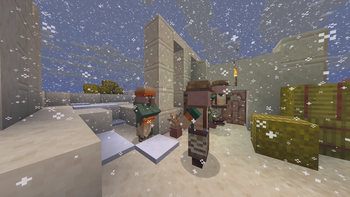
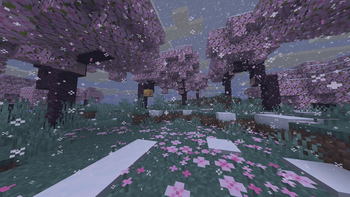
Ever dreamed of bringing a snowy tundra to your sunny desert world? Or maybe turn your forest into a swampy wonderland? With Capture Biomes, you can bottle up any biome and unleash it anywhere – reshape your own Minecraft world exactly the way you want!
## Features 🧪 Capture any biome in a Biome Potion using a Beacon 🎨 Potion colors, names, and descriptions match the captured biome 📏 Bigger Biome Potions depending on the Beacon pyramid size ⚙️ Full configuration support in the `config.yml`
## Usage 1. Place a Beacon and power it with the usual pyramid 2. Drop the required amount of XP bottles on top of the beacon: - Tier 1 Beacon + 16 XP bottles → 4x4 Biome Potion - Tier 2 Beacon + 32 XP bottles → 8x8 Biome Potion - Tier 3 Beacon + 48 XP bottles → 16x16 Biome Potion - Tier 4 Beacon + 64 XP bottles → 32x32 Biome Potion 3. The beacon automatically creates a Biome Potion of the biome in which the beacon is located 4. Throw the potion on the ground in another biome to change the biome in the area
The tier of the Beacon depends on the size of the pyramid: - 1 layer → Tier 1 - 2 layers → Tier 2 - 3 layers → Tier 3 - 4 layers → Tier 4
## Installation 1. Download the latest .jar from (https://modrinth.com/project/capture-biomes/versions) or (https://github.com/mxiwbr/capture-biomes/releases) 2. Place it in your server's `plugins` folder 3. (Optional) Configure the plugin via `config.yml` and restart the server or use the plugin's reload command
## Potion Size The size of a Biome Potion depends on the tier of the beacon used to create it. When thrown, the potion affects a cuboid of `size` × `size` × `size` blocks, `size` being the matching value for the Beacon tier (configurable in the `config.yml`).
Example: A potion created on a tier 2 Beacon affects an area of 8 × 8 × 8 blocks, with the location where the potion lands as the center.
Height behavior: - If there is a solid block above the center coordinate (e.g. in a cave), the biome extends up to `size` blocks above that block. - If there is no solid block above the center, the biome extends up to the world's maximum height. - The biome always extends `size` blocks below the point where the potion lands. - The amount of blocks to extend up- and downwards is configurable in the config.yml by modifying the `y-offset-multiplier`.
## Commands
| Command | Description | Permission |
|-------------------------------------------------|---------------------------------------------------------------------------------------------------------------------|------------|
| `/capturebiomes disable` | Disables the plugin. | OP |
| `/capturebiomes enable` | Enables the plugin. | OP |
| `/capturebiomes givebiomepotion
## Supported Versions - PaperMC on Minecraft Versions 1. 21. 5 - 26. 1. 2 - PurpurMC on Minecraft Versions 1. 21. 5 - 26. 1
📊 Mod Details
- Game
- Minecraft Plugins
- Author
- REDcrafterM
- Version
- 1.0.2
- Downloads
- 88
- Endorsements
- 2
- Category
- adventure
- Created
- 3/24/2026
- Updated
- 3/25/2026
- Game Versions
- 1.21.5, 1.21.6, 1.21.7, 1.21.8, 1.21.9
- Tags
- adventure, game-mechanics, worldgen
🔧 How to Install Minecraft Plugins Mods
Download from Modrinth. Use Prism Launcher or drop into your mods folder.
📖 Full step-by-step install guide for Minecraft Plugins →
Visit the official mod page for specific installation instructions for this mod.
🎮 Need cheat codes or console commands? Check ur gaming wiki for Minecraft Plugins commands, item IDs, and more.
❓ Frequently Asked Questions
Which Minecraft Plugins versions does Capture Biomes support?
The author lists 1.21.5, 1.21.6, 1.21.7, 1.21.8, 1.21.9, 1.21.10. Other versions may work but are untested by the author.
What is the latest version of Capture Biomes?
Version 1.0.2, published 2026-03-25 with 88 downloads recorded at the source.
Keep browsing — more Minecraft Plugins mods await