Camera For Streaming
🟡 Updated this year🖼️ Gallery (1 images)
🔍 Analysis
- 🏆 #78 of 333 management mods in this game by downloads
📋 About This Mod
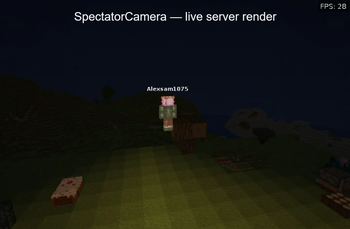
# **UNIQUE SERVER-SIDE CAMERA DEVELOPMENT** Want to stream what is happening on your Minecraft server without running a second Minecraft client? **SpectatorCamera** is an experimental Paper plugin that creates a virtual spectator camera directly on the server. It can automatically follow players, switch cinematic angles, patrol active locations when the server is empty, and publish a browser-based live preview. The project started as a simple spectator-camera plugin for Paper 1.21.1. It is now being developed into a server-side Minecraft renderer and streaming camera system. *Inspired by the Makoto server.* ## **WHAT MAKES IT DIFFERENT** - No second Minecraft account is required in bot mode. - No normal Minecraft client is required for the built-in browser preview. - The plugin creates a virtual camera bot with a configurable nickname. - The camera can appear in the tab list and server player count. - A built-in MJPEG stream can be opened in a browser. - The renderer uses assets from the official matching `client.jar`. - The camera can follow players automatically or be positioned manually. - When the server is empty, it can patrol saved “interesting places” where players spent the most time. - Chunks around the camera can remain loaded even without real players online. ## **RENDERER FEATURES** The experimental server-side renderer includes: - Vanilla texture and model loading from `client.jar` - Blockstate and model JSON support - UV mapping and alpha/cutout textures - Water, fire, foliage transparency and biome tinting - Day/night sky, clouds, sun and moon - Sky light, block light and emissive light - 3D players with real skins, nametags, head rotation, sneaking, running, held items and damage feedback - Initial support for mobs, paintings, item frames and selected block entities ## **CONFIGURATION** The configuration allows you to: - Choose between a virtual bot camera and a real camera account. - Set the camera nickname. - Enable or disable tab-list visibility. - Configure automatic player switching and cinematic angle intervals. - Configure a hub location for an empty server. - Configure chunk loading around the camera. - Configure local browser preview resolution, FPS and port. - Enable automatic `client.jar` download. - Configure interesting-place tracking and patrol behaviour. ## **COMMANDS** - `/camera start` — start automatic camera mode - `/camera stop` — stop the camera - `/camera auto on|off` — enable or disable automatic tracking - `/camera view` — move the camera to your current point of view in manual mode - `/camera sethub` — set the empty-server camera location - `/camera status` — show current camera status - `/camera render` — create a renderer image - `/camera disable ` — exclude a player from camera tracking - `/camera enable ` — enable tracking for a player again ## **BETA NOTICE** This plugin is currently a **beta / experimental development build**. The server-side renderer is still under active development. Many blocks, complex block entities, model variants, mobs, particles and animations may be missing or render incorrectly. It is not yet a full replacement for the official Minecraft client renderer. Use it for testing, development and streaming experiments. If you find a bug or want to share feedback, contact me on Telegram: **@AlexsandrDeveloper**
# UNIQUE SERVER-SIDE CAMERA DEVELOPMENT
Want to stream what is happening on your Minecraft server without running a second Minecraft client?
SpectatorCamera is an experimental Paper plugin that creates a virtual spectator camera directly on the server. It can automatically follow players, switch cinematic angles, patrol active locations when the server is empty, and publish a browser-based live preview.
The project started as a simple spectator-camera plugin for Paper 1. 21. 1. It is now being developed into a server-side Minecraft renderer and streaming camera system.
Inspired by the Makoto server.
## WHAT MAKES IT DIFFERENT
- No second Minecraft account is required in bot mode.
- No normal Minecraft client is required for the built-in browser preview.
- The plugin creates a virtual camera bot with a configurable nickname.
- The camera can appear in the tab list and server player count.
- A built-in MJPEG stream can be opened in a browser.
- The renderer uses assets from the official matching `client.jar`.
- The camera can follow players automatically or be positioned manually.
- When the server is empty, it can patrol saved “interesting places” where players spent the most time.
- Chunks around the camera can remain loaded even without real players online.
## RENDERER FEATURES
The experimental server-side renderer includes:
- Vanilla texture and model loading from `client.jar`
- Blockstate and model JSON support
- UV mapping and alpha/cutout textures
- Water, fire, foliage transparency and biome tinting
- Day/night sky, clouds, sun and moon
- Sky light, block light and emissive light
- 3D players with real skins, nametags, head rotation, sneaking, running, held items and damage feedback
- Initial support for mobs, paintings, item frames and selected block entities
## CONFIGURATION
The configuration allows you to:
- Choose between a virtual bot camera and a real camera account.
- Set the camera nickname.
- Enable or disable tab-list visibility.
- Configure automatic player switching and cinematic angle intervals.
- Configure a hub location for an empty server.
- Configure chunk loading around the camera.
- Configure local browser preview resolution, FPS and port.
- Enable automatic `client.jar` download.
- Configure interesting-place tracking and patrol behaviour.
## COMMANDS
- `/camera start` — start automatic camera mode
- `/camera stop` — stop the camera
- `/camera auto on|off` — enable or disable automatic tracking
- `/camera view` — move the camera to your current point of view in manual mode
- `/camera sethub` — set the empty-server camera location
- `/camera status` — show current camera status
- `/camera render` — create a renderer image
- `/camera disable ` — exclude a player from camera tracking
- `/camera enable ` — enable tracking for a player again
## BETA NOTICE
This plugin is currently a beta / experimental development build.
The server-side renderer is still under active development. Many blocks, complex block entities, model variants, mobs, particles and animations may be missing or render incorrectly. It is not yet a full replacement for the official Minecraft client renderer.
Use it for testing, development and streaming experiments.
If you find a bug or want to share feedback, contact me on Telegram: @AlexsandrDeveloper
📊 Mod Details
- Game
- Minecraft Plugins
- Author
- Alexsam1075
- Version
- 2.0.9
- Downloads
- 65
- Endorsements
- 2
- Category
- management
- Created
- 7/5/2026
- Updated
- 8/6/2026
- Game Versions
- 1.21, 1.21.1, 1.21.2, 1.21.3, 1.21.4
- Tags
- management, social, technology
🔧 How to Install Minecraft Plugins Mods
Download from Modrinth. Use Prism Launcher or drop into your mods folder.
📖 Full step-by-step install guide for Minecraft Plugins →
Visit the official mod page for specific installation instructions for this mod.
🎮 Need cheat codes or console commands? Check ur gaming wiki for Minecraft Plugins commands, item IDs, and more.
❓ Frequently Asked Questions
Which Minecraft Plugins versions does Camera For Streaming support?
The author lists 1.21, 1.21.1, 1.21.2, 1.21.3, 1.21.4, 1.21.5. Other versions may work but are untested by the author.
What is the latest version of Camera For Streaming?
Version 2.0.9, published 2026-08-06 with 65 downloads recorded at the source.
Keep browsing — more Minecraft Plugins mods await