CalcStack
🟡 Updated this year🖼️ Gallery (3 images)
🔍 Analysis
- 🏆 #186 of 383 adventure mods in this game by downloads
📋 About This Mod
# CalcStack Plugin Documentation Are you tired of staring at endless lists of materials in tutorials, unsure of how many stacks, boxes, or items you actually need? This plugin was created just for you! ## Features **CalcStack** allows players to easily calculate the stack count of items in hand and the required number of boxes with a simple command. It supports custom stack sizes and can display the raw materials needed for crafting items along with their stacking requirements. ### Key Features - Automatic translation to Chinese - Automatically retrieves the stack count of items - Easily solves large quantity to unit conversion issues - Perfect estimation system - For example, 1x Log -> 4x Planks, automatically estimating maximum values like 2x Planks -> 1x Log, 3x Planks -> 1x Log, 6x Planks -> 2x Logs - Automatic unit conversion for raw materials - Highly customizable language files ## Command Usage ``` /calculate <quantity> or /calculate <itemID> <quantity> ``` - **<quantity>**: The number of items to calculate. - **<itemID>**: The specific item ID (defaults to the item in hand). (Includes automatic ID completion) You can also use the shorthand command `/calc`. ### Example Players can use `/calculate 500` to calculate the stack and box requirements for 500 items in hand, or use `/calculate diamond 500` to calculate the stack and box requirements for storing 500 specified diamonds. ## Configuration File ### Max Stack Size Setting This setting is used to define the maximum stack size of items. If custom stack sizes are enabled, you can adjust the stack size as needed. ```yaml custom-stack-size: enabled: false # Enable custom stack size value: 64 # Maximum stack size ``` ### Chest Size (Number of Slots) Set the number of slots in each chest. The default is 27 slots (standard chest size). ```yaml chest-size: 27 # Size of each chest (number of slots) ``` ## Language File ### Usage Prompt Displays the correct command usage. ```yaml usage: "§eUsage: /calculate <quantity> or /calculate <itemID> <quantity>" ``` ### Error Messages Provides user-friendly error messages. ```yaml error: not_player: "§cThis command can only be used by players!" no_item_in_hand: "§cPlease hold a valid item, or specify the item ID in the command!" invalid_item: "§cInvalid item ID: {item}" invalid_number: "§cPlease enter a valid quantity!" ``` ### Calculation Result Display Shows the stacking situation of items, remaining item count, required number of boxes, and other details. ```yaml result: header: "§a===== Calculation Result =====" item: "§bItem: {item}({translated_name})" quantity: "§bQuantity: {quantity}" stacks: "§bStacks: {stacks} groups ({stack_size} items/group)" remaining: "§bRemaining: {remaining} items" chests: "§bChests needed: {chests} (each chest has {chest_size} slots)" footer: "§a====================" ``` ### Raw Materials Display Calculates the raw materials required for the item and their stacking needs. ```yaml ingredients: header: "§a===== Raw Materials =====" item: "§b- {ingredient}({translated_name}) - {quantity} items" stacks: " §7- {stacks} groups ({stack_size} items/group)" remaining: " §7- Remaining {remaining} items" chests: " §7- Chests needed: {chests} (each chest has {chest_size} slots)" ``` Feel free to customize the configuration and enjoy using CalcStack!
# CalcStack Plugin Documentation
Are you tired of staring at endless lists of materials in tutorials, unsure of how many stacks, boxes, or items you actually need? This plugin was created just for you!
## Features
CalcStack allows players to easily calculate the stack count of items in hand and the required number of boxes with a simple command. It supports custom stack sizes and can display the raw materials needed for crafting items along with their stacking requirements.
### Key Features
- Automatic translation to Chinese
- Automatically retrieves the stack count of items
- Easily solves large quantity to unit conversion issues
- Perfect estimation system
- - For example, 1x Log -> 4x Planks, automatically estimating maximum values like 2x Planks -> 1x Log, 3x Planks -> 1x Log, 6x Planks -> 2x Logs
- Automatic unit conversion for raw materials
- Highly customizable language files
## Command Usage
```
/calculate
: The number of items to calculate. : The specific item ID (defaults to the item in hand). (Includes automatic ID completion) - You can also use the shorthand command `/calc`.
### Example
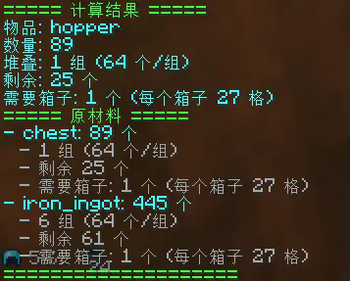
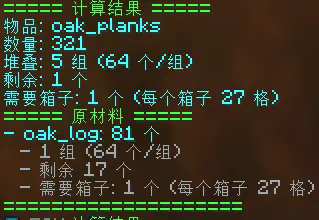
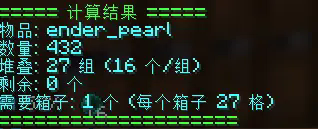
Players can use `/calculate 500` to calculate the stack and box requirements for 500 items in hand, or use `/calculate diamond 500` to calculate the stack and box requirements for storing 500 specified diamonds.
## Configuration File
### Max Stack Size Setting
This setting is used to define the maximum stack size of items. If custom stack sizes are enabled, you can adjust the stack size as needed.
```yaml custom-stack-size: enabled: false # Enable custom stack size value: 64 # Maximum stack size ```
### Chest Size (Number of Slots)
Set the number of slots in each chest. The default is 27 slots (standard chest size).
```yaml chest-size: 27 # Size of each chest (number of slots) ```
## Language File
### Usage Prompt
Displays the correct command usage.
```yaml
usage: "§eUsage: /calculate
### Error Messages
Provides user-friendly error messages.
```yaml error: not_player: "§cThis command can only be used by players!" no_item_in_hand: "§cPlease hold a valid item, or specify the item ID in the command!" invalid_item: "§cInvalid item ID: {item}" invalid_number: "§cPlease enter a valid quantity!" ```
### Calculation Result Display
Shows the stacking situation of items, remaining item count, required number of boxes, and other details.
```yaml result: header: "§a===== Calculation Result =====" item: "§bItem: {item}({translated_name})" quantity: "§bQuantity: {quantity}" stacks: "§bStacks: {stacks} groups ({stack_size} items/group)" remaining: "§bRemaining: {remaining} items" chests: "§bChests needed: {chests} (each chest has {chest_size} slots)" footer: "§a====================" ```
### Raw Materials Display
Calculates the raw materials required for the item and their stacking needs.
```yaml ingredients: header: "§a===== Raw Materials =====" item: "§b- {ingredient}({translated_name}) - {quantity} items" stacks: " §7- {stacks} groups ({stack_size} items/group)" remaining: " §7- Remaining {remaining} items" chests: " §7- Chests needed: {chests} (each chest has {chest_size} slots)" ```
Feel free to customize the configuration and enjoy using CalcStack!
📊 Mod Details
- Game
- Minecraft Plugins
- Author
- wling
- Version
- 0.0.6
- Downloads
- 118
- Endorsements
- 2
- Category
- adventure
- Created
- 1/17/2025
- Updated
- 2/22/2026
- Game Versions
- 1.18, 1.18.1, 1.18.2, 1.19, 1.19.1
- Tags
- adventure, social, utility
🔧 How to Install Minecraft Plugins Mods
Download from Modrinth. Use Prism Launcher or drop into your mods folder.
📖 Full step-by-step install guide for Minecraft Plugins →
Visit the official mod page for specific installation instructions for this mod.
🎮 Need cheat codes or console commands? Check ur gaming wiki for Minecraft Plugins commands, item IDs, and more.
❓ Frequently Asked Questions
Which Minecraft Plugins versions does CalcStack support?
The author lists 1.18, 1.18.1, 1.18.2, 1.19, 1.19.1, 1.19.2. Other versions may work but are untested by the author.
What is the latest version of CalcStack?
Version 0.0.6, published 2026-02-22 with 118 downloads recorded at the source.
Keep browsing — more Minecraft Plugins mods await