BossBarUltra
🟡 Updated this year🖼️ Gallery (8 images)
🔍 Analysis
- 🏆 #214 of 316 game-mechanics mods in this game by downloads
📋 About This Mod
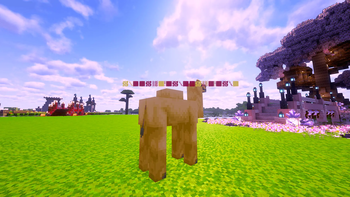
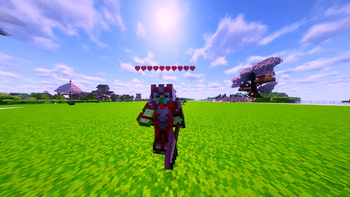
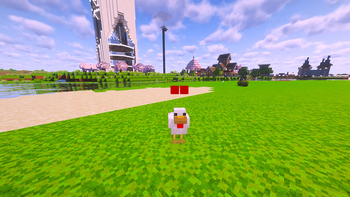
## ⭐ BossBarUltra **Modern floating health bars for mobs** **Recommended:** Paper / Purpur **Supported Minecraft Versions:** 1.20 → 1.21+ BossBarUltra adds **clean floating health bars above mobs** using Minecraft's **TextDisplay system**. It is lightweight, modern, and designed to work best on **Paper and Purpur servers**. Perfect for **PvE servers, RPG gameplay, custom mobs, and boss encounters.** *** ## ✨ Features ### 🟩 Modern Floating Health Bars * Uses **TextDisplay (Minecraft 1.19.4+)** * Smooth real-time health updates * Follows mobs accurately * No vanilla boss bars * No scoreboards * No shadows or background boxes *** ### ❤️ Customizable Bar Styles Change styles directly from the **in-game GUI**. **Available Styles** * **Solid** → ██████▒▒▒▒ * **Hearts** → ❤❤❤❤♡♡♡♡ * **Glitch Mode** → Unique glitch-style bar **Customization Options** * Adjustable bar width * Multiple bar colors * Optional glowing mode *** ### 👁 Display Modes Control when health bars appear. * **Look Mode** – Visible only when the player looks at the mob * **Combat Mode** – Visible while the mob is in combat * **Always Mode** – Always visible for nearby mobs Configurable options include: * Combat timeout * Detection range * Update interval *** ## ⚙️ In-Game Admin GUI Use **`/bb`** to open the admin GUI. From the GUI you can: * Change display modes * Switch bar styles * Change bar colors * Reload the configuration * Send feedback directly from the plugin All changes apply **instantly — no server restart required**. *** ## 🚀 Performance BossBarUltra is designed to be **lightweight and server-friendly**. * Very low performance impact * No dependencies required * Automatic cleanup when mobs die * No leftover TextDisplay entities * Safe for long-running servers *** ## 📥 Installation 1. Download **BossBarUltra.jar** 2. Place it in your **/plugins/** folder 3. Start the server 4. (Optional) edit `config.yml` The default configuration is already optimized. *** ## 🕹 Commands & Permissions **Command** * `/bb` — Opens the admin settings GUI **Permission** * `bossbarultra.admin` (default: OP) *** ## ⚙️ Compatibility * **Minecraft:** 1.20 – 1.21+ * **Recommended:** Paper / Purpur * **Spigot:** Supported but some features may be limited * **Dependencies:** None *** ## ❤️ Support If you enjoy **BossBarUltra**, please consider leaving a ⭐. Feedback helps improve the plugin and future updates.
## ⭐ BossBarUltra
Modern floating health bars for mobs
Recommended: Paper / Purpur Supported Minecraft Versions: 1. 20 → 1. 21+
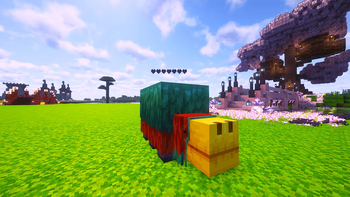
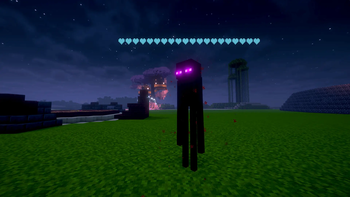
BossBarUltra adds clean floating health bars above mobs using Minecraft's TextDisplay system. It is lightweight, modern, and designed to work best on Paper and Purpur servers.
Perfect for PvE servers, RPG gameplay, custom mobs, and boss encounters.
## ✨ Features
### 🟩 Modern Floating Health Bars
Uses TextDisplay (Minecraft 1. 19. 4+) Smooth real-time health updates Follows mobs accurately No vanilla boss bars No scoreboards No shadows or background boxes
### ❤️ Customizable Bar Styles
Change styles directly from the in-game GUI.
Available Styles*
Solid → ██████▒▒▒▒ Hearts → ❤❤❤❤♡♡♡♡ Glitch Mode → Unique glitch-style bar
Customization Options
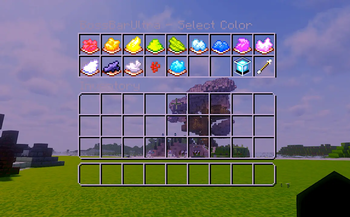
Adjustable bar width Multiple bar colors Optional glowing mode
### 👁 Display Modes
Control when health bars appear.
Look Mode – Visible only when the player looks at the mob Combat Mode – Visible while the mob is in combat Always Mode – Always visible for nearby mobs
Configurable options include:
Combat timeout Detection range Update interval
## ⚙️ In-Game Admin GUI
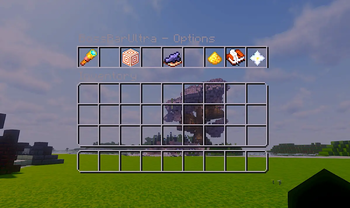
Use `/bb`* to open the admin GUI.
From the GUI you can:
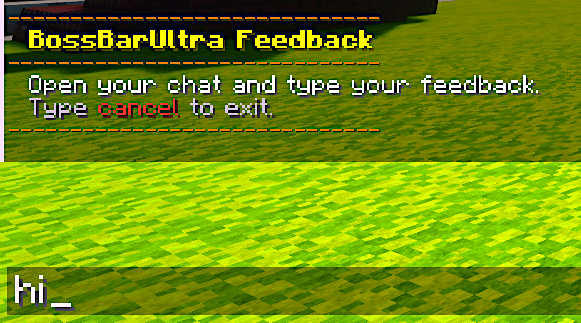
Change display modes Switch bar styles Change bar colors Reload the configuration Send feedback directly from the plugin
All changes apply instantly — no server restart required.
## 🚀 Performance
BossBarUltra is designed to be lightweight and server-friendly.
Very low performance impact No dependencies required Automatic cleanup when mobs die No leftover TextDisplay entities Safe for long-running servers
## 📥 Installation
1. Download BossBarUltra.jar 2. Place it in your /plugins/ folder 3. Start the server 4. (Optional) edit `config.yml`
The default configuration is already optimized.
## 🕹 Commands & Permissions
Command
`/bb` — Opens the admin settings GUI
Permission
`bossbarultra.admin` (default: OP)
## ⚙️ Compatibility
Minecraft: 1. 20 – 1. 21+ Recommended: Paper / Purpur Spigot: Supported but some features may be limited Dependencies: None
## ❤️ Support
If you enjoy BossBarUltra**, please consider leaving a ⭐. Feedback helps improve the plugin and future updates.
📊 Mod Details
- Game
- Minecraft Plugins
- Author
- aushaif
- Version
- 3.1
- Downloads
- 100
- Endorsements
- 1
- Category
- game-mechanics
- Created
- 3/19/2026
- Updated
- 5/1/2026
- Game Versions
- 1.21, 1.21.1, 1.21.2, 1.21.3, 1.21.4
- Tags
- game-mechanics
🔧 How to Install Minecraft Plugins Mods
Download from Modrinth. Use Prism Launcher or drop into your mods folder.
📖 Full step-by-step install guide for Minecraft Plugins →
Visit the official mod page for specific installation instructions for this mod.
🎮 Need cheat codes or console commands? Check ur gaming wiki for Minecraft Plugins commands, item IDs, and more.
❓ Frequently Asked Questions
Which Minecraft Plugins versions does BossBarUltra support?
The author lists 1.21, 1.21.1, 1.21.2, 1.21.3, 1.21.4, 1.21.5. Other versions may work but are untested by the author.
What is the latest version of BossBarUltra?
Version 3.1, published 2026-05-01 with 100 downloads recorded at the source.
Keep browsing — more Minecraft Plugins mods await