Better lodestone (immersive warp and home)
🟠 Updated over a year ago🖼️ Gallery (1 images)
🔍 Analysis
- 🏆 #40 of 333 adventure mods in this game by downloads
📋 About This Mod
## **--- version 0.2.8 (beta) ## add Warp and Home function** This plugin adds immersive teleportation, using the compass and lodestone you can teleport over long distances. WARNING: After teleportation, the compass will be destroyed Features: Ability to cancel teleportation. Delay before teleportation. Delay after teleportation. Setup: in the config.yam file - you can configure the delay before teleportation and the delay after teleportation. **How does it work?** - Take a compass - Place the lodestone block - Bind the compass to the lodestone (interact key) - Run far away... - Take the compass that is tied to the lodestone and press the interactive key - Wait (default is 3 seconds, but you can change it) - Teleportation, and you are now near the lodestone to which the compass was attached **When Warps and Homes are off.** **If you disable Homes and Warps, you can use Loadstones for untagged teleportation, meaning you don't need to tag the Loadstones, you can just tie your compass to the Loadstones and teleport to it.** **How do WARP work?** WARPS are places where players can teleport to. They are prepared in advance and use SPECIAL COMPASSES (compasses marked ‘warp’). Lodestones are places where a player teleports to. To make the lodestone a warp point, you need to assign it a ‘WARP’ label and place it where you want players to teleport to. And then bind a SPECIAL COMPASS (or several) to this lodestone. And then players can use these compasses as teleportation tools. Players with the special ‘teleporter’ tag can mark a compass with a ‘WARP’ tag, and can also mark an underground stone with a ‘WARP’ tag. Recommendation: _Warping can be controlled by in-game currency (diamonds, emerald) or anything else at the discretion of the server administration, i.e. teleportation compasses can be given out to players as an activity to immerse them in the game._ **How do the HOME work?** HOMES are places where players can teleport to. Lodestones are places where the player will teleport to. This Lodestone must have a ‘HOME’ tag. But unlike Lodestones with the ‘WARP’ tag, players can place and remove their homes wherever they want and do not need to use special compasses for this. Players with a special ‘teleporter’ tag can mark an underground stone with a ‘HOME’ tag.
## --- version 0. 2. 8 (beta) ## add Warp and Home function
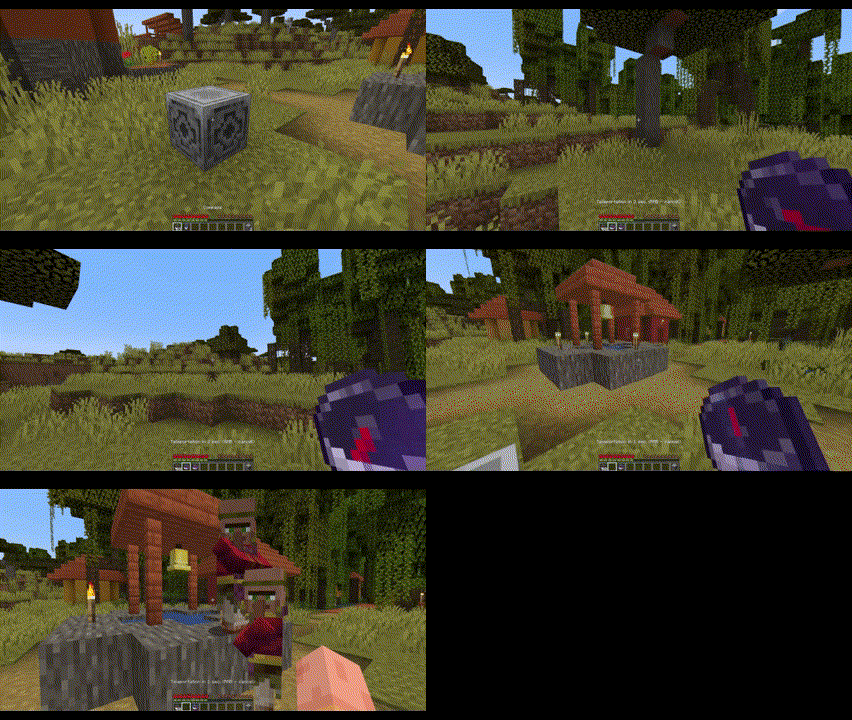
This plugin adds immersive teleportation, using the compass and lodestone you can teleport over long distances.
Features: Ability to cancel teleportation. Delay before teleportation. Delay after teleportation.
Setup: in the config.yam file - you can configure the delay before teleportation and the delay after teleportation.
How does it work? - Take a compass - Place the lodestone block - Bind the compass to the lodestone (interact key) - Run far away... - Take the compass that is tied to the lodestone and press the interactive key - Wait (default is 3 seconds, but you can change it) - Teleportation, and you are now near the lodestone to which the compass was attached
When Warps and Homes are off.
If you disable Homes and Warps, you can use Loadstones for untagged teleportation, meaning you don't need to tag the Loadstones, you can just tie your compass to the Loadstones and teleport to it.
How do WARP work?
WARPS are places where players can teleport to. They are prepared in advance and use SPECIAL COMPASSES (compasses marked ‘warp’).
Lodestones are places where a player teleports to. To make the lodestone a warp point, you need to assign it a ‘WARP’ label and place it where you want players to teleport to. And then bind a SPECIAL COMPASS (or several) to this lodestone. And then players can use these compasses as teleportation tools.
Players with the special ‘teleporter’ tag can mark a compass with a ‘WARP’ tag, and can also mark an underground stone with a ‘WARP’ tag.
Recommendation:
_Warping can be controlled by in-game currency (diamonds, emerald) or anything else at the discretion of the server administration, i.e. teleportation compasses can be given out to players as an activity to immerse them in the game._
How do the HOME work?
HOMES are places where players can teleport to.
Lodestones are places where the player will teleport to. This Lodestone must have a ‘HOME’ tag. But unlike Lodestones with the ‘WARP’ tag, players can place and remove their homes wherever they want and do not need to use special compasses for this.
Players with a special ‘teleporter’ tag can mark an underground stone with a ‘HOME’ tag.
📊 Mod Details
- Game
- Minecraft Plugins
- Author
- TheImpossible
- Version
- blw-0.2.8_mc-1.21
- Downloads
- 317
- Endorsements
- 3
- Category
- adventure
- Created
- 5/12/2024
- Updated
- 10/22/2024
- Game Versions
- 1.21, 1.21.1
- Tags
- adventure, game-mechanics, utility
🔧 How to Install Minecraft Plugins Mods
Download from Modrinth. Use Prism Launcher or drop into your mods folder.
📖 Full step-by-step install guide for Minecraft Plugins →
Visit the official mod page for specific installation instructions for this mod.
🎮 Need cheat codes or console commands? Check ur gaming wiki for Minecraft Plugins commands, item IDs, and more.
❓ Frequently Asked Questions
Which Minecraft Plugins versions does Better lodestone (immersive warp and home) support?
The author lists 1.21, 1.21.1. Other versions may work but are untested by the author.
What is the latest version of Better lodestone (immersive warp and home)?
Version blw-0.2.8_mc-1.21, published 2024-10-22 with 317 downloads recorded at the source.
Keep browsing — more Minecraft Plugins mods await