BlueMap-Towny
🟡 Updated this year🖼️ Gallery (2 images)
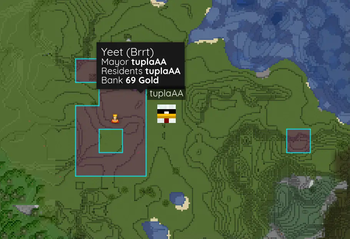
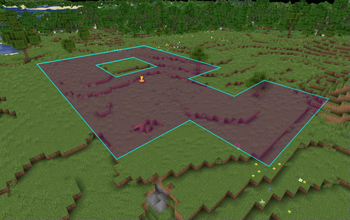
🔍 Analysis
- 👍 0.5% endorsement rate
- 🏆 #65 of 169 folia mods in this game by downloads
📋 About This Mod
# BlueMap-Towny > *(https://github.com/BlueMap-Minecraft/BlueMap) addon for showing your (https://github.com/TownyAdvanced/Towny) towns on your beautiful map* Configuration, placeholders and main features heavily inspired by Dynmap-Towny. Has support for holes in claims and claims outside main town. Does not have support for external plugins hooking into placeholders. ## Installation Put the plugin jar file inside your plugins folder and have both Towny and BlueMap installed. The plugin does not come with any default icons. I recommend just using (https://github.com/webbukkit/dynmap/tree/v3.0/DynmapCore/src/main/resources/markers) ## Config ```yml # BlueMap-Towny configuration # https://github.com/Chicken/BlueMap-Towny#config # Seconds between checks for marker updates update-interval: 30 # Display name of the marker set shown in BlueMap UI marker-set-name: Towns # Label for town markers, %name% is replaced with the town name town-label: '%name%' # Label for outpost markers, %name% is replaced with the town name, %index% with the outpost number outpost-label: '%name% Outpost %index%' # Set by /n set mapcolor dynamic-nation-colors: true # Set by /t set mapcolor dynamic-town-colors: true # HTML for town popup, placeholders documented in README popup: '<span style="font-size: 120%">%name% (%nation%)</span><br><span>Mayor <strong>%mayor%</strong></span><br><span>Residents <strong>%residents%</strong></span><br><span>Bank <strong>%bank%</strong></span>' # HTML for War popup(SiegeWar Only), placeholders documented in README popup-siege: '<span style="font-size: 120%"><strong>Siege: %attacker% vs %defender%</strong></span><br><hr><span>Town <strong>%name%</strong></span><br><span>Type <strong>%siege_type%</strong></span><br><span>War Chest <strong>%war_chest%</strong></span><br><span>Siege Progress <strong>%sessions_completed%/%sessions_total%</strong></span><br><span>Siege Status <strong>%siege_status%</strong></span><br><span>Siege Balance <strong>%siege_balance%</strong></span><br><span>Banner Control <strong>%banner_control%</strong></span><br><span>Battle Points <strong>%battle_points_attacker% / %battle_points_defender%</strong></span><br><span>Battle Time Left <strong>%battle_time_left%</strong></span>' # If you want claims with holes in them to show up as fully claimed if only the perimeter is claimed. # This means that the map will LIE about the actual claim status of the area!!! lie-about-holes: false # For servers with a lot of towns, filter smaller ones out of the map, -1 to disable filter min-town-blocks: -1 min-residents: -1 style: # Y-level to put area markers at, icons are at spawn positions y-level: 62 # Use y level of town home for areas, fallback to y-level use-home-y: false # Town border settings border-color: '#FF0000' border-opacity: 0.8 border-width: 3 # Town fill settings fill-color: '#FF0000' fill-opacity: 0.35 # Path to icons on web or a link # Town home home-icon-enabled: false home-icon: assets/house.png home-icon-anchor-x: 8 home-icon-anchor-y: 8 # Nation capital capital-icon-enabled: false capital-icon: assets/king.png capital-icon-anchor-x: 8 capital-icon-anchor-y: 8 # Icon during war war-icon-enabled: false war-icon: assets/war.png war-icon-anchor-x: 8 war-icon-anchor-y: 8 # Icon for ruined towns ruined-icon-enabled: false ruined-icon: assets/ruined.png ruined-icon-anchor-x: 8 ruined-icon-anchor-y: 8 # Icon for outposts outpost-icon-enabled: false outpost-icon: assets/tower.png outpost-icon-anchor-x: 8 outpost-icon-anchor-y: 8 ``` ### Label placeholders `town-label` and `outpost-label` support the following placeholders: | Placeholder | Content | |-------------|---------------------------------| | `%name%` | Town name | | `%index%` | Outpost number (outpost-label only) | ### Popup placeholders | Placeholder | Content | |--------------------------|------------------------------------------------------------------------| | `%name%` | Town name | | `%mayor%` | Town mayor | | `%residents%` | Town residents | | `%assistants%` | Town assistants | | `%residentdisplaynames%` | Town residents but display names | | `%residentcount%` | Number of town residents | | `%founded%` | Town founding date | | `%board%` | Town board text | | `%trusted%
# BlueMap-Towny
> (https://github.com/BlueMap-Minecraft/BlueMap) addon for showing your (https://github.com/TownyAdvanced/Towny) towns on your beautiful map
Configuration, placeholders and main features heavily inspired by Dynmap-Towny. Has support for holes in claims and claims outside main town. Does not have support for external plugins hooking into placeholders.
## Installation
Put the plugin jar file inside your plugins folder and have both Towny and BlueMap installed. The plugin does not come with any default icons. I recommend just using (https://github.com/webbukkit/dynmap/tree/v3. 0/DynmapCore/src/main/resources/markers)
```yml # BlueMap-Towny configuration # https://github.com/Chicken/BlueMap-Towny#config
# Seconds between checks for marker updates update-interval: 30 # Display name of the marker set shown in BlueMap UI marker-set-name: Towns # Label for town markers, %name% is replaced with the town name town-label: '%name%' # Label for outpost markers, %name% is replaced with the town name, %index% with the outpost number outpost-label: '%name% Outpost %index%' # Set by /n set mapcolor dynamic-nation-colors: true # Set by /t set mapcolor dynamic-town-colors: true # HTML for town popup, placeholders documented in README popup: '%name% (%nation%) Mayor %mayor% Residents %residents% Bank %bank%' # HTML for War popup(SiegeWar Only), placeholders documented in README popup-siege: 'Siege: %attacker% vs %defender%
Town %name% Type %siege_type% War Chest %war_chest% Siege Progress %sessions_completed%/%sessions_total% Siege Status %siege_status% Siege Balance %siege_balance% Banner Control %banner_control% Battle Points %battle_points_attacker% / %battle_points_defender% Battle Time Left %battle_time_left%' # If you want claims with holes in them to show up as fully claimed if only the perimeter is claimed. # This means that the map will LIE about the actual claim status of the area!!! lie-about-holes: false # For servers with a lot of towns, filter smaller ones out of the map, -1 to disable filter min-town-blocks: -1 min-residents: -1 style: # Y-level to put area markers at, icons are at spawn positions y-level: 62 # Use y level of town home for areas, fallback to y-level use-home-y: false # Town border settings border-color: '#FF0000' border-opacity: 0. 8 border-width: 3 # Town fill settings fill-color: '#FF0000' fill-opacity: 0. 35 # Path to icons on web or a link # Town home home-icon-enabled: false home-icon: assets/house.png home-icon-anchor-x: 8 home-icon-anchor-y: 8 # Nation capital capital-icon-enabled: false capital-icon: assets/king.png capital-icon-anchor-x: 8 capital-icon-anchor-y: 8 # Icon during war war-icon-enabled: false war-icon: assets/war.png war-icon-anchor-x: 8 war-icon-anchor-y: 8 # Icon for ruined towns ruined-icon-enabled: false ruined-icon: assets/ruined.png ruined-icon-anchor-x: 8 ruined-icon-anchor-y: 8 # Icon for outposts outpost-icon-enabled: false outpost-icon: assets/tower.png outpost-icon-anchor-x: 8 outpost-icon-anchor-y: 8 ```
### Label placeholders
`town-label` and `outpost-label` support the following placeholders:
| Placeholder | Content | |-------------|---------------------------------| | `%name%` | Town name | | `%index%` | Outpost number (outpost-label only) |
### Popup placeholders
| Placeholder | Content | |--------------------------|------------------------------------------------------------------------| | `%name%` | Town name | | `%mayor%` | Town mayor | | `%residents%` | Town residents | | `%assistants%` | Town assistants | | `%residentdisplaynames%` | Town residents but display names | | `%residentcount%` | Number of town residents | | `%founded%` | Town founding date | | `%board%` | Town board text | | `%trusted%
📊 Mod Details
- Game
- Minecraft Plugins
- Author
- Antti
- Version
- 2.4.0
- Downloads
- 4,771
- Endorsements
- 25
- Category
- folia
- Created
- 5/21/2023
- Updated
- 4/17/2026
- Game Versions
- 1.16, 1.16.1, 1.16.2, 1.16.3, 1.16.4
- Tags
- utility
🔧 How to Install Minecraft Plugins Mods
Download from Modrinth. Use Prism Launcher or drop into your mods folder.
📖 Full step-by-step install guide for Minecraft Plugins →
Visit the official mod page for specific installation instructions for this mod.
🎮 Need cheat codes or console commands? Check ur gaming wiki for Minecraft Plugins commands, item IDs, and more.
❓ Frequently Asked Questions
Which Minecraft Plugins versions does BlueMap-Towny support?
The author lists 1.16, 1.16.1, 1.16.2, 1.16.3, 1.16.4, 1.16.5. Other versions may work but are untested by the author.
What is the latest version of BlueMap-Towny?
Version 2.4.0, published 2026-04-17 with 4,771 downloads recorded at the source.
Keep browsing — more Minecraft Plugins mods await