BiomeMap
🟡 Updated this year🖼️ Gallery (1 images)
🔍 Analysis
- 🏆 #206 of 219 paper mods in this game by downloads
📋 About This Mod
<div align="center"> # BiomeMap Generates a lightweight JSON file mapping each world region to its dominant biome. Ideal for creating stylized biome maps on external web apps. </div> ## 📋 Overview BiomeMap exports the dominant biome of a rectangular selection. You choose a world and 2 corners (`x/z`), and the plugin builds a grid of cells over that area. Then it samples biomes and writes: - a JSON file - optionally a PNG preview (`1 pixel = 1 cell`) ## ✨ Features - Rectangular selection defined by two coordinates (`/biomemap world x1 z1 x2 z2 `) - Cell size with chunk-friendly alignment (`4`, `8`, `16`, `32`, ...) - Chunk-based sampling to smooth biome transitions - Asynchronous processing with frequent progress updates (no server freeze) - One export at a time (global lock) - Stop command to cancel running exports cleanly - Structured JSON output with min/max bounds per cell and namespaced biome IDs - Optional PNG preview output (`1 pixel = 1 cell`) using a biome RGB palette ## 🚀 Installation 1. Install (https://papermc.io/downloads/paper) with Java 25+ 2. Download the latest `biomemap-x.x.x+mcx.x.x.jar` from the (https://github.com/Sukikui/BiomeMap/releases) 3. Drop the jar into your server’s `plugins/` folder 4. Restart the server or run `/reload confirm` ## 🕹 Command Usage Only one export can run at a time. ### Commands | Command | Description | | --- | --- | | `/biomemap <world> <x1> <z1> <x2> <z2> ` | Starts a biome export (JSON + optional PNG). | | `/biomemap status ` | Shows current progress, ETA, outputs. Add `map` for compact ASCII completion map. | | `/biomemap stop` | Stops the current export and removes files from that run in `exports/`. | ### Arguments | Argument | Required | Description | | --- | --- | --- | | `<world>` | Yes | World name, for example `world` or `world_nether`. | | `<x1> <z1>` | Yes | First corner of the area. | | `<x2> <z2>` | Yes | Opposite corner of the area. | | `` | No | Cell size in blocks. Default `16` (common values: `4`, `8`, `16`, `32`, `64`, ...). | | `` | No | Add `preview` to generate a PNG (`1 pixel = 1 cell`). | ## 📁 Output files All files are written to `plugins/BiomeMap/exports/`. | File | Pattern | Created when | | --- | --- | --- | | JSON | `<world>_<cellSize>_<index>.json` | Always | | PNG | `<world>_<cellSize>_<index>.png` | Only if `preview` is used | Rules: - `index` starts at `1` and increases if the filename already exists. - If you run `/biomemap stop`, files from the canceled export are removed. ## ⚙️ Configuration (src/main/resources/config.yml) exposes performance throttles. | Key | Default | Description | | --- | --- | --- | | `performance.chunks-per-tick` | `1` | How many new chunk jobs are started each tick. Lower = safer, slower. | | `performance.max-in-flight` | `4` | Max number of BiomeMap jobs currently in pipeline (queued/running). | | `performance.max-concurrent-chunks` | `64` | Max real chunk loads at the same time (main server pressure knob). | Quick tuning guide: - If players feel lag, lower `max-concurrent-chunks` first. - If export feels too slow but server is stable, increase `chunks-per-tick` a bit. - Keep `max-in-flight >= chunks-per-tick`. ## 🗺 JSON Format ```json { "cellSize": 16, "selectionMin": { "x": -200, "z": -200 }, "selectionMax": { "x": -50, "z": -20 }, "gridOrigin": { "x": -208, "z": -208 }, "width": 10, "height": 12, "cells": } ``` | Field | Type | Description | | --- | --- | --- | | `cellSize` | `number` | Cell size in blocks (minimum 4; values above that are aligned to the chunk grid). | | `selectionMin/Max` | `object` | Raw coordinates provided in the command. | | `gridOrigin` | `object` | North-west corner of the grid (min X, min Z). | | `width`, `height` | `number` | Number of cells on the X and Z axes. | | `cells.bounds.min/max` | `object` | Inclusive bounds delimiting the cell. | | `cells.biome` | `string` | Namespaced biome ID (e.g. `minecraft:savanna`). | --- <div align="center"> Crafted by <img src="https://starlightskins.lunareclipse.studio/render/head/_Suki_/full?borderHighlight=true&borderHighlightRadius=7&dropShadow=true" width="20" height="20" style="vertical-align:-3px;"> Sukikui </div>
Generates a lightweight JSON file mapping each world region to its dominant biome. Ideal for creating stylized biome maps on external web apps.
## 📋 Overview
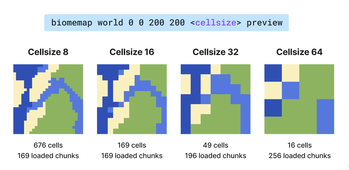
BiomeMap exports the dominant biome of a rectangular selection. You choose a world and 2 corners (`x/z`), and the plugin builds a grid of cells over that area. Then it samples biomes and writes: - a JSON file - optionally a PNG preview (`1 pixel = 1 cell`)
## ✨ Features
- Rectangular selection defined by two coordinates (`/biomemap world x1 z1 x2 z2 `)
- Cell size with chunk-friendly alignment (`4`, `8`, `16`, `32`, ...)
- Chunk-based sampling to smooth biome transitions
- Asynchronous processing with frequent progress updates (no server freeze)
- One export at a time (global lock)
- Stop command to cancel running exports cleanly
- Structured JSON output with min/max bounds per cell and namespaced biome IDs
- Optional PNG preview output (`1 pixel = 1 cell`) using a biome RGB palette
## 🚀 Installation
1. Install (https://papermc.io/downloads/paper) with Java 25+ 2. Download the latest `biomemap-x.x.x+mcx.x.x.jar` from the (https://github.com/Sukikui/BiomeMap/releases) 3. Drop the jar into your server’s `plugins/` folder 4. Restart the server or run `/reload confirm`
## 🕹 Command Usage
Only one export can run at a time.
### Commands
| Command | Description |
| --- | --- |
| `/biomemap
### Arguments
| Argument | Required | Description |
| --- | --- | --- |
| `
## 📁 Output files
All files are written to `plugins/BiomeMap/exports/`.
| File | Pattern | Created when |
| --- | --- | --- |
| JSON | `
Rules: - `index` starts at `1` and increases if the filename already exists. - If you run `/biomemap stop`, files from the canceled export are removed.
## ⚙️ Configuration
[`config.yml`](src/main/resources/config.yml) exposes performance throttles.
| Key | Default | Description | | --- | --- | --- | | `performance.chunks-per-tick` | `1` | How many new chunk jobs are started each tick. Lower = safer, slower. | | `performance.max-in-flight` | `4` | Max number of BiomeMap jobs currently in pipeline (queued/running). | | `performance.max-concurrent-chunks` | `64` | Max real chunk loads at the same time (main server pressure knob). |
Quick tuning guide: - If players feel lag, lower `max-concurrent-chunks` first. - If export feels too slow but server is stable, increase `chunks-per-tick` a bit. - Keep `max-in-flight >= chunks-per-tick`.
## 🗺 JSON Format
```json { "cellSize": 16, "selectionMin": { "x": -200, "z": -200 }, "selectionMax": { "x": -50, "z": -20 }, "gridOrigin": { "x": -208, "z": -208 }, "width": 10, "height": 12, "cells": [ { "i": 0, "j": 0, "bounds": { "min": { "x": -208, "z": -208 }, "max": { "x": -193, "z": -193 } }, "biome": "minecraft:plains" }, { "i": 1, "j": 0, "bounds": { "min": { "x": -192, "z": -208 }, "max": { "x": -177, "z": -193 } }, "biome": "minecraft:forest" } ] } ```
| Field | Type | Description | | --- | --- | --- | | `cellSize` | `number` | Cell size in blocks (minimum 4; values above that are aligned to the chunk grid). | | `selectionMin/Max` | `object` | Raw coordinates provided in the command. | | `gridOrigin` | `object` | North-west corner of the grid (min X, min Z). | | `width`, `height` | `number` | Number of cells on the X and Z axes. | | `cells[].bounds.min/max` | `object` | Inclusive bounds delimiting the cell. | | `cells[].biome` | `string` | Namespaced biome ID (e.g. `minecraft:savanna`). |
📊 Mod Details
- Game
- Minecraft Plugins
- Author
- Sukikui
- Version
- 0.1.5+mc26.1.2
- Downloads
- 172
- Endorsements
- 0
- Category
- paper
- Created
- 11/13/2025
- Updated
- 5/28/2026
- Game Versions
- 26.1.2
- Tags
- utility, worldgen
🔧 How to Install Minecraft Plugins Mods
Download from Modrinth. Use Prism Launcher or drop into your mods folder.
📖 Full step-by-step install guide for Minecraft Plugins →
Visit the official mod page for specific installation instructions for this mod.
🎮 Need cheat codes or console commands? Check ur gaming wiki for Minecraft Plugins commands, item IDs, and more.
❓ Frequently Asked Questions
Which Minecraft Plugins versions does BiomeMap support?
The author lists 26.1.2. Other versions may work but are untested by the author.
What is the latest version of BiomeMap?
Version 0.1.5+mc26.1.2, published 2026-05-28 with 172 downloads recorded at the source.
Keep browsing — more Minecraft Plugins mods await