Biome Compass
⚪ Last updated 2023🖼️ Gallery (3 images)
🔍 Analysis
- 👍 0.9% endorsement rate
- 🏆 #181 of 351 adventure mods in this game by downloads
📋 About This Mod
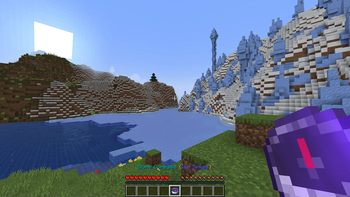
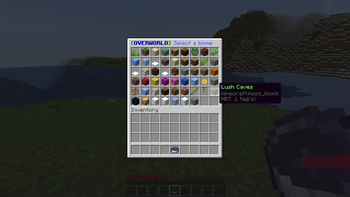
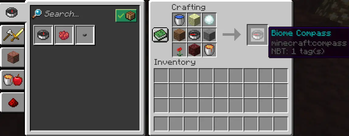
## About **Biome Compass** is a **Spigot** plugin that adds a new item to the game – a compass that helps players navigate to specific biomes in any dimension. Players can use a GUI to select the desired biome and the compass will locate it in a short time. ## Compatibility This plugin is compatible with Minecraft versions **1.16.2 up to 1.19.2**. It is designed to work with **Spigot servers**, and may not be compatible with other custom servers or mods. ## Features The Biome Compass plugin offers a variety of features to enhance gameplay on your server: - **Navigate to specific biomes:** Players can use the Biome Compass to navigate to specific biomes in any dimension. The compass will locate the desired biome in a short time, making it easy for players to find the resources they need or complete quests. - **Customizable settings:** The Biome Compass includes a configuration file where you can adjust the plugin's settings to suit your server's needs. You can change the cooldown period, search resolution, and maximum search radius, as well as the size of the cache. - **Easy to use:** The Biome Compass is easy to use, with a simple GUI that allows players to select the desired biome. No complicated commands or chat messages are required. - **Compatible with multiple Minecraft versions:** The Biome Compass is compatible with Minecraft versions 1.16.2 up to 1.19.2, making it easy to use on a variety of servers. **Note:** The Biome Compass plugin requires **Vault** if you are using the money cost feature. ### Changelog (1.3.0) Multi-language support: - American English language support has been added - Chinese Simplified language support has been added - Turkish language support has been added Custom model data option: - An option to change the custom model data for the biome compass from the configuration file has been added ## Configuration The Biome Compass plugin allows users to customize its behavior through the config.yml file. This file can be found in the plugins/BiomeCompass folder of your server. For detailed information on every field, please check the (https://github.com/rusthero/BiomeCompass/wiki/Configuration). ## Permissions The Biome Compass plugin includes two permissions: - **biomecompass.use:** Allows players to use the Biome Compass. This permission is granted by default. - **biomecompass.craft:** Allows players to craft the Biome Compass. This permission is granted by default. ## Documentation For more information about the Biome Compass plugin, including usage guide, configuration options, and troubleshooting tips, please check out the (https://github.com/rusthero/BiomeCompass/wiki). The wiki includes detailed instructions and examples to help you use the Biome Compass, as well as answers to frequently asked questions. ## Issue Tracker If you encounter any issues or bugs while using the plugin, please report them in the (https://github.com/rusthero/BiomeCompass/issues) section of the repository. By providing detailed information about the issue, you can help me fix it more efficiently. ## Installation To install the Biome Compass plugin, you will need to follow these steps: 1. Make sure you have the latest version of (https://adoptium.net/temurin/releases/) installed on your machine. 2. Install Spigot on your server. You can find instructions on how to install it (https://www.spigotmc.org/wiki/spigot-installation/). 3. Download the latest release of the "Biome Compass" plugin from the (https://github.com/rusthero/BiomeCompass/releases) page. 4. Copy the downloaded JAR file to the `plugins` folder of your Spigot server. 5. Start the server and wait for the plugin to be loaded. 6. You can now use the Biome Compass plugin in your game. Alternatively, you can use Gradle to build the plugin from source: 1. Clone the repository by running `git clone https://github.com/rusthero/BiomeCompass.git` in your terminal. 2. Navigate to the root directory of the repository. 3. Run `gradle build` to build the plugin. This will create a JAR file in the build/libs directory. 4. Copy the JAR file to the `plugins` folder of your Spigot server and start the server. ### Note about Translations Biome Compass now supports multi-language translations. If you would like to add support for your language, you can follow the guidelines provided in the (https://github.com/rusthero/BiomeCompass/blob/main/CONTRIBUTING.md) file on our GitHub repository. I would greatly appreciate any contributions to help make Biome Compass more accessible to a wider range of players around the world. Thank you for your support!
## About Biome Compass is a Spigot plugin that adds a new item to the game – a compass that helps players navigate to specific biomes in any dimension. Players can use a GUI to select the desired biome and the compass will locate it in a short time.
## Compatibility This plugin is compatible with Minecraft versions 1. 16. 2 up to 1. 19. 2. It is designed to work with Spigot servers, and may not be compatible with other custom servers or mods.
## Features The Biome Compass plugin offers a variety of features to enhance gameplay on your server: - Navigate to specific biomes: Players can use the Biome Compass to navigate to specific biomes in any dimension. The compass will locate the desired biome in a short time, making it easy for players to find the resources they need or complete quests. - Customizable settings: The Biome Compass includes a configuration file where you can adjust the plugin's settings to suit your server's needs. You can change the cooldown period, search resolution, and maximum search radius, as well as the size of the cache. - Easy to use: The Biome Compass is easy to use, with a simple GUI that allows players to select the desired biome. No complicated commands or chat messages are required. - Compatible with multiple Minecraft versions: The Biome Compass is compatible with Minecraft versions 1. 16. 2 up to 1. 19. 2, making it easy to use on a variety of servers. Note: The Biome Compass plugin requires Vault if you are using the money cost feature.
### Changelog (1. 3. 0) Multi-language support: - American English language support has been added - Chinese Simplified language support has been added - Turkish language support has been added
Custom model data option: - An option to change the custom model data for the biome compass from the configuration file has been added
## Configuration The Biome Compass plugin allows users to customize its behavior through the config.yml file. This file can be found in the plugins/BiomeCompass folder of your server. For detailed information on every field, please check the (https://github.com/rusthero/BiomeCompass/wiki/Configuration).
## Permissions The Biome Compass plugin includes two permissions: - biomecompass.use: Allows players to use the Biome Compass. This permission is granted by default. - biomecompass.craft: Allows players to craft the Biome Compass. This permission is granted by default.
## Documentation For more information about the Biome Compass plugin, including usage guide, configuration options, and troubleshooting tips, please check out the (https://github.com/rusthero/BiomeCompass/wiki).
The wiki includes detailed instructions and examples to help you use the Biome Compass, as well as answers to frequently asked questions.
## Issue Tracker If you encounter any issues or bugs while using the plugin, please report them in the (https://github.com/rusthero/BiomeCompass/issues) section of the repository. By providing detailed information about the issue, you can help me fix it more efficiently.
## Installation To install the Biome Compass plugin, you will need to follow these steps: 1. Make sure you have the latest version of (https://adoptium.net/temurin/releases/) installed on your machine. 2. Install Spigot on your server. You can find instructions on how to install it (https://www.spigotmc.org/wiki/spigot-installation/). 3. Download the latest release of the "Biome Compass" plugin from the (https://github.com/rusthero/BiomeCompass/releases) page. 4. Copy the downloaded JAR file to the `plugins` folder of your Spigot server. 5. Start the server and wait for the plugin to be loaded. 6. You can now use the Biome Compass plugin in your game.
Alternatively, you can use Gradle to build the plugin from source: 1. Clone the repository by running `git clone https://github.com/rusthero/BiomeCompass.git` in your terminal. 2. Navigate to the root directory of the repository. 3. Run `gradle build` to build the plugin. This will create a JAR file in the build/libs directory. 4. Copy the JAR file to the `plugins` folder of your Spigot server and start the server.
### Note about Translations Biome Compass now supports multi-language translations. If you would like to add support for your language, you can follow the guidelines provided in the (https://github.com/rusthero/BiomeCompass/blob/main/CONTRIBUTING.md) file on our GitHub repository.
I would greatly appreciate any contributions to help make Biome Compass more accessible to a wider range of players around the world. Thank you for your support!
📊 Mod Details
- Game
- Minecraft Plugins
- Author
- rusthero
- Version
- 1.3.0
- Downloads
- 548
- Endorsements
- 5
- Category
- adventure
- Created
- 5/21/2023
- Updated
- 5/19/2023
- Game Versions
- 1.16.2, 1.16.3, 1.16.4, 1.16.5, 1.17
- Tags
- adventure, equipment, utility
🔧 How to Install Minecraft Plugins Mods
Download from Modrinth. Use Prism Launcher or drop into your mods folder.
📖 Full step-by-step install guide for Minecraft Plugins →
Visit the official mod page for specific installation instructions for this mod.
🎮 Need cheat codes or console commands? Check ur gaming wiki for Minecraft Plugins commands, item IDs, and more.
❓ Frequently Asked Questions
Which Minecraft Plugins versions does Biome Compass support?
The author lists 1.16.2, 1.16.3, 1.16.4, 1.16.5, 1.17, 1.17.1. Other versions may work but are untested by the author.
What is the latest version of Biome Compass?
Version 1.3.0, published 2023-05-19 with 548 downloads recorded at the source.
Keep browsing — more Minecraft Plugins mods await