BeeChat
🟡 Updated this year🖼️ Gallery (2 images)
🔍 Analysis
- 👍 0.4% endorsement rate
- 🏆 #80 of 82 paper mods in this game by downloads
📋 About This Mod
# BeeChat Chat and tab formatting plugin for Paper and its forks. ### Features - (https://docs.advntr.dev/minimessage/format.html) in config and chat - Using placeholders from (https://modrinth.com/plugin/miniplaceholders) and (https://hangar.papermc.io/HelpChat/PlaceholderAPI) in config - Message formatting with permissions - Chat channels with customizable formats and permissions - Spy mode for monitoring chat channels - Tab customization ## Message formatting Players with permission can use formatting with MiniMessage in chat. ### Permissions - **beechat.format.all** - all formatting tags - **beechat.format.color** - `color`, `gradient`, `rainbow`, `pride` and `shadow` tags - **beechat.format.reset** - `reset` tag - **beechat.format.decorations** - `bold`, `italic`, `underlined`, `strikethrough` and `obfuscated` decorations - **beechat.format.insertion** - `insert` tag - **beechat.format.click** - `click` tag - **beechat.format.hover** - `hover` tag - **beechat.format.head** - `head` tag - **beechat.format.sprite** - `sprite` tag ### Example !(https://cdn.modrinth.com/data/cached_images/3e62983eb618d1df5747f697c433811dd3b5922c.png) _The **MiniPlaceholders LuckPerms Expansion** plugin is used here to display the prefix from **LuckPerms**_ ## Chat channels BeeChat supports multiple chat channels, each with its own format, distance and permission. Channels are identified by prefixes in the message. ### Example !(https://cdn.modrinth.com/data/cached_images/102e3cb99f4701a44c0217f327f609aec828aced.jpeg) ## Spy mode Spy mode allows players with permission to monitor all chat channels. This is useful for administrators who need to oversee conversations for moderation purposes. When enabled, all messages sent in any channel will be displayed to the spy, formatted according to the spy mode configuration. Can be enabled or disabled using the `/beechat spy` command. Permission: **beechat.spy** ## Tab customization Tab header, footer and player name format can be customized in config. ### Example !(https://cdn.modrinth.com/data/cached_images/6c4cec84f34910c20872e2ce60347cd9867e95e5.jpeg) ## Configuration The default config can be found here: (https://github.com/KotQWERTY/bee-chat/blob/main/src/main/resources/config.yml). The configuration file (`config.yml`) only supports (https://docs.advntr.dev/minimessage/format.html) format. Legacy (ampersand) formatting is not supported. You can use placeholders from (https://modrinth.com/plugin/miniplaceholders) and (https://hangar.papermc.io/HelpChat/PlaceholderAPI) in the configuration. ### Reloading The configuration can be reloaded using the command `/beechat reload`. Permission for the command: **beechat.reload** ### Example configuration ```yaml chat: message-format: '<luckperms_prefix><reset> <name> <yellow>→ <gray><message>' channels: - identifier: '!' format: '<message_format>' - identifier: '#' permission: chat.channel.staff format: '<red>(Staff)</red> <message_format>' - identifier: '' distance: 40 format: '<yellow>(Local)</yellow> <message_format>' spy: format: '<aqua>Spy</aqua> <channel_message>' disable-on-leave: true tab-list: enable: true update-period: 200 header: '<br><gradient:yellow:gold>Example Server<br>' footer: '<br>There are <green><server_online></green> players online<br>' player-name: '<luckperms_prefix> <reset><name> <luckperms_suffix>' messages: reload: '<green>The <gradient:yellow:gold>BeeChat</gradient> configuration has been reloaded' not-player: '<red>This command can only be executed by a player' spy-mode-enabled: '<aqua>Spy</aqua> mode <green>enabled</green>. Enter the command again to <red>disable</red>' spy-mode-disabled: '<aqua>Spy</aqua> mode <red>disabled</red>' ```
# BeeChat Chat and tab formatting plugin for Paper and its forks. ### Features - (https://docs.advntr.dev/minimessage/format.html) in config and chat - Using placeholders from (https://modrinth.com/plugin/miniplaceholders) and (https://hangar.papermc.io/HelpChat/PlaceholderAPI) in config - Message formatting with permissions - Chat channels with customizable formats and permissions - Spy mode for monitoring chat channels - Tab customization
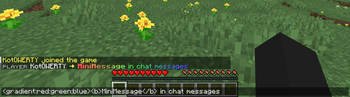
## Message formatting Players with permission can use formatting with MiniMessage in chat.
### Permissions - beechat.format.all - all formatting tags - beechat.format.color - `color`, `gradient`, `rainbow`, `pride` and `shadow` tags - beechat.format.reset - `reset` tag - beechat.format.decorations - `bold`, `italic`, `underlined`, `strikethrough` and `obfuscated` decorations - beechat.format.insertion - `insert` tag - beechat.format.click - `click` tag - beechat.format.hover - `hover` tag - beechat.format.head - `head` tag - beechat.format.sprite - `sprite` tag
### Example !(https://cdn.modrinth.com/data/cached_images/3e62983eb618d1df5747f697c433811dd3b5922c.png) _The MiniPlaceholders LuckPerms Expansion plugin is used here to display the prefix from LuckPerms_
## Chat channels BeeChat supports multiple chat channels, each with its own format, distance and permission. Channels are identified by prefixes in the message.
### Example !(https://cdn.modrinth.com/data/cached_images/102e3cb99f4701a44c0217f327f609aec828aced.jpeg)
## Spy mode Spy mode allows players with permission to monitor all chat channels. This is useful for administrators who need to oversee conversations for moderation purposes. When enabled, all messages sent in any channel will be displayed to the spy, formatted according to the spy mode configuration. Can be enabled or disabled using the `/beechat spy` command. Permission: beechat.spy
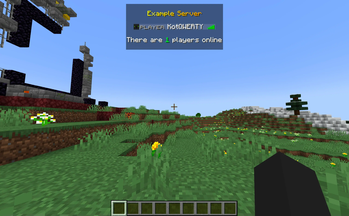
## Tab customization Tab header, footer and player name format can be customized in config.
### Example !(https://cdn.modrinth.com/data/cached_images/6c4cec84f34910c20872e2ce60347cd9867e95e5.jpeg)
## Configuration
The default config can be found here: (https://github.com/KotQWERTY/bee-chat/blob/main/src/main/resources/config.yml).
The configuration file (`config.yml`) only supports (https://docs.advntr.dev/minimessage/format.html) format. Legacy (ampersand) formatting is not supported.
You can use placeholders from (https://modrinth.com/plugin/miniplaceholders) and (https://hangar.papermc.io/HelpChat/PlaceholderAPI) in the configuration.
### Reloading The configuration can be reloaded using the command `/beechat reload`.
Permission for the command: beechat.reload
### Example configuration
```yaml
chat:
message-format: '
- identifier: '#'
- permission: chat.channel.staff
- format: '
(Staff) '
- identifier: ''
- distance: 40
- format: '
(Local) ' - spy:
- format: '
Spy ' - disable-on-leave: true
tab-list:
enable: true
update-period: 200
header: '
messages:
reload: '
📊 Mod Details
- Game
- Minecraft Plugins
- Author
- KotQWERTY
- Version
- 1.8.1
- Downloads
- 1,157
- Endorsements
- 5
- Category
- paper
- Created
- 2/20/2024
- Updated
- 1/27/2026
- Game Versions
- 1.21.10, 1.21.11
- Tags
- social
🔧 How to Install Minecraft Plugins Mods
Download from Modrinth. Use Prism Launcher or drop into your mods folder.
📖 Full step-by-step install guide for Minecraft Plugins →
Visit the official mod page for specific installation instructions for this mod.
🎮 Need cheat codes or console commands? Check ur gaming wiki for Minecraft Plugins commands, item IDs, and more.
❓ Frequently Asked Questions
Which Minecraft Plugins versions does BeeChat support?
The author lists 1.21.10, 1.21.11. Other versions may work but are untested by the author.
What is the latest version of BeeChat?
Version 1.8.1, published 2026-01-27 with 1,157 downloads recorded at the source.
Keep browsing — more Minecraft Plugins mods await